
Short answer: To learn JavaScript, start with its fundamentals in order: variables, declared with let (block-scoped and reassignable), const (cannot be reassigned) or the older var; functions, reusable blocks of code like function add(a, b) { return a + b; }; then loops and equality comparisons. Practice each concept with small examples before tackling advanced techniques such as recursion.
If you're contemplating a career in web development, starting with a solid grasp of JavaScript is crucial. The language is employed in 95% of websites worldwide and can be considered the cornerstone of modern interactive user experiences. In this article we'll clarify core concepts such as variables, functions, loops, and equality comparisons and more to help you gain a clearer understanding of JavaScript fundamentals and pave the way for your journey toward becoming a proficient full-stack developer. To plan a realistic study schedule, this guide on how long it takes to learn JavaScript breaks down timelines based on prior experience and weekly practice.
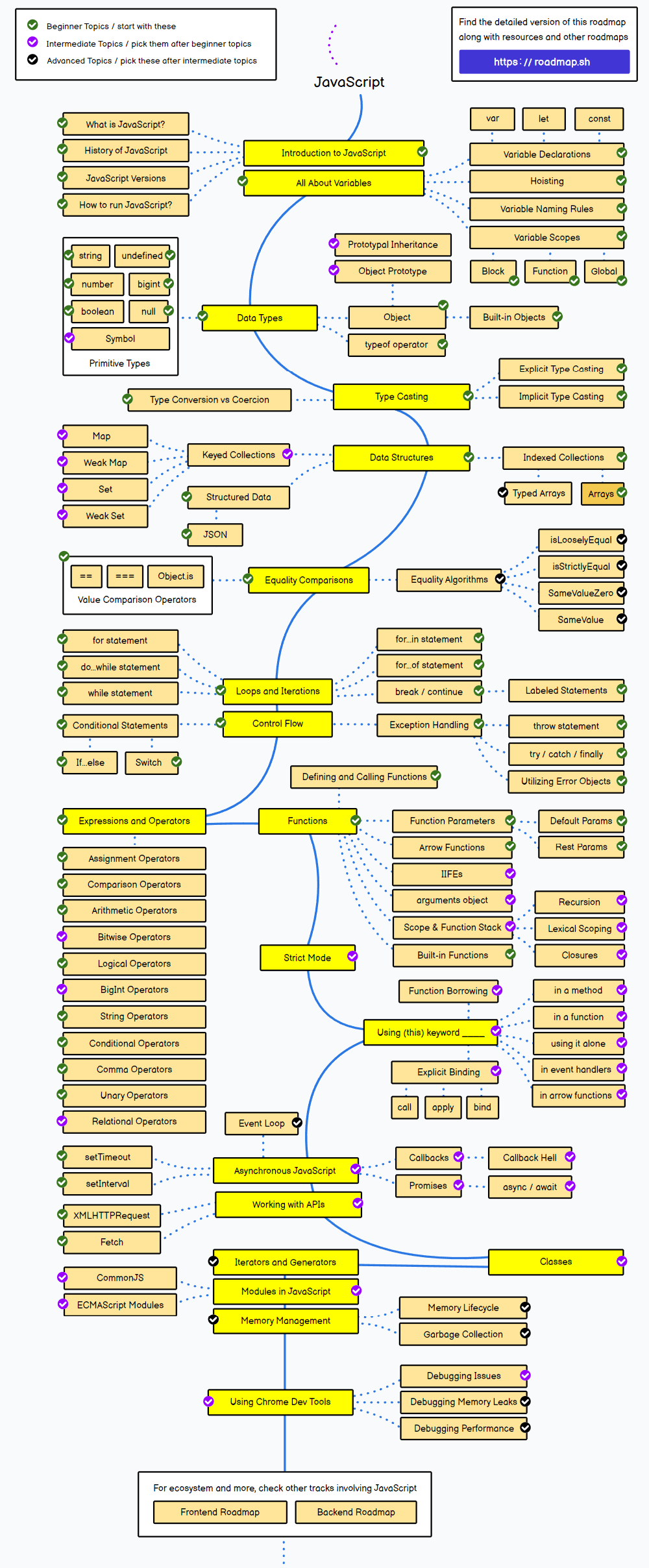
Let's start with variables.
The first step in learning JavaScript is understanding the concept of variables. Think of variables like boxes for holding data. There are currently three ways to create these boxes: var, let, and const. The original variable was created using var, but it's become less relevant because it has some tricky rules. For example, with var, a variable can be seen everywhere in a function, even if it was created in just a small part of the function's code. This can make the code harder to work with and understand, so many developers prefer to use other ways of declaring variables that have clearer and more predictable behavior. Let Variable: Imagine "let" as a box that you can use to store things. You can change what's inside the box whenever you want. For example, if you put a number in the box, you can later take it out and put something else in its place. The let variable has block scope and can be reassigned, making it the preferred choice in modern JavaScript for its greater level of predictability. Block scope refers to the visibility and accessibility of a variable within a code block, limiting its usage to the interior of that block. Variables declared within a block are not accessible outside of that block. Reassigning means changing the value of a variable that has already been declared using the assignment operator, replacing its current value with a new one. The Const Variable on the other hand, "const" is like a safe. Once you put something in the safe, you can't swap it for something else: a const variable can't be reassigned, although the contents of an object or array stored in it can still be modified.
Example:
var x = 10
// Here, we use "var" (which is similar to "let" in this context) to create a box
// named "x" and put the number 10 inside. Later, we can change what's in "x" if we want.

let name = "John"
// We create a box named "name" and store the name "John" in it.
// If we want, we can change it to another name later.

const PI = 3.14159
// Here, we create a safe named "PI" and put the number π (pi) inside.
//No matter how much time passes, the value of π won't change; it will be secure in the safe.
Now, let’s move on to functions.
In JavaScript, a function is a reusable block of code that performs a specific task or calculates a specific value. Functions are fundamental in programming because they allow you to define logic—meaning, you outline the precise steps or instructions—that you can then use or execute in multiple places in your program without having to repeat the same code over and over again. Learn how to work with functions here Example 1:
function add(a, b) {
    return a + b;
}
⬆ In this example , a function named "add" is defined, which takes two parameters, a and b. Parameters act like "boxes" where you can pass values when you call the function. Within the function, an addition operation is performed by adding a and b together. The result of the addition is returned using the return keyword. So, if you call this function with values, such as add(3, 7), it will return the sum of those values, which in this case would be 10. Functions are useful for encapsulating a set of instructions and reusing them in multiple parts of your program.
Example 2:
function multiply(c, d) {
    return c * d;
}
⬆ Here a function named "multiply" is defined, which also takes two parameters, c and d. Within the function, a multiplication operation is performed by multiplying c and d together. The result of the multiplication is returned using return. When you call this function with values, such as multiply(4, 6), it will return the product of those values, which in this case would be 24. Just like in the previous example, functions allow you to encapsulate logic and reuse it in your program when needed.
Additional Functions: Customizing your Program
The term "additional functions" typically refers to custom or external functions added to an application or program to extend its capabilities and to perform specific tasks that are not included in the language's standard functions. These additional functions are used to enhance the functionality of an application so it can better carry out specific operations the project requirements. Imagine them like custom tools you bring to a regular toolbox. Just as you might add a unique gadget to a toolbox for a specific job, additional functions are like tools you can use to customize and improve how your program works. This customization allows your application to handle particular tasks according to your project's needs. Gaining proficiency in using these additional functions is essential for customizing your programs to meet your specific requirements.
Example 1
function subtract(a, b) {
    return a - b;
}
⬆ In this example, a function called "subtract" is defined. This function takes two parameters, "a" and "b", which represent two numbers. Within the function, a subtraction operation is performed by subtracting "b" from "a". The result of this operation is returned using the "return" keyword. So, when you call this function with two numbers, such as "subtract(10, 5)", it will return the result of the subtraction, which in this case would be 5. Functions like these are useful for performing specific operations and reusing them in your program.
Additional Example:
function divide(x, y) {
    return x / y;
}
⬆ In this additional example, a function called "divide" is defined. Just like in the first example, it takes two parameters, "x" and "y", which are numbers. Within the function, a division operation is performed by dividing "x" by "y". The result of the division is returned using the "return" keyword. When you call this function with two numbers, such as "divide(10, 2)", it will return the result of the division, which in this case would be 5. Functions like this are useful for encapsulating common operations and facilitating the customization of your program according to specific needs. Advanced Functions: Enhancing Your Code Advanced functions enable developers to tackle more advanced projects. They are essential for creating efficient and maintainable code in more sophisticated web applications and software projects by allowing for more complex logic. Understanding and learning to use them is the next step for any JavaScript student who is ready to dive into the deeper aspects of the language and its capacities.
Example:
function factorial(n) {
    if (n === 0) {
        return 1;
    } else {
        return n * factorial(n - 1);
    }
}
let result = factorial(5);
// Output: 120
⬆ This example demonstrates a function called "factorial" that calculates the factorial of a non-negative integer "n." The factorial of a number is calculated by multiplying that number by all positive integers less than or equal to it. Here's a more detailed explanation of how it works:
- The "factorial" function takes a parameter "n," which is the number for which you want to calculate the factorial.
- Inside the function, it checks if "n" is equal to 0. If "n" is indeed equal to 0, the function returns 1. This serves as the base case for calculating the factorial, as the factorial of 0 is defined as 1.
- If "n" is not equal to 0, the function employs recursion. It calls itself with the value reduced by 1 ("n - 1") and multiplies the result by "n." This is done to calculate the factorial of "n" as the product of "n" and the factorial of "n - 1." So, when you call "factorial(5)," here's how it's calculated:
// "factorial(5)" is calculated as "5 * factorial(4)."
// "factorial(4)" is calculated as "4 * factorial(3)."
// "factorial(3)" is calculated as "3 * factorial(2)."
// "factorial(2)" is calculated as "2 * factorial(1)."
// "factorial(1)" is calculated as "1 * factorial(0)."
The function is recursively called until "n" reaches 0. When it reaches 0, the recursive calls return and calculate the factorials in reverse order, multiplying each value. Ultimately, "factorial(5)" returns 120, which is the factorial of 5. The result is stored in the "result" variable.
Expressions and Operators
-
Expressions: These are like pieces of information or values that we work with. They can be numbers, words, or any type of data. For example: if you have a number 5 or a word "Hello," that's an expression.
-
Operators: Operators are the actions you can do with those expressions. Some operators are like a calculator; you can add, subtract, multiply, or divide numbers. Other operators allow you to make decisions, like checking if one number is greater than another. There are also operators that help you combine words or data.
For example, if you want the computer to add two numbers, you'll use the addition operator, which is the symbol "+". The expression would be something like "5 + 3", and the computer will give you the result, which is 8.
Another interesting thing is that you can use operators to make decisions. For instance, you can ask the computer if one number is greater than another, and it will tell you if it's true or false.
These tools, expressions, and operators are like the building blocks for creating programs. You can use them to do math, make decisions based on certain conditions (like whether it's sunny or rainy), store information (such as people's names), or perform specific tasks (like displaying messages on the screen) Think of learning JavaScript like getting a toolbox for your computer. In this analogy, expressions are like the different tools, and operators are what you can do with those tools.
Example 1:
let sum = 10 + 5
 // 'sum' will be 15.
⬆ In this example, an addition is being performed. You have two numbers, 10 and 5, that are being added together. The result of the addition is stored in the variable sum. So, after executing this line of code, sum will contain the value 15. In summary, you are adding 10 and 5, and the result is stored in the sum variable.
Example 2:
let product = 8 * 4
 // 'product' will be 32.
⬆ In this case, a multiplication operation is being performed. You have two numbers, 8 and 4, which are being multiplied together. The result of the multiplication is stored in the variable product. Therefore, after executing this line of code, product will contain the value 32. In summary, you are multiplying 8 by 4, and the result is stored in the product variable.
Equality Comparisons
In programming, you often need to compare things to see if they are the same or different. This is useful when you're working with numbers, words, and other types of information. Equality comparisons are like asking questions to see if two things are the same. For example, is the number 5 the same as the number 5? Is the word "dog" the same as the word "cat"? In JavaScript, there are different ways to ask these questions: strict and non-strict equality. Strict equality is like a strict teacher. It checks if things are the same and makes sure they are of the same type. For example, if you have the number 5 and another number 5, strict equality will say they are the same. But if you have the number 5 and the word "5", it will say they are different because they are of different types. Non-strict equality is more relaxed. Sometimes, it may say that different things are the same if they can be temporarily converted from one form to another. For example, it might say that the number 5 is the same as the word "5" because they can be temporarily changed into one another. So, depending on what you need in your program, you can choose between these two ways of comparing things. The choice depends on your needs and whether you care if things are of the same type or can be temporarily converted from one form to another.
Example 1:
let num1 = 10;
let num2 = "10";
console.log(num1 === num2);
// Output: false
The code checks if num1 and num2 are exactly the same. Even though they both represent the number 10, one is written as a number and the other as a word. Because of this small difference, the computer says they are not exactly the same, giving us the result "false".
Example 2:
let a = 5;
let b = 5;
let result = (a !== b)
// The '!==' means 'not equal to'. So, if 'a' is not equal to 'b',
// Since 'a' is equal to 'b', the result will be false.
⬆ In this example, you have two variables, a and b, which store the numerical value 5. Then, a comparison is made using !==, which checks if a is not strictly equal to b. However, in this case, a and b have the same value and the same data type (both are numbers). As a result, the comparison a !== b returns false, since a and b are equal in both value and data type.
Arrays: The Versatile Organizers in JavaScript
An array in JavaScript is like a specialized container that allows us to arrange a set of items in a specific order. These items can include numbers, words, or even other containers with different types of information. Arrays in JavaScript can be compared to Swiss Army knives in real life—efficiently organized tools designed to handle a wide variety of tasks. They prove incredibly useful for a multitude of programming tasks. Learning how to use arrays is a crucial step in mastering JavaScript, enabling you to manage information in a flexible and efficient manner.
Example 1:
let fruits = ["apple", "banana", "orange"];
// Array indexes start at 0.
console.log(fruits);
// Output: ["apple", "banana", "orange"]
console.log(fruits[0]);
// Output: "apple"
⬆ In this example, an array named "fruits" is created. An array is a data structure that can hold multiple elements. In this case, "fruits" contains three elements, which are strings representing the names of fruits: "apple," "banana," and "orange." To access the elements of an array, their index is used. Indexes start at 0. Therefore, "fruits[0]" represents "apple", "fruits[1]" represents "banana", and "fruits[2]" represents "orange". Arrays are useful for storing a collection of related elements.
Example 2:
let colors = ["red", "green", "blue"];
console.log(colors[1]);
// Output: "green"
⬆ In this example, an array named "colors" is created, which contains three elements, represented as strings: "red" , "green" and "blue".
Subsequently, console.log(colors[1]); is used to print the element at position 1 of the "colors" array to the console. Since indexes start at 0, "colors[1]" represents the second element of the array, which is "green." Therefore, the output in the console will be "green."
Arrays are highly useful for storing sets of related data and accessing that data by position through indexes.
Loops: the repeat button in programming
Loops in JavaScript act like a set of instructions that tell your program to repeat a certain block of code as long as a particular condition remains true. They’re important because they let you automate tasks that you'd otherwise have to do manually over and over again. They're one of the key tools for making your code more efficient and powerful.
Example 1:
for (let i = 0; i < 5; i++) {
	console.log("Count: " + i);
}
//The output is:
//Count: 0
//Count: 1
//Count: 2
//Count: 3
//Count: 4
⬆ This example demonstrates a "for" loop in JavaScript. It initializes a variable i to 0, and as long as i is less than 5, it executes a block of code. In each iteration, it increments i by 1 and prints a message to the console showing the current value of i.
Example 2:
let numbers = [1, 2, 3, 4, 5];
for (let number of numbers) {
    console.log("Number: " + number);
}
//The output is:
//Number: 1
//Number: 2
//Number: 3
//Number: 4
//Number: 5
⬆ This example uses a "for-of" loop in JavaScript. It defines an array numbers containing the values 1 to 5. The loop iterates through each element of the numbers array, assigning it to the variable number. In each iteration, it prints a message to the console showing the current value of the number. see more about loops in here In summary, Example 1 counts from 0 to 4, while Example 2 prints out the numbers 1 to 5. The key difference lies in the type of loop used and the data structure being operated on (a variable in Example 1 and an array in Example 2).
APIs (Application Programming Interfaces): Bridging the Gaps
In JavaScript, when we talk about APIs, we're essentially discussing sets of tools (functions and methods) that allow different programs or parts of software to communicate with each other. These tools define how one program can ask for and use services provided by another program or a web service. In the world of JavaScript, APIs are like bridges that let us tap into functions and data that aren't directly built into the language itself. APIs are incredibly useful because they save developers from having to “reinvent the wheel” by providing ready-made solutions for accessing specific features and functionalities in their applications. This means we can use existing tools and services without starting from scratch. It's a big time-saver and makes it much easier to add external services and data to web applications.
Example1:
fetch('https://jsonplaceholder.typicode.com/users/1')
  .then(response => response.json())
  .then(data => console.log(data))
  .catch(error => console.error('Error:', error));
⬆ In this example, fetch is used to make a request to the example URL. The fetch function returns a promise that resolves with the HTTP response of the request. Subsequently, then methods are chained to process the response:
The first then takes the response and converts it into JSON format using response.json(). This is done because API responses are often in JSON format.
The second then takes the data in JSON format and displays it in the console using console.log.
If there is any error in the process, it is captured in the catch block, and an error message is displayed in the console.
Example 2:
fetch('https://api.example.com/data')
  .then(response => response.json())
  .then(data => {
    // Process the data further
  })
  .catch(error => console.error('Error:', error));
⬆ In this second example, fetch is used to make a request to the second example URL. The structure is similar to the first example. The response is obtained, converted to JSON, and then, instead of displaying the data in the console, it allows for further processing within the second then. You can perform various operations on the data within that block, such as displaying it on a web page or performing additional calculations.
Again, any errors that occur in the process are handled in the catch block, and an error message is displayed in the console.
These examples illustrate how to use the fetch function to obtain data from an online API and how to handle both successful data and errors that may occur during the request.
Asynchronous JavaScript
Asynchronous JavaScript refers to JavaScript's ability to handle tasks in a non-blocking manner, allowing the code to keep running while certain operations are in progress. Non-blocking means that the program can move on to other tasks even while waiting for some actions to complete. This approach significantly enhances the efficiency and responsiveness of programs, especially when dealing with operations that may take time to finish, such as fetching data from a server or performing complex calculations.
Example:
console.log("Start");
setTimeout(() => {
    console.log("Delayed log");
}, 2000);
console.log("End");
// Output: Start, End, Delayed log
⬆ In this example, setTimeout is a function used to schedule a task to be executed after a certain period of time (in this case, 2000 milliseconds or 2 seconds). The code inside the setTimeout function will run asynchronously after the specified time period. Meanwhile, the program continues to execute other lines of code, such as the console.log statements before and after setTimeout.
So, when you run this code, you'll observe that "Start" is printed first, then "End" is printed, and finally, "Delayed log" is printed after 2 seconds.
Please note that using APIs or working with asynchronous operations typically comes after the initial steps in learning JavaScript. However, we mention it here as it provides a useful way to grasp the fundamental concepts and gain a broader perspective on the language.
Hopefully, you now have a basic understanding of JavaScript and how it operates. Just to give you a taste of everything it can do, think about how Amazon personalizes your shopping experience or how social media platforms recommend content you might enjoy—JavaScript is behind those seamless, interactive features we have grown so used to.
JavaScript isn't just another language; it's the engine that powers modern web pages, making them interactive and responsive. If you're considering a career in web development and aiming to become a full-stack developer, grasping JavaScript is absolutely crucial—it might actually be your gateway to your success.
At 4Geeks Academy, you'll learn to master JavaScript and other essential technologies in just 18 weeks. At our coding bootcamp we won't just help you understand the ins and outs of programming, you will be applying that knowledge and creating real projects from day one. Imagine this: your very own website, born from your creativity and nurtured by your newfound skills. Ready to take the step? Contact us below.
Additional Resources
Practicing is key when you’re a beginner. We offer a series of free resources you can use to start exploring JavaScript and improving your skills. Here, you'll find some javascript beginner exercises and also you can find more resources to learn javascript, If you’d like more support, you can also join a coding community that will help you advance much faster in Start Coding Using Javascript.
Practical JavaScript guides to keep going
Once you have the basics, these guides help you practice with real code: