4Geeks chosen to deliver AI education in the Bahamas alongside Harvard, Oxford, and Columbia.See more

How to run javascript

Learn how to run JavaScript effortlessly using Node.js, browser consoles, or IDEs. Master your coding skills today—click to discover more!
5 min readLast updated

The most common way to run a javascript file would be:

javascript
node ./filename.js

There are many ways to execute javascript locally, without the need of internet or hosting our web apps on a server. Here are a few ways to do this:

  • Using the browser console
  • Using the command line
  • Using an IDE for developing

Using the browser console

If you are in the need to interact for debugging or testing a running web app on a server, or locally, you can make use of the built-in browser console.

How to access the browser console/terminal

  • Press left click anywhere in the browser window.
  • Select inspect.
  • Once the inspector is displayed, then on the top of the tab, click console.
  • Start writing your javascript code.

Here´s an example:
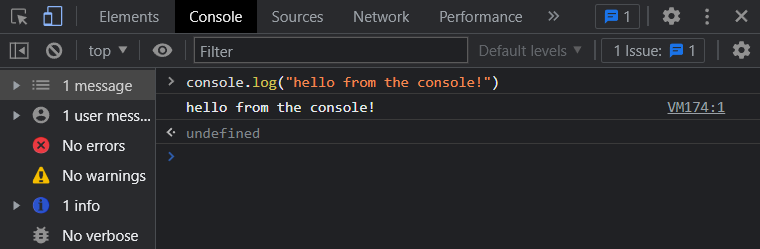
How to run javascript on browser terminal

Using the command line

If you don´t want to use the browser built-in terminal, you can always choose the command line to run javascript. For the command line to be able to execute javascript code, you´ll need to install NodeJS (or just Node as referred usually).

What´s NodeJS?

Node.js is a JavaScript engine that allows us to execute and write javascript for front-end, back-end o full-stack apps. Node it´s the go-to solution for most cases when we want to develop web apps for most developers (myself included).

Installing NodeJS

Installing NodeJS on your system is pretty straightforward:

  • Go to https://www.nodejs.org
  • Click on DOWNLOADS section
  • Select your OS and download the installer
  • Execute the installer once downloaded
  • Follow the instructions (or just accept the terms and conditions and next, next, next)

Running javascript from the command line:

We downloaded and installed NodeJS on our system, now let´s run some javascript!

  • Open the command line (windows users: click on the start menu, write cmd, start the cmd. Linux and MacOS users, just run the terminal)
  • type node

Now we started the node environment and we have access to javascript. Here´s an example of javascript executed on the command line
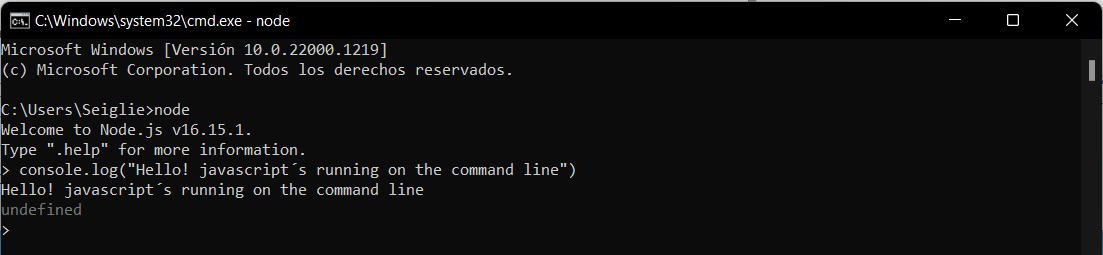
How to run javascript from the command line

Using an IDE for developing

So, I understand that you want to run javascript locally for developing purposes, let´s dig in in how to start a javascript project from your favorite IDE. We´ll be using Visual Code, but the process is the same for all of them.

We already covered how to install NodeJS, the javascript engine we´ll need to execute our code. Having this step been taken care of, lets dig in in how to run javascript from your IDE.

  • Start Visual Code (or your preferred IDE)
  • Open a terminal inside the IDE (Visual code: Go to terminal on the menu, new terminal)
  • Create the folder you want to store your project (example, mkdir nodeTest)
  • Access the folder with cd nodeTest
  • Write npm init -y
    • npm stands form Node Package Manager
    • init stands for initialize/initiate
    • -y is to apply the default values and start, you can change them later or run the code without the -y and see for yourself the given options

After it finishes, a package.json will show on your files, and if you open it, it´ll have all the data we manually specified by omitting the -y flag or the generic information which can be edited anytime we want.

Next, we need to create our javascript file and start coding.

  • Right click on the VS Code file explorer and select New file
  • Name it as you wish, I´ll go with local.js (js is the javascript extension)
  • We can start now developing our javascript app

How to run javascript

To run your app, you can do it by writing on the terminal:

javascript
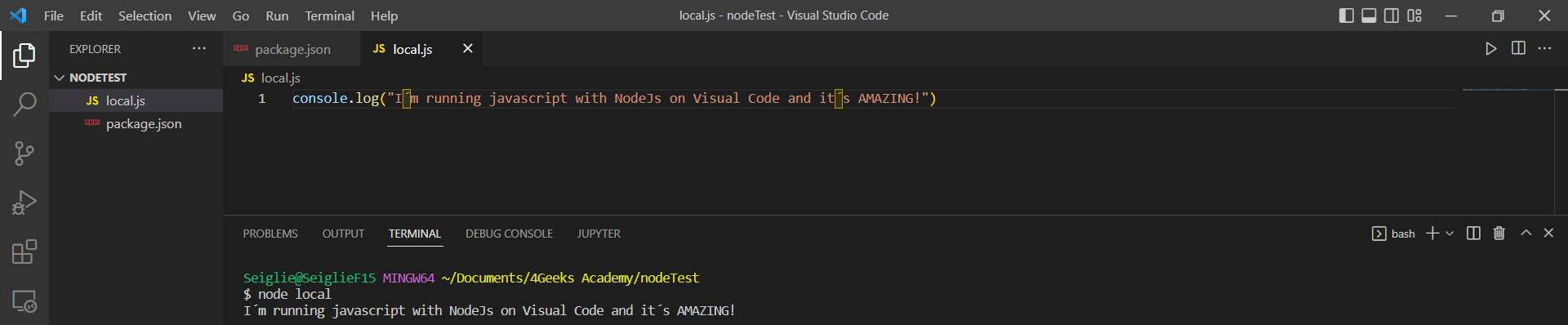
 $ node local

how to run javascript with node

Remember to take out the $ when writing on the terminal.

We use node to summon our node engine and we tell which file we want to run, in this how-to we named our file local, that’s why node local.

Well now, even if we manage to execute our app, this is not the most common way to do it. Remember the package.json we created with npm init -y? Well, we´re editing it now to run our app. We need to add to our package.json the following:

json
    "start": "node local"

We´ll add it on the "scripts" section, start will be the keyword we´ll use to tell node to run local, our javascript file we created on the previous steps.

To run our app, all we need to do now is write in the IDE built-in terminal

npm run start

Here´s a visual example of how the package.json file:

json
{
  "name": "nodetest",
  "version": "1.0.0",
  "description": "",
  "main": "index.js",
  "scripts": {
    "test": "echo \"Error: no test specified\" && exit 1",
    "start": "node local"
  },
  "keywords": [],
  "author": "",
  "license": "ISC"
}

Now, every time we run npm run start, node will run our local.js file.
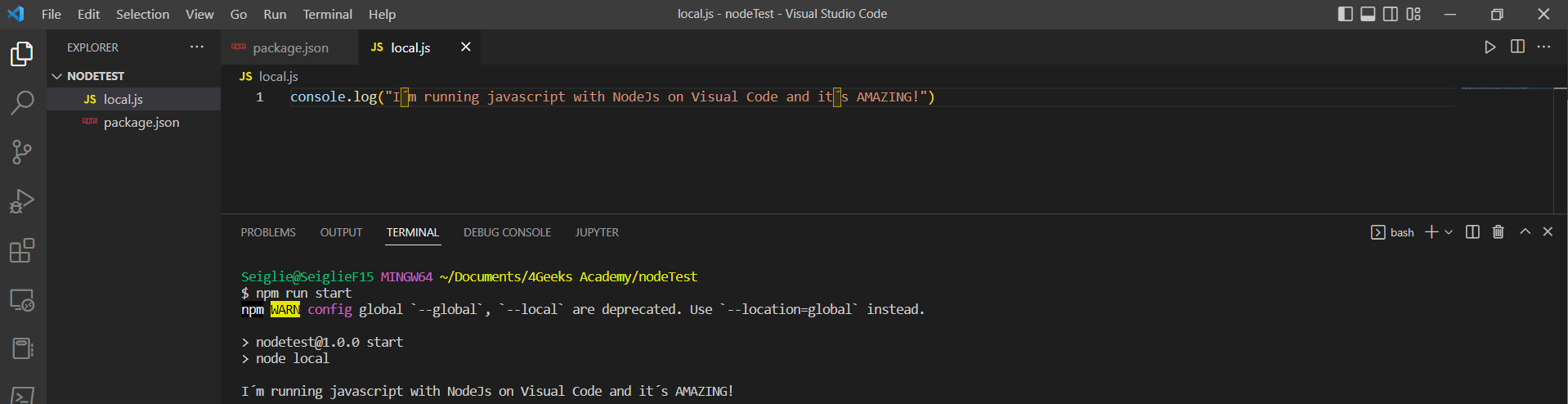
How to run javascript with npm

We covered how to run javascript in different environments, from the browser´s console to a fully installed NodeJS running with Visual Code (or the IDE of your choice).

You can check the 4Geeks Blog and will find more valuable content like How to print in Javascript or How to call a Function in Javascript. Hope you enjoyed the reading and keep on the Geek side!

How to Run JavaScript: Browser Console, Node.js and IDE
4Geeks chosen to deliver AI education in the Bahamas alongside Harvard, Oxford, and Columbia.See more

How to run javascript

Learn how to run JavaScript effortlessly using Node.js, browser consoles, or IDEs. Master your coding skills today—click to discover more!
5 min readLast updated

The most common way to run a javascript file would be:

javascript
node ./filename.js

There are many ways to execute javascript locally, without the need of internet or hosting our web apps on a server. Here are a few ways to do this:

  • Using the browser console
  • Using the command line
  • Using an IDE for developing

Using the browser console

If you are in the need to interact for debugging or testing a running web app on a server, or locally, you can make use of the built-in browser console.

How to access the browser console/terminal

  • Press left click anywhere in the browser window.
  • Select inspect.
  • Once the inspector is displayed, then on the top of the tab, click console.
  • Start writing your javascript code.

Here´s an example:

How to run javascript on browser terminal

Using the command line

If you don´t want to use the browser built-in terminal, you can always choose the command line to run javascript. For the command line to be able to execute javascript code, you´ll need to install NodeJS (or just Node as referred usually).

What´s NodeJS?

Node.js is a JavaScript engine that allows us to execute and write javascript for front-end, back-end o full-stack apps. Node it´s the go-to solution for most cases when we want to develop web apps for most developers (myself included).

Installing NodeJS

Installing NodeJS on your system is pretty straightforward:

  • Go to https://www.nodejs.org
  • Click on DOWNLOADS section
  • Select your OS and download the installer
  • Execute the installer once downloaded
  • Follow the instructions (or just accept the terms and conditions and next, next, next)

Running javascript from the command line:

We downloaded and installed NodeJS on our system, now let´s run some javascript!

  • Open the command line (windows users: click on the start menu, write cmd, start the cmd. Linux and MacOS users, just run the terminal)
  • type node

Now we started the node environment and we have access to javascript. Here´s an example of javascript executed on the command line

How to run javascript from the command line

Using an IDE for developing

So, I understand that you want to run javascript locally for developing purposes, let´s dig in in how to start a javascript project from your favorite IDE. We´ll be using Visual Code, but the process is the same for all of them.

We already covered how to install NodeJS, the javascript engine we´ll need to execute our code. Having this step been taken care of, lets dig in in how to run javascript from your IDE.

  • Start Visual Code (or your preferred IDE)
  • Open a terminal inside the IDE (Visual code: Go to terminal on the menu, new terminal)
  • Create the folder you want to store your project (example, mkdir nodeTest)
  • Access the folder with cd nodeTest
  • Write npm init -y
    • npm stands form Node Package Manager
    • init stands for initialize/initiate
    • -y is to apply the default values and start, you can change them later or run the code without the -y and see for yourself the given options

After it finishes, a package.json will show on your files, and if you open it, it´ll have all the data we manually specified by omitting the -y flag or the generic information which can be edited anytime we want.

Next, we need to create our javascript file and start coding.

  • Right click on the VS Code file explorer and select New file
  • Name it as you wish, I´ll go with local.js (js is the javascript extension)
  • We can start now developing our javascript app

How to run javascript

To run your app, you can do it by writing on the terminal:

javascript
 $ node local

how to run javascript with node

Remember to take out the $ when writing on the terminal.

We use node to summon our node engine and we tell which file we want to run, in this how-to we named our file local, that’s why node local.

Well now, even if we manage to execute our app, this is not the most common way to do it. Remember the package.json we created with npm init -y? Well, we´re editing it now to run our app. We need to add to our package.json the following:

json
    "start": "node local"

We´ll add it on the "scripts" section, start will be the keyword we´ll use to tell node to run local, our javascript file we created on the previous steps.

To run our app, all we need to do now is write in the IDE built-in terminal

npm run start

Here´s a visual example of how the package.json file:

json
{
  "name": "nodetest",
  "version": "1.0.0",
  "description": "",
  "main": "index.js",
  "scripts": {
    "test": "echo \"Error: no test specified\" && exit 1",
    "start": "node local"
  },
  "keywords": [],
  "author": "",
  "license": "ISC"
}

Now, every time we run npm run start, node will run our local.js file.

How to run javascript with npm

We covered how to run javascript in different environments, from the browser´s console to a fully installed NodeJS running with Visual Code (or the IDE of your choice).

You can check the 4Geeks Blog and will find more valuable content like How to print in Javascript or How to call a Function in Javascript. Hope you enjoyed the reading and keep on the Geek side!

when writing on the terminal.\n\nWe use `node` to summon our node engine and we tell which file we want to run, in this how-to we named our file `local`, that’s why `node local`. \n\nWell now, even if we manage to execute our app, this is not the most common way to do it. Remember the `package.json` we created with `npm init -y`? Well, we´re editing it now to run our app. We need to add to our `package.json` the following:\n\n```json\n \"start\": \"node local\"\n```\n\nWe´ll add it on the `\"scripts\"` section, `start` will be the keyword we´ll use to tell node to run `local`, our javascript file we created on the previous steps. \n\nTo run our app, all we need to do now is write in the IDE built-in terminal \n\n`npm run start`\n\nHere´s a visual example of how the `package.json` file:\n\n```json\n{\n \"name\": \"nodetest\",\n \"version\": \"1.0.0\",\n \"description\": \"\",\n \"main\": \"index.js\",\n \"scripts\": {\n \"test\": \"echo \\\"Error: no test specified\\\" && exit 1\",\n \"start\": \"node local\"\n },\n \"keywords\": [],\n \"author\": \"\",\n \"license\": \"ISC\"\n}\n```\n\nNow, every time we run `npm run start`, node will run our `local.js` file.\n\n![How to run javascript with npm](https://github.com/breatheco-de/content/blob/master/src/content/how-to/../../assets/images/how_to_run_javascript_4.png?raw=true)\n\n\nWe covered how to run javascript in different environments, from the browser´s console to a fully installed NodeJS running with Visual Code (or the IDE of your choice). \n\nYou can check the 4Geeks Blog and will find more valuable content like [How to print in Javascript](/en/how-to/how-to-print-in-javascript) or [How to call a Function in Javascript](/en/how-to/how-to-call-a-function-in-javascript). Hope you enjoyed the reading and keep on the Geek side!\n\n## Related guides\n\n- [Difference between Java and JavaScript](/en/how-to/what-is-the-difference-between-java-and-javascript)\n- [How to disable JavaScript in Tor](/en/how-to/how-to-disable-javascript-in-tor)\n- [Install JavaScript on your computer](/en/how-to/How-to-Install-Javascript)\n- [Create an object in JavaScript](/en/how-to/How-to-create-an-object-in-javascript)\n- [Run a JS file in VS Code](/en/how-to/how-to-run-javascript-in-visual-studio-code)\n","updated_at":"2026-09-30T17:54:23.384Z","seo":{"main_keyword":"how to run javascript","kw_monthly_volume":null,"kw_difficulty":null,"pillar_path":null},"locale":"en","param":{"slug":"how-to-run-javascript","locale":"en"},"singleEntry":{"locale":"en","title":"How to run javascript","description":"Learn how to run JavaScript effortlessly using Node.js, browser consoles, or IDEs. Master your coding skills today—click to discover more!","content":"The most common way to run a javascript file would be: \n\n```javascript\nnode ./filename.js\n```\n\nThere are many ways to execute javascript locally, without the need of internet or hosting our web apps on a server. Here are a few ways to do this:\n\n- Using the browser console\n- Using the command line\n- Using an IDE for developing \n\n## Using the browser console\n\nIf you are in the need to interact for debugging or testing a running web app on a server, or locally, you can make use of the built-in browser console. \n\n### How to access the browser console/terminal\n\n- Press left click anywhere in the browser window.\n- Select inspect.\n- Once the inspector is displayed, then on the top of the tab, click console.\n- Start writing your javascript code.\n\nHere´s an example:\n\n![How to run javascript on browser terminal](https://github.com/breatheco-de/content/blob/master/src/assets/images/how_to_run_javascript_1.png?raw=true)\n\n## Using the command line\n\nIf you don´t want to use the browser built-in terminal, you can always choose the command line to run javascript. For the command line to be able to execute javascript code, you´ll need to install NodeJS (or just Node as referred usually).\n\n### What´s NodeJS?\n\nNode.js is a JavaScript engine that allows us to execute and write javascript for front-end, back-end o full-stack apps. Node it´s the go-to solution for most cases when we want to develop web apps for most developers (myself included).\n\n### Installing NodeJS\n\nInstalling NodeJS on your system is pretty straightforward:\n- Go to https://www.nodejs.org\n- Click on DOWNLOADS section\n- Select your OS and download the installer\n- Execute the installer once downloaded\n- Follow the instructions (or just accept the terms and conditions and next, next, next)\n\n### Running javascript from the command line:\n\nWe downloaded and installed NodeJS on our system, now let´s run some javascript!\n\n- Open the command line (windows users: click on the start menu, write cmd, start the cmd. Linux and MacOS users, just run the terminal)\n- type `node`\n\nNow we started the node environment and we have access to javascript. Here´s an example of javascript executed on the command line\n\n![How to run javascript from the command line](https://github.com/breatheco-de/content/blob/master/src/content/how-to/../../assets/images/how_to_run_javascript_2.png?raw=true)\n\n## Using an IDE for developing\n\nSo, I understand that you want to run javascript locally for developing purposes, let´s dig in in how to start a javascript project from your favorite IDE. We´ll be using Visual Code, but the process is the same for all of them.\n\nWe already covered how to install NodeJS, the javascript engine we´ll need to execute our code. Having this step been taken care of, lets dig in in how to run javascript from your IDE.\n\n- Start Visual Code (or your preferred IDE)\n- Open a terminal inside the IDE (Visual code: Go to terminal on the menu, new terminal)\n- Create the folder you want to store your project (example, `mkdir nodeTest`)\n- Access the folder with `cd nodeTest`\n- Write `npm init -y` \n - `npm` stands form Node Package Manager\n - `init` stands for initialize/initiate\n - `-y` is to apply the default values and start, you can change them later or run the code without the `-y` and see for yourself the given options\n\nAfter it finishes, a `package.json` will show on your files, and if you open it, it´ll have all the data we manually specified by omitting the `-y` flag or the generic information which can be edited anytime we want.\n\nNext, we need to create our javascript file and start coding.\n- Right click on the VS Code file explorer and select `New file`\n- Name it as you wish, I´ll go with `local.js` (js is the javascript extension)\n- We can start now developing our javascript app \n\n### How to run javascript\n\nTo run your app, you can do it by writing on the terminal:\n\n```javascript\n $ node local\n```\n\n![how to run javascript with node](https://github.com/breatheco-de/content/blob/master/src/content/how-to/../../assets/images/how_to_run_javascript_3.png?raw=true)\n\nRemember to take out the ` How to Run JavaScript: Browser Console, Node.js and IDE
4Geeks chosen to deliver AI education in the Bahamas alongside Harvard, Oxford, and Columbia.See more

How to run javascript

Learn how to run JavaScript effortlessly using Node.js, browser consoles, or IDEs. Master your coding skills today—click to discover more!
5 min readLast updated

The most common way to run a javascript file would be:

javascript
node ./filename.js

There are many ways to execute javascript locally, without the need of internet or hosting our web apps on a server. Here are a few ways to do this:

  • Using the browser console
  • Using the command line
  • Using an IDE for developing

Using the browser console

If you are in the need to interact for debugging or testing a running web app on a server, or locally, you can make use of the built-in browser console.

How to access the browser console/terminal

  • Press left click anywhere in the browser window.
  • Select inspect.
  • Once the inspector is displayed, then on the top of the tab, click console.
  • Start writing your javascript code.

Here´s an example:

How to run javascript on browser terminal

Using the command line

If you don´t want to use the browser built-in terminal, you can always choose the command line to run javascript. For the command line to be able to execute javascript code, you´ll need to install NodeJS (or just Node as referred usually).

What´s NodeJS?

Node.js is a JavaScript engine that allows us to execute and write javascript for front-end, back-end o full-stack apps. Node it´s the go-to solution for most cases when we want to develop web apps for most developers (myself included).

Installing NodeJS

Installing NodeJS on your system is pretty straightforward:

  • Go to https://www.nodejs.org
  • Click on DOWNLOADS section
  • Select your OS and download the installer
  • Execute the installer once downloaded
  • Follow the instructions (or just accept the terms and conditions and next, next, next)

Running javascript from the command line:

We downloaded and installed NodeJS on our system, now let´s run some javascript!

  • Open the command line (windows users: click on the start menu, write cmd, start the cmd. Linux and MacOS users, just run the terminal)
  • type node

Now we started the node environment and we have access to javascript. Here´s an example of javascript executed on the command line

How to run javascript from the command line

Using an IDE for developing

So, I understand that you want to run javascript locally for developing purposes, let´s dig in in how to start a javascript project from your favorite IDE. We´ll be using Visual Code, but the process is the same for all of them.

We already covered how to install NodeJS, the javascript engine we´ll need to execute our code. Having this step been taken care of, lets dig in in how to run javascript from your IDE.

  • Start Visual Code (or your preferred IDE)
  • Open a terminal inside the IDE (Visual code: Go to terminal on the menu, new terminal)
  • Create the folder you want to store your project (example, mkdir nodeTest)
  • Access the folder with cd nodeTest
  • Write npm init -y
    • npm stands form Node Package Manager
    • init stands for initialize/initiate
    • -y is to apply the default values and start, you can change them later or run the code without the -y and see for yourself the given options

After it finishes, a package.json will show on your files, and if you open it, it´ll have all the data we manually specified by omitting the -y flag or the generic information which can be edited anytime we want.

Next, we need to create our javascript file and start coding.

  • Right click on the VS Code file explorer and select New file
  • Name it as you wish, I´ll go with local.js (js is the javascript extension)
  • We can start now developing our javascript app

How to run javascript

To run your app, you can do it by writing on the terminal:

javascript
 $ node local

how to run javascript with node

Remember to take out the $ when writing on the terminal.

We use node to summon our node engine and we tell which file we want to run, in this how-to we named our file local, that’s why node local.

Well now, even if we manage to execute our app, this is not the most common way to do it. Remember the package.json we created with npm init -y? Well, we´re editing it now to run our app. We need to add to our package.json the following:

json
    "start": "node local"

We´ll add it on the "scripts" section, start will be the keyword we´ll use to tell node to run local, our javascript file we created on the previous steps.

To run our app, all we need to do now is write in the IDE built-in terminal

npm run start

Here´s a visual example of how the package.json file:

json
{
  "name": "nodetest",
  "version": "1.0.0",
  "description": "",
  "main": "index.js",
  "scripts": {
    "test": "echo \"Error: no test specified\" && exit 1",
    "start": "node local"
  },
  "keywords": [],
  "author": "",
  "license": "ISC"
}

Now, every time we run npm run start, node will run our local.js file.

How to run javascript with npm

We covered how to run javascript in different environments, from the browser´s console to a fully installed NodeJS running with Visual Code (or the IDE of your choice).

You can check the 4Geeks Blog and will find more valuable content like How to print in Javascript or How to call a Function in Javascript. Hope you enjoyed the reading and keep on the Geek side!

when writing on the terminal.\n\nWe use `node` to summon our node engine and we tell which file we want to run, in this how-to we named our file `local`, that’s why `node local`. \n\nWell now, even if we manage to execute our app, this is not the most common way to do it. Remember the `package.json` we created with `npm init -y`? Well, we´re editing it now to run our app. We need to add to our `package.json` the following:\n\n```json\n \"start\": \"node local\"\n```\n\nWe´ll add it on the `\"scripts\"` section, `start` will be the keyword we´ll use to tell node to run `local`, our javascript file we created on the previous steps. \n\nTo run our app, all we need to do now is write in the IDE built-in terminal \n\n`npm run start`\n\nHere´s a visual example of how the `package.json` file:\n\n```json\n{\n \"name\": \"nodetest\",\n \"version\": \"1.0.0\",\n \"description\": \"\",\n \"main\": \"index.js\",\n \"scripts\": {\n \"test\": \"echo \\\"Error: no test specified\\\" && exit 1\",\n \"start\": \"node local\"\n },\n \"keywords\": [],\n \"author\": \"\",\n \"license\": \"ISC\"\n}\n```\n\nNow, every time we run `npm run start`, node will run our `local.js` file.\n\n![How to run javascript with npm](https://github.com/breatheco-de/content/blob/master/src/content/how-to/../../assets/images/how_to_run_javascript_4.png?raw=true)\n\n\nWe covered how to run javascript in different environments, from the browser´s console to a fully installed NodeJS running with Visual Code (or the IDE of your choice). \n\nYou can check the 4Geeks Blog and will find more valuable content like [How to print in Javascript](/en/how-to/how-to-print-in-javascript) or [How to call a Function in Javascript](/en/how-to/how-to-call-a-function-in-javascript). Hope you enjoyed the reading and keep on the Geek side!\n\n## Related guides\n\n- [Difference between Java and JavaScript](/en/how-to/what-is-the-difference-between-java-and-javascript)\n- [How to disable JavaScript in Tor](/en/how-to/how-to-disable-javascript-in-tor)\n- [Install JavaScript on your computer](/en/how-to/How-to-Install-Javascript)\n- [Create an object in JavaScript](/en/how-to/How-to-create-an-object-in-javascript)\n- [Run a JS file in VS Code](/en/how-to/how-to-run-javascript-in-visual-studio-code)\n","technologies":["javascript","node","git"],"slug":"how-to-run-javascript","_slug":"how-to-run-javascript","_locale":"en","updated_at":"2026-09-30T17:54:23.384Z","_updated_at":"2026-09-30T17:54:23.384Z"},"layout":{"menu":{"top":"main-navbar","bottom":"main-footer"}},"detached":false}},{"queryKey":["/api/variables"],"data":{"global.campus_phone":{"description":"Admissions phone number shown on pages and forms; per-campus numbers for Santiago, Madrid and Caracas.","category":"contact","default":"+1 (786) 416-6640","conditions":[{"query":{"location":"santiago-de-chile"},"value":"+56 9 5765 3466"},{"query":{"location":"madrid-spain"},"value":"+34 910 86 69 83"},{"query":{"location":"caracas"},"value":"+58 212-555-0100"}]},"global.sample_greeting":{"description":"Old demo greeting used to test location conditions. Not for real pages.","category":"copy","deprecated":true,"default":"Welcome to 4Geeks Academy","conditions":[{"query":{"location":"downtown-miami"},"value":"Welcome to 4Geeks Miami"},{"query":{"location":"santiago-de-chile"},"value":"Bienvenido a 4Geeks Santiago"},{"query":{"location":"madrid-spain"},"value":"Bienvenido a 4Geeks Madrid"},{"query":{"region":"latam"},"value":"Bienvenido a 4Geeks Academy"},{"query":{"region":"europe"},"value":"Welcome to 4Geeks Academy"},{"query":{"locale":"es"},"value":"Bienvenido a 4Geeks Academy"}]},"global.workflowlele":{"description":"Test variable left over from setup. Not for real pages.","category":"copy","deprecated":true,"default":"workflows"},"global.global_job_placement_rate":{"description":"Share of graduates hired after the bootcamp, by region. Write it with a % sign after the token.","category":"outcome_claim","unit":"percent","default":"84","conditions":[{"query":{"region":"usa-canada"},"value":"84"},{"query":{"region":"europe"},"value":"75"},{"query":{"region":"latam"},"value":"81"}]},"global.global_salary_increase":{"description":"Average salary increase graduates report after the bootcamp, by region. Write it with a % sign after the token.","category":"outcome_claim","unit":"percent","default":"55","conditions":[{"query":{"region":"usa-canada"},"value":"55"},{"query":{"region":"europe"},"value":"30"},{"query":{"region":"latam"},"value":"40"}]},"global.global_review_rating":{"description":"Average review rating across review sites (out of 5).","category":"social_proof","unit":"rating","default":"4.9"},"global.global_review_count":{"description":"Number of public reviews, rounded with a plus sign.","category":"social_proof","unit":"count","default":"700+","conditions":[{"query":{"locale":"es"},"value":"700+"},{"query":{"locale":"en"},"value":"700+"}]},"global.global_teacher_student_ratio":{"description":"Mentor-to-student ratio in live classes, by region.","category":"product_fact","default":"1:7","conditions":[{"query":{"region":"europe"},"value":"1:8"}]},"global.call_to_action_apply":{"description":"Default apply button label, localized for Chile, Madrid and LATAM.","category":"copy","default":"Apply now","conditions":[{"query":{"location":"santiago-chile"},"value":"Postular Ahora"},{"query":{"location":"madrid-spain"},"value":"Aplicar Ahora"},{"query":{"region":"latam"},"value":"Aplicar Ahora"}]},"global.price_full_datascience":{"description":"Full upfront tuition for the Data Science & ML bootcamp, by region.","category":"price","default":"$10,999","conditions":[{"query":{"region":"usa-canada"},"value":"$10,999"},{"query":{"region":"europe"},"value":"7.800 €"},{"query":{"region":"latam"},"value":"3250 USD"}]},"global.price_ai_engineering":{"description":"Monthly payment for the AI Engineering bootcamp, by region.","category":"price","default":"$399","conditions":[{"query":{"region":"usa-canada"},"value":"$399"},{"query":{"region":"europe"},"value":"140€"},{"query":{"region":"latam"},"value":"459 USD"}]},"global.price_full_ai_engineering":{"description":"Full upfront tuition for the AI Engineering bootcamp, by region.","category":"price","default":"$14,999","conditions":[{"query":{"region":"usa-canada"},"value":"$14,999"},{"query":{"region":"europe"},"value":"9.800 €"},{"query":{"region":"latam"},"value":"3500 USD"}]},"global.price_cybersecurity":{"description":"Monthly payment for the Cybersecurity bootcamp, by region.","category":"price","default":"$299","conditions":[{"query":{"region":"usa-canada"},"value":"$299"},{"query":{"region":"europe"},"value":"200 €"},{"query":{"region":"latam"},"value":"388 USD"}]},"global.price_full_cybersecurity":{"description":"Full upfront tuition for the Cybersecurity bootcamp, by region.","category":"price","default":"$9,999","conditions":[{"query":{"region":"usa-canada"},"value":"$9,999"},{"query":{"region":"europe"},"value":"7.800 €"},{"query":{"region":"latam"},"value":"2500 USD"}]},"global.price_fullstack":{"description":"Monthly payment for the Full Stack bootcamp, by region.","category":"price","default":"$299","conditions":[{"query":{"region":"usa-canada"},"value":"$299"},{"query":{"region":"europe"},"value":"200€"},{"query":{"region":"latam"},"value":"388 USD"}]},"global.price_full_fullstack":{"description":"Full upfront tuition for the Full Stack bootcamp, by region.","category":"price","default":"$10,999","conditions":[{"query":{"region":"usa-canada"},"value":"$10,999"},{"query":{"region":"latam"},"value":"2500 USD"},{"query":{"region":"europe"},"value":"6.800 €"}]},"global.price_datascience":{"description":"Monthly payment for the Data Science & ML bootcamp, by region.","category":"price","default":"$299","conditions":[{"query":{"region":"usa-canada"},"value":"$299"},{"query":{"region":"europe"},"value":"200€"},{"query":{"region":"latam"},"value":"388 USD"}]},"global.global_total_alumni":{"description":"Total number of graduates.","category":"social_proof","unit":"count","default":"4,000","conditions":[{"query":{"locale":"en"},"value":"6,000"},{"query":{"locale":"es"},"value":"6.000"}]},"global.global_salary_cybersecurity_analist":{"description":"Typical salary range for a cybersecurity analyst, by region.","category":"outcome_claim","default":"$75K–$120K","conditions":[{"query":{"region":"usa-canada"},"value":"$75K–$120K"},{"query":{"region":"europe"},"value":"20.000€ - 25.000€"},{"query":{"region":"latam"},"value":"$30K – $55K"}]},"global.global_salary_penetration_tester":{"description":"Typical salary range for a penetration tester, by region.","category":"outcome_claim","default":"$90K–$150K","conditions":[{"query":{"region":"usa-canada"},"value":"$90K–$150K"},{"query":{"region":"europe"},"value":"18.000€ - 30.000€"},{"query":{"region":"latam"},"value":"$35K – $65K"}]},"global.global_salary_security_engineer":{"description":"Typical salary range for a security engineer, by region.","category":"outcome_claim","default":"$100K–$165K","conditions":[{"query":{"region":"usa-canada"},"value":"$100K–$165K"},{"query":{"region":"europe"},"value":"22.000€- 30.000€"},{"query":{"region":"latam"},"value":"$45K – $75K"}]},"global.global_salary_incident_responder":{"description":"Typical salary range for an incident responder, by region.","category":"outcome_claim","default":"$85K–$140K","conditions":[{"query":{"region":"usa-canada"},"value":"$85K–$140K"},{"query":{"region":"europe"},"value":"25.000€ - 32.000€"},{"query":{"region":"latam"},"value":"$40K – $70K"}]},"global.average_salary_cybersecurity_short":{"description":"Short average cybersecurity salary for tight spaces (one number), by region.","category":"outcome_claim","default":"$85K","conditions":[{"query":{"region":"europe"},"value":"35.000€"},{"query":{"region":"latam"},"value":"35K USD"}]},"global.salary_data_scientist":{"description":"Typical salary range for a data scientist, by region.","category":"outcome_claim","default":"$80K–$130K","conditions":[{"query":{"region":"usa-canada"},"value":"$80K–$130K"},{"query":{"region":"europe"},"value":"20.000€ - 30.000€"},{"query":{"region":"latam"},"value":"$35K – $65K"}]},"global.minimun_isa_salary":{"description":"Minimum yearly salary before income-share payments start (Europe financing).","category":"price","default":"17.000 €","conditions":[{"query":{"region":"europe"},"value":"17.000 €"}]},"global.average_salary_fullstack":{"description":"Typical salary range for a full stack developer, by region.","category":"outcome_claim","default":"$75K–$110K","conditions":[{"query":{"region":"europe"},"value":"20.000€ - 30.000€"},{"query":{"region":"latam"},"value":"$45K – $70K"}]},"global.mounthly_price_bootcamp":{"description":"Generic monthly bootcamp payment for Europe and LATAM.","category":"price","default":"200 €","conditions":[{"query":{"region":"europe"},"value":"200 €"},{"query":{"region":"latam"},"value":"170 USD"}]},"global.average_salary_machine_learning_engineer":{"description":"Typical salary range for a machine learning engineer, by region.","category":"outcome_claim","default":"$90K–$150K","conditions":[{"query":{"region":"europe"},"value":"22.000 € - 30.000 €"},{"query":{"region":"latam"},"value":"$45K – $80K"}]},"global.average_salary_ai_fluent_software_developer":{"description":"Typical salary range for an AI-fluent software developer, by region.","category":"outcome_claim","default":"$90 K–$140 K","conditions":[{"query":{"region":"usa-canada"},"value":"$90 K–$140 K"},{"query":{"region":"europe"},"value":"20.000€ - 30.000€"},{"query":{"region":"latam"},"value":"$55K – $75K"}]},"global.average_salary_web_aplications_engineer":{"description":"Typical salary range for a web applications engineer, by region.","category":"outcome_claim","default":"$95K–$140K","conditions":[{"query":{"region":"latam"},"value":"$40K – $65K"},{"query":{"region":"latam"},"value":"$40K – $65K"}]},"global.average_salary_backend_services_developer":{"description":"Typical salary range for a backend services developer, by region.","category":"outcome_claim","default":"$100K–$150K","conditions":[{"query":{"region":"latam"},"value":"$50K – $75K"}]},"global.average_salary_data_analyst":{"description":"Typical salary range for a data analyst, by region.","category":"outcome_claim","default":"$60K–$95K","conditions":[{"query":{"region":"usa-canada"},"value":"$60K–$95K"},{"query":{"region":"europe"},"value":"20.000€ - 30.000€"},{"query":{"region":"latam"},"value":"$20K – $40K"}]},"global.average_salary_ai_engineer":{"description":"Typical salary range for an AI engineer, by region and language.","category":"outcome_claim","default":"$95K–$150K","conditions":[{"query":{"region":"usa-canada"},"value":"$95K–$150K"},{"query":{"region":"latam"},"value":"$40K – $75K"},{"query":{"region":"europe","locale":"es"},"value":"25.000€ - 60.000€"},{"query":{"region":"europe","locale":"en"},"value":"25,000€ - 60,000€"}]},"global.average_salary_ai_specialist":{"description":"Typical salary range for an AI specialist, by region.","category":"outcome_claim","default":"$95K–$145K","conditions":[{"query":{"region":"europe"},"value":" 40.000 € - 60.000 €"},{"query":{"region":"latam"},"value":"$25K–$60K USD"}]},"global.average_salary_ai_automation":{"description":"Typical salary range for an AI automation role, by region.","category":"outcome_claim","default":"$140K–$210K\"","conditions":[{"query":{"region":"europe"},"value":"30.000 € - 45.000 €"},{"query":{"region":"latam"},"value":"$25K–$40K"}]},"global.monthly_full_stack":{"description":"Monthly payment for Full Stack in Europe and LATAM (no default value).","category":"price","conditions":[{"query":{"region":"latam"},"value":"150 USD"},{"query":{"region":"europe"},"value":"200 €"}]},"global.monthly_ai_eng":{"description":"Monthly payment for AI Engineering in Europe and LATAM (no default value).","category":"price","conditions":[{"query":{"region":"latam"},"value":"227 USD"},{"query":{"region":"europe"},"value":"140 €"}]},"global.monthly_cyber":{"description":"Monthly payment for Cybersecurity, by region.","category":"price","default":"$299","conditions":[{"query":{"region":"usa-canada"},"value":"$299"},{"query":{"region":"latam"},"value":"150 USD"},{"query":{"region":"europe"},"value":"200 €"}]},"global.global_verified_reviews_count":{"description":"Number of verified reviews, by language.","category":"social_proof","unit":"count","default":"1,000","conditions":[{"query":{"locale":"en"},"value":"700"},{"query":{"locale":"es"},"value":"700"}]},"global.starting_salary_datascience":{"description":"Typical starting salary for data science graduates in the US.","category":"outcome_claim","default":"$90K","conditions":[{"query":{"region":"usa-canada"},"value":"$90K"}]},"global.global_spending_cybersecurity":{"description":"Yearly global spending on cybersecurity (industry figure; cite the source when used).","category":"company_fact","default":"$520B USD","conditions":[{"query":{"region":"usa-canada"},"value":"$520B"},{"query":{"region":"europe"},"value":"442.000 M€"}]},"global.lowest_monthly_financing_option":{"description":"Lowest monthly payment available through financing, by region.","category":"price","default":"$299","conditions":[{"query":{"region":"usa-canada"},"value":"$299"},{"query":{"region":"europe"},"value":"200€"}]},"global.anual_income_based_payment_guarantee":{"description":"Yearly income below which income-based payments pause (US job guarantee terms).","category":"price","default":"$35,000","conditions":[{"query":{"locale":"en","region":"usa-canada"},"value":"$35,000"},{"query":{"region":"usa-canada","locale":"es"},"value":"$35.000"}]},"global.job_guarantee_price":{"description":"Price of the job guarantee add-on (US).","category":"price","default":"$2,000","conditions":[{"query":{"region":"usa-canada"},"value":"$2,000"}]},"global.monthly_payment_minimun":{"description":"Lowest monthly payment plan (US).","category":"price","default":"$349","conditions":[{"query":{"region":"usa-canada"},"value":"$349"}]},"global.global_campuses":{"description":"Number of campuses.","category":"company_fact","unit":"count","default":"10","conditions":[{"query":{"region":"usa-canada"},"value":"10"}]},"global.average_salary_agent_engineer":{"description":"Typical salary range for an AI agent engineer, by region.","category":"outcome_claim","default":"$75 K–$115 K","conditions":[{"query":{"region":"usa-canada"},"value":"$75 K–$115 K"},{"query":{"region":"europe"},"value":"20.000€ - 30.000€"}]},"global.average_salary_workflow_automation_engineer":{"description":"Typical salary range for a workflow automation engineer, by region.","category":"outcome_claim","default":"$25K–$40K","conditions":[{"query":{"region":"usa-canada"},"value":"$70 K–$110 K"},{"query":{"region":"europe"},"value":"20.000€- 30.000€"}]},"global.data_science_week_duration":{"description":"Length of the Data Science & ML bootcamp in weeks, by region.","category":"product_fact","unit":"weeks","default":"18","conditions":[{"query":{"region":"europe"},"value":"18 "},{"query":{"region":"latam"},"value":"18"},{"query":{"region":"usa-canada"},"value":"18"}]},"global.ai_engineering_week_duration":{"description":"Length of the AI Engineering bootcamp in weeks.","category":"product_fact","unit":"weeks","default":"24 "},"global.cybersecurity_week_duration":{"description":"Length of the Cybersecurity bootcamp in weeks.","category":"product_fact","unit":"weeks","default":"16 "},"global.fullstack_week_duration":{"description":"Length of the Full Stack bootcamp in weeks.","category":"product_fact","unit":"weeks","default":"20 "},"global.total_scholarships":{"description":"Total scholarship money awarded, by region.","category":"company_fact","default":"20$M","conditions":[{"query":{"region":"europe"},"value":"17M€"}]},"global.number_of_hiring_partners_aprox":{"description":"Approximate number of hiring partner companies.","category":"company_fact","unit":"count","default":"400"},"global.who_is_eligible_work_authorization":{"description":"Work-authorization requirement for enrollment, by region.","category":"product_fact","conditions":[{"query":{"region":"latam"},"value":"Have authorization to work in your country of residence"},{"query":{"region":"europe"},"value":"Have authorization to work in your country of residence"},{"query":{"region":"usa-canada"},"value":"Have U.S. work authorization"}],"default":"Have authorization to work in your country of residence"},"global.address_miami":{"description":"Miami campus street address.","category":"contact","default":"1111 Brickell Ave, Miami, FL 33129"},"reserved.legal_terms_url":{"default":"/en/terms-conditions","isReserved":true},"reserved.legal_privacy_url":{"default":"/en/privacy-policy","isReserved":true},"reserved.consent_whatsapp":{"default":"","isReserved":true},"reserved.consent_sms":{"default":"","isReserved":true},"reserved.consent_email":{"default":"","isReserved":true},"reserved.consent_general":{"default":"I have read and accept the \u003ca href=\"/en/terms-conditions\">terms and conditions\u003c/a> and the \u003ca href=\"/en/privacy-policy\">privacy policy\u003c/a>, and the processing of my data by 4Geeks to contact me and send me related information.","conditions":[{"query":{"locale":"es"},"value":"He leído y acepto los \u003ca href=\"/es/terminos-y-condiciones\">términos y condiciones\u003c/a> y la \u003ca href=\"/es/politicas-de-privacidad\">política de privacidad\u003c/a>, y el tratamiento de mis datos por 4Geeks para contactarme y enviarme información relacionada."}],"isReserved":true},"global.ai_fluency_price":{"description":"AI Fluency course price, by region.","category":"price","default":"$900","conditions":[{"query":{"region":"europe"},"value":"€900"},{"query":{"region":"latam"},"value":"$500"}]},"global.ai.fluency.price":{"description":"Old duplicate of the AI Fluency price. Use global.ai_fluency_price.","category":"price","deprecated":true,"replaced_by":"global.ai_fluency_price","default":"$900","conditions":[{"query":{"region":"europe"},"value":"€900"},{"query":{"region":"latam"},"value":"$500"}]},"global.full_tuition_ai_engineering":{"description":"Full AI Engineering tuition (US only; empty default).","category":"price","default":"","conditions":[{"query":{"region":"usa-canada"},"value":"Standard tuition is $15,999."}]},"global.ai_flex_path_1_url":{"description":"Checkout link for AI Flex path 1, by region and language.","category":"link","unit":"url","default":"https://4geeks.com/es/checkout?plan=ai-flex-plan-pro&cohort=1713&team_seats=1","conditions":[{"query":{"region":"usa-canada","locale":"es"},"value":"https://4geeks.com/es/checkout?plan=ai-flex-plan-pro&cohort=1713&team_seats=1"},{"query":{"region":"europe","locale":"es"},"value":"https://4geeks.com/es/checkout?plan=ai-flex-pro-ue&cohort=1713&team_seats=1"},{"query":{"region":"latam","locale":"es"},"value":"https://4geeks.com/es/checkout?plan=ai-flex-pro-latam&cohort=1713&team_seats=1"},{"query":{"region":"usa-canada"},"value":"https://4geeks.com/checkout?plan=ai-flex-plan-pro&cohort=1713&team_seats=1"},{"query":{"region":"europe"},"value":"https://4geeks.com/checkout?plan=ai-flex-pro-ue&cohort=1713&team_seats=1"},{"query":{"region":"latam"},"value":"https://4geeks.com/checkout?plan=ai-flex-pro-latam&cohort=1713&team_seats=1"}]},"global.ai_flex_path_2_url":{"description":"Checkout link for AI Flex path 2, by region and language.","category":"link","unit":"url","default":"https://4geeks.com/es/checkout?plan=ai-flex-plan-pro&cohort=1717&team_seats=1","conditions":[{"query":{"region":"usa-canada","locale":"es"},"value":"https://4geeks.com/es/checkout?plan=ai-flex-plan-pro&cohort=1717&team_seats=1"},{"query":{"region":"europe","locale":"es"},"value":"https://4geeks.com/es/checkout?plan=ai-flex-pro-ue&cohort=1717&team_seats=1"},{"query":{"region":"latam","locale":"es"},"value":"https://4geeks.com/es/checkout?plan=ai-flex-pro-latam&cohort=1717&team_seats=1"},{"query":{"region":"usa-canada"},"value":"https://4geeks.com/checkout?plan=ai-flex-plan-pro&cohort=1717&team_seats=1"},{"query":{"region":"europe"},"value":"https://4geeks.com/checkout?plan=ai-flex-pro-ue&cohort=1717&team_seats=1"},{"query":{"region":"latam"},"value":"https://4geeks.com/checkout?plan=ai-flex-pro-latam&cohort=1717&team_seats=1"}]},"global.ai_flex_path_3_url":{"description":"Checkout link for AI Flex path 3, by region and language.","category":"link","unit":"url","default":"https://4geeks.com/es/checkout?plan=ai-flex-plan-pro&cohort=1719&team_seats=1","conditions":[{"query":{"region":"usa-canada","locale":"es"},"value":"https://4geeks.com/es/checkout?plan=ai-flex-plan-pro&cohort=1719&team_seats=1"},{"query":{"region":"europe","locale":"es"},"value":"https://4geeks.com/es/checkout?plan=ai-flex-pro-ue&cohort=1719&team_seats=1"},{"query":{"region":"latam","locale":"es"},"value":"https://4geeks.com/es/checkout?plan=ai-flex-pro-latam&cohort=1719&team_seats=1"},{"query":{"region":"usa-canada"},"value":"https://4geeks.com/checkout?plan=ai-flex-plan-pro&cohort=1719&team_seats=1"},{"query":{"region":"europe"},"value":"https://4geeks.com/checkout?plan=ai-flex-pro-ue&cohort=1719&team_seats=1"},{"query":{"region":"latam"},"value":"https://4geeks.com/checkout?plan=ai-flex-pro-latam&cohort=1719&team_seats=1"}]},"global.ai_flex_path_4_url":{"description":"Checkout link for AI Flex path 4, by region and language.","category":"link","unit":"url","default":"https://4geeks.com/es/checkout?plan=ai-flex-plan-pro&cohort=1718&team_seats=1","conditions":[{"query":{"region":"usa-canada","locale":"es"},"value":"https://4geeks.com/es/checkout?plan=ai-flex-plan-pro&cohort=1718&team_seats=1"},{"query":{"region":"europe","locale":"es"},"value":"https://4geeks.com/es/checkout?plan=ai-flex-pro-ue&cohort=1718&team_seats=1"},{"query":{"region":"latam","locale":"es"},"value":"https://4geeks.com/es/checkout?plan=ai-flex-pro-latam&cohort=1718&team_seats=1"},{"query":{"region":"usa-canada"},"value":"https://4geeks.com/checkout?plan=ai-flex-plan-pro&cohort=1718&team_seats=1"},{"query":{"region":"europe"},"value":"https://4geeks.com/checkout?plan=ai-flex-pro-ue&cohort=1718&team_seats=1"},{"query":{"region":"latam"},"value":"https://4geeks.com/checkout?plan=ai-flex-pro-latam&cohort=1718&team_seats=1"}]},"global.ai_fluency_url":{"description":"Checkout link for the AI Fluency course, by region and language.","category":"link","unit":"url","default":"https://4geeks.com/checkout?plan=ai-fluency&cohort=1706","conditions":[{"query":{"region":"usa-canada","locale":"es"},"value":"https://4geeks.com/es/checkout?plan=ai-fluency&cohort=1706"},{"query":{"region":"latam","locale":"es"},"value":"https://4geeks.com/es/checkout?plan=ai-fluency-latam&cohort=1706"},{"query":{"region":"europe","locale":"es"},"value":"https://4geeks.com/es/checkout?plan=ai-fluency-ue&cohort=1706"},{"query":{"region":"usa-canada"},"value":"https://4geeks.com/checkout?plan=ai-fluency&cohort=1706"},{"query":{"region":"latam"},"value":"https://4geeks.com/checkout?plan=ai-fluency-latam&cohort=1706"},{"query":{"region":"europe"},"value":"https://4geeks.com/checkout?plan=ai-fluency-ue&cohort=1706"}]},"global.price_ai_fluency_financing":{"description":"Monthly financing payment for AI Fluency.","category":"price","default":"$75"},"global.ai_engineering_program_tracks":{"description":"AI Engineering program length label (US).","category":"product_fact","default":"22 Weeks ","conditions":[{"query":{"region":"usa-canada"},"value":"22 Weeks or 17-Week Accelerated Morning Track"}]},"brand.title":{"default":"4Geeks Academy","isReserved":true},"brand.logo":{"default":"4geeks-logo-big","isReserved":true},"brand.logo_dark":{"default":"logo-4geeks-white","isReserved":true},"global.salary_range_forward_deployed_engineer":{"description":"Typical salary range for a forward deployed engineer.","category":"outcome_claim","default":"$105K–$155K"},"global.default_free_signup_plan":{"description":"Plan slug assigned on free signup. Technical — do not quote in copy.","category":"system","default":"4geeks-basic-subscription"},"global.breathecode_api_host":{"description":"Backend API host for signup and checkout. Technical — do not quote in copy.","category":"system","unit":"url","default":"https://s.4geeks.co"},"global.legal_terms_url":{"default":"/en/terms-conditions","isReserved":true},"global.legal_privacy_url":{"default":"/en/privacy-policy","isReserved":true},"global.consent_whatsapp":{"default":"","isReserved":true},"global.consent_sms":{"default":"","isReserved":true},"global.consent_email":{"default":"","isReserved":true},"global.consent_general":{"default":"I have read and accept the \u003ca href=\"/en/terms-conditions\">terms and conditions\u003c/a> and the \u003ca href=\"/en/privacy-policy\">privacy policy\u003c/a>, and the processing of my data by 4Geeks to contact me and send me related information.","conditions":[{"query":{"locale":"es"},"value":"He leído y acepto los \u003ca href=\"/es/terminos-y-condiciones\">términos y condiciones\u003c/a> y la \u003ca href=\"/es/politicas-de-privacidad\">política de privacidad\u003c/a>, y el tratamiento de mis datos por 4Geeks para contactarme y enviarme información relacionada."}],"isReserved":true}}},{"queryKey":["/api/menus","main-navbar","en"],"data":{"name":"main-navbar","locale":"en","data":{"navbar":{"items":[{"label":"Logo","href":"/","component":"Logo","imageId":"4geeks-logo-big","imageAlt":"Image: 4geeks logo big"},{"label":"PROGRAMS","href":"/programs","component":"Dropdown","dropdown":{"type":"cards","title":"Programs","description":"From beginner to job-ready in record time. Train in today's most in-demand tech fields and launch a lasting career.","items":[{"title":"AI Engineering","description":"Transform a business into a fully AI-native system, layer by layer.","cta":"View program","href":"/en/career-programs/ai-engineering","icon":"brain"},{"title":"AI Fluency","description":"Automate your daily work with AI and become irreplaceable, in just 4 weeks","cta":"Learn More","href":"/en/career-programs/ai-fluency","icon":"briefcase"},{"title":"AI Flex","description":"A personalized path through AI, automation, and more, at your own pace.","cta":"Learn more","href":"/en/career-programs/ai-flex","icon":"puzzle"}],"footer":{"text":"\u003cb>Unsure which program fits you best? \u003c/b>See our program comparison \u003ca href=\"/en/program-comparison\">here\u003c/a>.\u003cbr>\u003cbr>\u003cspan style=\"font-size: 0.75rem;\">Florida residents: Continue on \u003ca href=\"https://fl.4geeksacademy.com\">fl.4geeksacademy.com\u003c/a> for CIE-authorized programs. Our only physical Florida campus is in Miami.\u003c/span>"}}},{"label":"WHY 4GEEKS","href":"/why-4geeks","component":"Dropdown","dropdown":{"type":"columns","title":"Why 4Geeks","description":"Launch your tech career with the unlimited support of expert mentors, AI-powered tools, and personalized career guidance. With strong outcomes and global recognition, we've helped thousands thrive in tech.","icon":"medal","columns":[{"title":"Support","items":[{"label":"Mentors and teachers","href":"/en/geekpal-support"},{"label":"Career Support","href":"/en/geekforce-career-support"},{"label":"Online Platform","href":"/en/online-platform"},{"label":"Rigobot","href":"/en/rigobot-ai-coding-mentor"},{"label":"LearnPack","href":"/en/learnpack"}]},{"title":"Validation","items":[{"label":"Awards","href":"/en/awards"},{"label":"Outcomes","href":"/en/outcomes"},{"label":"4Geeks Vs Others","href":"/en/geeks-vs-others"}]},{"title":"Pricing","items":[{"label":"Financing","href":"/en/financials"},{"label":"Scholarships","href":"/en/scholarships"},{"label":"Job or Refund","href":"/en/job-guarantee"}]},{"title":"Our Students","items":[{"label":"Alumni & Projects","href":"/en/graduates-and-projects"},{"label":"Testimonials","href":"/en/testimonials"},{"label":"Talent","href":"https://www.notion.so/4geeksacademy/4Geeks-Talent-Hub-USA-ef91aba17f9c4964bf7972396d190bdf"}]}]}},{"label":"THE ACADEMY","href":"/the-academy","component":"Dropdown","dropdown":{"type":"simple-list","title":"The Academy","description":"Join a global learning community where tech, community, and innovation come together to accelerate careers.","icon":"graduation-cap","items":[{"label":"Hire our alumni","href":"https://www.notion.so/4geeksacademy/4Geeks-Talent-Hub-USA-ef91aba17f9c4964bf7972396d190bdf"},{"label":"Partner with 4Geeks","href":"/en/partners"},{"label":"Work with us","href":"/en/work-with-us"},{"label":"Who we are","href":"/en/the-academy"},{"label":"Press","href":"/en/press"},{"label":"Blog","href":"/en/blog"}]}},{"label":"CAMPUS","href":"/campus","component":"Dropdown","dropdown":{"type":"grouped-list","title":"Our Campus","description":"Study in-person at one of our global campuses, or join remotely and access the same world-class training and community.","icon":"building","groups":[{"title":"US & CANADA","items":[{"label":"New York, USA","href":"/en/location/newyork-usa"},{"label":"Toronto, Canada","href":"/en/location/toronto-canada"},{"label":"Atlanta, USA","href":"/en/location/atlanta-usa"},{"label":"Chicago, USA","href":"/en/location/chicago-usa"},{"label":"Remote, USA","href":"/en/location/remote"}]},{"title":"EUROPE","items":[{"label":"Madrid, Spain","href":"/en/location/madrid-spain"},{"label":"Barcelona, Spain","href":"/en/location/barcelona-spain"},{"label":"Valencia, Spain","href":"/en/location/valencia-spain"},{"label":"Malaga, Spain","href":"/en/location/malaga-spain"},{"label":"Berlin, Germany","href":"/en/location/berlin-germany"},{"label":"Lisbon, Portugal","href":"/en/location/lisbon-portugal"},{"label":"Hamburg, Germany","href":"/en/location/hamburg-germany"},{"label":"Munich, Germany","href":"/en/location/munich-germany"},{"label":"Dublin, Ireland","href":"/en/location/dublin-ireland"},{"label":"Milan, Italy","href":"/en/location/milan-italy"},{"label":"Rome, Italy","href":"/en/location/rome-italy"},{"label":"Rest of Europe","href":"/en/location/rest-of-europe"}]},{"title":"LATAM","items":[{"label":"Santiago, Chile","href":"/en/location/santiago-chile"},{"label":"Bogota, Colombia","href":"/en/location/bogota-colombia"},{"label":"Mexico City, Mexico","href":"/en/location/mexicocity-mexico"},{"label":"Caracas, Venezuela","href":"/en/location/caracas-venezuela"},{"label":"Buenos Aires, Argentina","href":"/en/location/buenosaires-argentina"},{"label":"La Paz, Bolivia","href":"/en/location/lapaz-bolivia"},{"label":"Costa Rica ","href":"/en/location/costa-rica"},{"label":"Quito, Ecuador","href":"/en/location/quito-ecuador"},{"label":"Panama City, Panama","href":"/en/location/panamacity-panama"},{"label":"Montevideo, Uruguay","href":"/en/location/montevideo-uruguay"},{"label":"Lima, Peru","href":"/en/location/lima-peru"},{"label":"Rest Of America","href":"/en/location/remote"}]}]}},{"label":"UPCOMING","href":"/en/upcoming-dates","component":"Dropdown","dropdown":{"type":"simple-list","title":"Don't waste more time!","description":"Join our free workshops, webinars, and other events. Learn more about our programs and check upcoming program dates.","items":[{"label":"Join a free workshop","href":"/en/workshops"},{"label":"Join a course","href":"/en/upcoming-dates"}],"columns":[],"groups":[],"icon":"puzzle"}},{"label":"LanguageSwitcher","href":"#","component":"LanguageSwitcher"},{"label":"SIGN IN","href":"https://learn.4geeks.com/login","component":"Button"}],"marquee":{"enabled":true,"position":"above","texts":[{"text":"4Geeks chosen to deliver AI education in the Bahamas alongside Harvard, Oxford, and Columbia.","cta_label":"See more","cta_url":"https://www.entnerd.com/startup-chilena-es-reclutada-por-bahamas-junto-a-oxford-columbia-y-harvard-para-dar-clases-gratuitas-online/","cta_url_overrides":{"/":"#list_press_mentions-w7r1sh","/home":"#list_press_mentions-w7r1sh"}}],"char_delay":20,"display_time":6500},"floating":true,"subtle_at_top":true}}}},{"queryKey":["/api/menus","main-footer","en"],"data":{"name":"main-footer","locale":"en","data":{"footer":{"columns":[{"title":"Company","items":[{"label":"Contact Us","href":"/en/contact-us"},{"label":"Academy","href":"/en/the-academy"},{"label":"Partners","href":"/en/partners"},{"label":"Pricing","href":"/en/financials"},{"label":"Events","href":"/en/next-dates"},{"label":"Upcoming Dates","href":"/en/upcoming-dates"},{"label":"FAQ","href":"/en/faq"},{"label":"Awards","href":"/en/awards"}],"items_per_column":20},{"title":"Main Programs","items":[{"label":"AI Fluency","href":"/en/career-programs/ai-fluency"},{"label":"AI Engineering","href":"/en/career-programs/ai-engineering"},{"label":"AI Flex","href":"/en/career-programs/ai-flex"},{"label":"Other Programs","href":""},{"label":"AI Engineering for Developers","href":"/en/career-programs/ai-engineering-for-devs"},{"label":"AI Fluency for Data Analysis","href":"/en/career-programs/ai-fluency-for-data-analysis"},{"label":"AI Fluency for HR","href":"/en/career-programs/ai-fluency-for-hr"},{"label":"AI Fluency for Marketing","href":"/en/career-programs/ai-fluency-for-marketing"},{"label":"AI Fluency for Sales","href":"/en/career-programs/ai-fluency-for-sales"},{"label":"Applied AI Course","href":"/en/career-programs/applied-ai-course"},{"label":"Data Science and Machine Learning with AI","href":"/en/career-programs/data-science-ml"},{"label":"Cybersecurity","href":"/en/career-programs/cybersecurity"},{"label":"Full Stack with AI","href":"/en/career-programs/full-stack"}],"items_per_column":20},{"title":"Locations","items":[{"label":"New York, USA","href":"/en/location/newyork-usa"},{"label":"Toronto, Canada","href":"/en/location/toronto-canada"},{"label":"Atlanta, USA","href":"/en/location/atlanta-usa"},{"label":"Chicago, USA","href":"/en/location/chicago-usa"},{"label":"Remote, USA","href":"/en/location/remote"},{"label":"Madrid, Spain","href":"/en/location/madrid-spain"},{"label":"Barcelona, Spain","href":"/en/location/barcelona-spain"},{"label":"Valencia, Spain","href":"/en/location/valencia-spain"},{"label":"Malaga, Spain","href":"/en/location/malaga-spain"},{"label":"Berlin, Germany","href":"/en/location/berlin-germany"},{"label":"Lisbon, Portugal","href":"/en/location/lisbon-portugal"},{"label":"Hamburg, Germany","href":"/en/location/hamburg-germany"},{"label":"Munich, Germany","href":"/en/location/munich-germany"},{"label":"Dublin, Ireland","href":"/en/location/dublin-ireland"},{"label":"Milan, Italy","href":"/en/location/milan-italy"},{"label":"Rome, Italy","href":"/en/location/rome-italy"},{"label":"Rest of Europe","href":"/en/location/rest-of-europe"},{"label":"Santiago, Chile","href":"/en/location/santiago-chile"},{"label":"Bogota, Colombia","href":"/en/location/bogota-colombia"},{"label":"Mexico City, Mexico","href":"/en/location/mexicocity-mexico"},{"label":"Caracas, Venezuela","href":"/en/location/caracas-venezuela"},{"label":"Buenos Aires, Argentina","href":"/en/location/buenosaires-argentina"},{"label":"La Paz, Bolivia","href":"/en/location/lapaz-bolivia"},{"label":"Costa Rica","href":"/en/location/costa-rica"},{"label":"Quito, Ecuador","href":"/en/location/quito-ecuador"},{"label":"Panama City, Panama","href":"/en/location/panamacity-panama"},{"label":"Montevideo, Uruguay","href":"/en/location/montevideo-uruguay"},{"label":"Lima, Peru","href":"/en/location/lima-peru"},{"label":"Rest Of America","href":"/en/location/remote"}],"items_per_column":20},{"title":"For Companies","items":[{"label":"4Geeks For Companies","href":"/en/partners"},{"label":"Talent","href":"https://www.notion.so/4geeksacademy/Talent-Pipeline-4Geeks-Academy-ef91aba17f9c4964bf7972396d190bdf"}],"items_per_column":20},{"title":"For Students","items":[{"label":"Free Interactive Tutorials","href":"/en/interactive-exercises"},{"label":"How to's","href":"/en/how-to"},{"label":"Student Support","href":"/en/geekpal-support"}],"items_per_column":20}],"socials":[{"name":"Linkedin","icon":"linkedin","link":"https://www.linkedin.com/school/4geeksacademy/"},{"name":"Facebook","icon":"facebook","link":"https://www.facebook.com/4GeeksAcademy"},{"name":"Twitter","icon":"x-logo","link":"https://twitter.com/4GeeksAcademy"},{"name":"Instagram","icon":"instagram","link":"https://www.instagram.com/4GeeksAcademy"}],"legal_links":[{"label":"Privacy Policy","href":"/en/privacy-policy"},{"label":"Cookies","href":"/en/cookies"},{"label":"Terms and Conditions","href":"/en/terms-conditions"},{"label":"Code of Conduct","href":"/en/code-of-conduct"}],"subscribe_text":"Subscribe for more","copyright_text":"© Learnpack Inc. All rights reserved.","show_fldoe_logo":false}}}},{"queryKey":["/api/content-types"],"data":[{"name":"program","label":"Program","directory":"programs","has_database":false,"database_slug":null,"single_template":false,"has_field_mapping":true,"unique_fields":["slug","bc_slug","job_role"],"field_mapping_keys":["slug","title","bc_slug","job_role"],"url_pattern":{"en":"/en/career-programs/:slug","es":"/es/programas-de-carrera/:slug"},"locale_key":"locale","static_entry_count":12,"database_entry_count":null,"layout":{"menu":{"top":"main-navbar","bottom":"main-footer"}}},{"name":"location","label":"Location","directory":"locations","has_database":false,"database_slug":null,"single_template":false,"has_field_mapping":true,"unique_fields":["slug","name","latitude","longitude","city"],"field_mapping_keys":["slug","name","city","country","country_code","region","default_language","phone","address","latitude","longitude","timezone","available_programs","catalog"],"url_pattern":{"en":"/en/location/:slug","es":"/es/ubicacion/:slug"},"locale_key":"locale","static_entry_count":36,"database_entry_count":null,"layout":{"menu":{"top":"main-navbar","bottom":"main-footer"}}},{"name":"landing","label":"Landing","directory":"landings","has_database":false,"database_slug":null,"single_template":false,"has_field_mapping":true,"unique_fields":["slug"],"field_mapping_keys":["title","locale","programs","published_at"],"url_pattern":{"default":"/landing/:slug"},"locale_key":"locale","static_entry_count":79,"database_entry_count":null,"layout":{"menu":{"top":"logo-only","bottom":null}}},{"name":"page","label":"Page","directory":"pages","has_database":false,"database_slug":null,"single_template":false,"has_field_mapping":true,"unique_fields":["slug"],"field_mapping_keys":["title","published_at","locations","programs"],"url_pattern":{"en":"/en/:slug","es":"/es/:slug"},"locale_key":"locale","static_entry_count":41,"database_entry_count":null,"layout":{"menu":{"top":"main-navbar","bottom":"main-footer"}}},{"name":"blog","label":"Blog","directory":"blog","has_database":false,"database_slug":null,"single_template":true,"has_field_mapping":true,"unique_fields":["slug"],"field_mapping_keys":["title","description","published_at","status","category","tags","lang","content","downloadable","faq_entries","call_to_action","authors","downloadable_entry"],"url_pattern":{"en":"/en/blog/:category/:slug","es":"/es/blog/:category/:slug"},"locale_key":"locale","static_entry_count":334,"database_entry_count":null,"layout":{"menu":{"top":"main-navbar","bottom":"main-footer"}}},{"name":"authors","label":"Authors","directory":"authors","has_database":false,"database_slug":null,"single_template":true,"has_field_mapping":true,"unique_fields":["slug"],"field_mapping_keys":["name","job_title","bio","same_as","works_for","knows_about","published_at"],"url_pattern":{"en":"/en/authors/:slug","es":"/es/autores/:slug"},"locale_key":"locale","static_entry_count":5,"database_entry_count":null,"layout":{"menu":{"top":"main-navbar","bottom":"main-footer"}}},{"name":"downloadable","label":"Downloadable","directory":"downloadable","has_database":false,"database_slug":null,"single_template":false,"has_field_mapping":true,"unique_fields":["slug"],"field_mapping_keys":["title","pdf_url"],"url_pattern":{"en":"/en/downloadable/:slug","es":"/es/descargable/:slug"},"locale_key":"locale","static_entry_count":4,"database_entry_count":null,"layout":{"menu":{"top":"main-navbar","bottom":"main-footer"}}},{"name":"outcome-report","label":"Outcome-report","directory":"outcome-report","has_database":false,"database_slug":null,"single_template":true,"has_field_mapping":true,"unique_fields":["slug"],"field_mapping_keys":["title","description","content","published_at"],"url_pattern":{"en":"/en/outcomes-report/:slug","es":"/es/informe-de-resultados/:slug"},"locale_key":"locale","static_entry_count":2,"database_entry_count":null,"layout":{"menu":{"top":"main-navbar","bottom":"main-footer"}}},{"name":"how-to","label":"How-to","directory":"how-to","has_database":false,"database_slug":null,"single_template":true,"has_field_mapping":true,"unique_fields":["slug"],"field_mapping_keys":["locale","title","description","content","technologies","published_at"],"url_pattern":{"en":"/en/how-to/:slug","es":"/es/how-to/:slug"},"locale_key":"locale","static_entry_count":81,"database_entry_count":null,"layout":{"menu":{"top":"main-navbar","bottom":"main-footer"}}},{"name":"interactive-exercise","label":"Interactive-exercise","directory":"interactive-exercise","has_database":true,"database_slug":"interactive-exercises","single_template":true,"has_field_mapping":true,"unique_fields":["slug"],"field_mapping_keys":["locale","title","description","category","tags","content","learnpack_url","interactive","video","difficulty","duration","manifest","published_at","bc_slug"],"url_pattern":{"en":"/en/interactive-exercise/:slug","es":"/es/interactive-exercise/:slug"},"locale_key":"locale","static_entry_count":0,"database_entry_count":76,"layout":{"menu":{"top":"main-navbar","bottom":null}}},{"name":"workshop","label":"Workshop","directory":"workshop","has_database":true,"database_slug":"workshops","single_template":true,"has_field_mapping":true,"unique_fields":["slug"],"field_mapping_keys":["locale","id","title","description","starting_at","ending_at","capacity","host_name","host_avatar_url","host_bio","host_twitter_url","host_linkedin_url","host_website_url","host_github_url","duration_label","badge","published_at","registered_count","registered_attendee_ids","event_started","seats_remaining","registrant_avatars","seats_checkins","calendar_google_url","calendar_yahoo_url","calendar_outlook_url","tags"],"url_pattern":{"en":"/en/workshop/:slug","es":"/es/workshop/:slug"},"locale_key":"lang","static_entry_count":0,"database_entry_count":3,"layout":{"menu":{"top":"main-navbar","bottom":null}}},{"name":"lesson","label":"Lesson","directory":"lesson","has_database":true,"database_slug":"lesson_tuples","single_template":true,"has_field_mapping":true,"unique_fields":["slug"],"field_mapping_keys":["locale","title","description","published_at","category","tags","content","is_featured"],"url_pattern":{"en":"/en/lesson/:slug","es":"/es/lesson/:slug"},"locale_key":"locale","static_entry_count":1,"database_entry_count":0,"layout":{"menu":{"top":"main-navbar","bottom":"main-footer"}}},{"name":"scholarship","label":"Scholarship","directory":"scholarship","has_database":false,"database_slug":null,"single_template":false,"has_field_mapping":true,"unique_fields":["slug"],"field_mapping_keys":["published_at","partner_name","partner_logo","partner_url","program_focus","eligibility","how_to_apply","region","funding_type","application_opens","application_closes","outcomes","proof_points"],"url_pattern":{"en":"/en/scholarship/:slug","es":"/es/scholarship/:slug"},"locale_key":"locale","static_entry_count":1,"database_entry_count":null,"layout":{"menu":{"top":"main-navbar","bottom":"main-footer"}}}]},{"queryKey":["/api/image-registry"],"data":{"presets":{"hero-wide":{"aspect_ratio":"16:9","widths":[320,480,640,720,960,1280,1920],"quality":85,"description":"Full-width hero images"},"hero-tall":{"aspect_ratio":"9:16","widths":[360,480,640],"quality":85,"description":"Vertical hero images for mobile-style content"},"card":{"aspect_ratio":"4:3","widths":[320,480,640],"quality":80,"description":"Standard card thumbnails"},"card-wide":{"aspect_ratio":"16:9","widths":[320,480,640],"quality":80,"description":"Wide card thumbnails"},"avatar":{"aspect_ratio":"1:1","widths":[32,64,128,256],"quality":85,"description":"Profile pictures and avatars"},"logo":{"aspect_ratio":null,"widths":[32,64,120,240],"quality":90,"description":"Company logos, preserves original aspect ratio"},"icon":{"aspect_ratio":"1:1","widths":[32,64,128],"quality":90,"description":"Small icons and badges"},"full":{"aspect_ratio":null,"widths":[640,960,1280,1920],"quality":85,"description":"Full-size images, preserves original aspect ratio"}},"images":{"4geeks-logo-big":{"src":"https://storage.googleapis.com/4geeks-academy-website/site_4geeks-com/media/4geeks-logo-big.png","alt":"Image: 4geeks logo big","focal_point":"center","tags":["logo","brand"],"usage_count":0,"hash":"dec507e33608f5988d1575f61b008c8ea6384273a2bdb5870f95f8df4608ca9d","width":2128,"height":455,"preset":["logo"],"widths_generated":[32,64,120,240],"format":"webp","srcset":[{"w":32,"url":"https://storage.googleapis.com/4geeks-academy-website/site_4geeks-com/media/4geeks-logo-big-32w.webp"},{"w":64,"url":"https://storage.googleapis.com/4geeks-academy-website/site_4geeks-com/media/4geeks-logo-big-64w.webp"},{"w":120,"url":"https://storage.googleapis.com/4geeks-academy-website/site_4geeks-com/media/4geeks-logo-big-120w.webp"},{"w":240,"url":"https://storage.googleapis.com/4geeks-academy-website/site_4geeks-com/media/4geeks-logo-big-240w.webp"}]},"4geeks-devs-logo-1763162063433":{"src":"https://storage.googleapis.com/4geeks-academy-website/media/4geeks-devs-logo_1763162063433.png","alt":"Image: 4geeks-devs-logo_1763162063433","focal_point":"center","tags":["logo","brand","partner","press"],"usage_count":0,"hash":"25422248ede1db8734e27ad0c5d3d67b6e7df20a60911995b5de0d50e6048ec9","width":359,"height":82,"preset":["logo"],"widths_generated":[32,64,120,240],"format":"webp","srcset":[{"w":32,"url":"https://storage.googleapis.com/4geeks-academy-website/media/4geeks-devs-logo_1763162063433-32w.webp"},{"w":64,"url":"https://storage.googleapis.com/4geeks-academy-website/media/4geeks-devs-logo_1763162063433-64w.webp"},{"w":120,"url":"https://storage.googleapis.com/4geeks-academy-website/media/4geeks-devs-logo_1763162063433-120w.webp"},{"w":240,"url":"https://storage.googleapis.com/4geeks-academy-website/media/4geeks-devs-logo_1763162063433-240w.webp"}]}},"tagDefinitions":{"hero":{"label":"Hero","description":"Full-width hero or banner images used in page headers","presets":["hero-wide","hero-tall"],"srcset_widths":[640,960,1280,1920],"detection":{"yaml_fields":["hero.image","hero.background_image","hero.media.src"],"component_keys":["hero","hero_showcase","hero_singleColumn","hero_twoColumn","hero_productShowcase"],"filename_patterns":["hero","banner","header-bg"],"aspect_ratio_range":{"min":1.5,"max":3}}},"logo":{"label":"Logo","description":"Company or partner logos, typically wide and short","presets":["logo"],"srcset_widths":[120,240],"detection":{"yaml_fields":["logo","partner_logo","brand_logo"],"component_keys":["partners","trust_badges"],"filename_patterns":["logo","brand","company"],"aspect_ratio_range":{"min":1,"max":6}}},"avatar":{"label":"Avatar","description":"Profile pictures, headshots, or user avatars","presets":["avatar"],"srcset_widths":[64,128,256],"detection":{"yaml_fields":["avatar","profile_image","headshot","testimonial.image"],"component_keys":["testimonials","team","staff"],"filename_patterns":["avatar","headshot","profile","portrait"],"aspect_ratio_range":{"min":0.8,"max":1.2}}},"card":{"label":"Card","description":"Thumbnails used in card layouts and grids","presets":["card","card-wide"],"srcset_widths":[320,480,640],"detection":{"yaml_fields":["card.image","thumbnail"],"component_keys":["cards","grid","features"],"filename_patterns":["card","thumb","thumbnail"],"aspect_ratio_range":{"min":0.75,"max":2}}},"icon":{"label":"Icon","description":"Small icons, badges, or UI elements","presets":["icon"],"srcset_widths":[32,64,128],"detection":{"yaml_fields":["icon","badge_icon"],"component_keys":["icons","features"],"filename_patterns":["icon","ico","symbol"],"aspect_ratio_range":{"min":0.8,"max":1.2}}},"photo":{"label":"Photo","description":"General photographs of people, places, or events","presets":["full","card"],"srcset_widths":[640,960,1280,1920],"detection":{"yaml_fields":["image","photo"],"component_keys":["gallery","about"],"filename_patterns":["photo","campus","classroom","event"],"aspect_ratio_range":{"min":0.5,"max":2.5}}},"badge":{"label":"Badge","description":"Award badges, certification marks, or trust seals","presets":["icon","logo"],"srcset_widths":[64,128,256],"detection":{"yaml_fields":["badge","certification","seal"],"component_keys":["badges","awards","certifications"],"filename_patterns":["badge","seal","certification","cert"],"aspect_ratio_range":{"min":0.6,"max":1.6}}},"partner":{"label":"Partner","description":"Partner organization logos and images","presets":["logo"],"srcset_widths":[120,240],"detection":{"yaml_fields":["partner.logo","partner_image"],"component_keys":["partners","collaborators"],"filename_patterns":["partner","sponsor","university","college"],"aspect_ratio_range":{"min":1,"max":5}}},"press":{"label":"Press","description":"Press and media mentions, publication logos","presets":["logo"],"srcset_widths":[120,240],"detection":{"yaml_fields":["press_logo","publication"],"component_keys":["press","media_mentions"],"filename_patterns":["press","media","news","forbes","newsweek","fortune"],"aspect_ratio_range":{"min":1,"max":5}}},"illustration":{"label":"Illustration","description":"Illustrations, diagrams, or infographics","presets":["full","card"],"srcset_widths":[320,640,960],"detection":{"yaml_fields":["illustration","diagram"],"component_keys":["features","how_it_works"],"filename_patterns":["illustration","diagram","infographic","graphic"],"aspect_ratio_range":{"min":0.5,"max":2.5}}},"testimonial":{"label":"Testimonial","description":"Images associated with student or alumni testimonials","presets":["avatar","card"],"srcset_widths":[64,128,256],"detection":{"yaml_fields":["testimonial.image","review.image"],"component_keys":["testimonials","reviews","success_stories"],"filename_patterns":["testimonial","review","success"],"aspect_ratio_range":{"min":0.8,"max":1.5}}},"team":{"label":"Team","description":"Staff, instructor, or team member photos","presets":["avatar","card"],"srcset_widths":[128,256,480],"detection":{"yaml_fields":["staff.image","instructor.image","team.image"],"component_keys":["team","staff","instructors"],"filename_patterns":["team","staff","instructor","teacher","mentor"],"aspect_ratio_range":{"min":0.7,"max":1.5}}},"award":{"label":"Award","description":"Award images, accolades, or recognition marks","presets":["icon","logo"],"srcset_widths":[64,128,256],"detection":{"yaml_fields":["award","accolade"],"component_keys":["awards","recognition"],"filename_patterns":["award","accolade","recognition","prize","course-report","switchup"],"aspect_ratio_range":{"min":0.6,"max":1.6}}}}}},{"queryKey":["navigation-eager-manifest"],"data":{"version":1,"generatedAt":"2026-08-24T21:12:23.604Z","defaultEagerCount":3,"paths":{"/":{"eager":[["schema_org","default"],["hero","credibility"]]},"/en":{"eager":[["schema_org","default"],["hero","credibility"]]},"/en/apply":{"eager":[["hero","singleColumn"],["apply_form","default"],["breadcrumb","default"]],"leadForm":true},"/en/awards":{"eager":[["hero","singleColumn"],["list_press_mentions","default"],["cta_banner","form"]],"leadForm":true},"/en/blog":{"eager":[["list_cards","default"]]},"/en/blog/ai-powered-learning/inside-4geeks-platform":{"eager":[["breadcrumb","blogWithTags"],["hero","blogHero"],["article","default"]]},"/en/blog/ai-tools/what-is-grok-bot":{"eager":[["breadcrumb","blogWithTags"],["hero","blogHero"],["article","default"]]},"/en/blog/full-stack-developer/full-stack-developer":{"eager":[["breadcrumb","blogWithTags"],["hero","blogHero"],["article","default"]]},"/en/blog/learn-javascript/learn-javascript":{"eager":[["breadcrumb","blogWithTags"],["hero","blogHero"],["article","default"]]},"/en/blog/machine-learning-engineer/machine-learning-engineer":{"eager":[["breadcrumb","blogWithTags"],["hero","blogHero"],["article","default"]]},"/en/blog/software-engineer-salary/software-engineer-salary":{"eager":[["breadcrumb","blogWithTags"],["hero","blogHero"],["article","default"]]},"/en/career-programs/ai-engineering":{"eager":[["schema_org","default"],["hero","course"],["modal","default"]],"leadForm":true},"/en/career-programs/ai-engineering-for-devs":{"eager":[["schema_org","default"],["hero","course"],["modal","default"]],"leadForm":true},"/en/career-programs/ai-flex":{"eager":[["schema_org","default"],["hero","course"],["awards_marquee","default"]]},"/en/career-programs/ai-fluency":{"eager":[["schema_org","default"],["hero","course"],["awards_marquee","default"]],"leadForm":true},"/en/career-programs/ai-fluency-for-data-analysis":{"eager":[["schema_org","default"],["hero","course"],["awards_marquee","default"]],"leadForm":true},"/en/career-programs/ai-fluency-for-hr":{"eager":[["schema_org","default"],["hero","course"],["awards_marquee","default"]],"leadForm":true},"/en/career-programs/ai-fluency-for-marketing":{"eager":[["schema_org","default"],["hero","course"],["awards_marquee","default"]],"leadForm":true},"/en/career-programs/ai-fluency-for-sales":{"eager":[["schema_org","default"],["hero","course"],["awards_marquee","default"]],"leadForm":true},"/en/career-programs/applied-ai-course":{"eager":[["schema_org","default"],["breadcrumb","default"],["hero","course"]]},"/en/career-programs/cybersecurity":{"eager":[["schema_org","default"],["hero","course"],["modal","default"]],"leadForm":true},"/en/career-programs/data-science-ml":{"eager":[["schema_org","default"],["hero","course"],["modal","default"]],"leadForm":true},"/en/career-programs/full-stack":{"eager":[["schema_org","default"],["hero","course"],["modal","default"]],"leadForm":true},"/en/coding-bootcamp":{"eager":[["hero","simpleTwoColumn"],["article","default"]]},"/en/contact-us":{"eager":[["schema_org","default"],["hero","singleColumn"],["contact_us_info","default"]],"leadForm":true},"/en/cookies":{"eager":[["article","default"],["sticky_cta","default"]],"leadForm":true},"/en/faq":{"eager":[["faq_editor","default"],["sticky_cta","default"]],"leadForm":true},"/en/financials":{"eager":[["hero","productShowcase"],["features_grid","stats-text"],["syllabus","default"]]},"/en/geekforce-career-support":{"eager":[["hero","productShowcase"],["graduates_stats","default"],["career_support_explain","default"]]},"/en/geekpal-support":{"eager":[["hero","productShowcase"],["banner","default"],["human_and_ai_duo","default"]]},"/en/geeks-vs-others":{"eager":[["hero","simpleTwoColumn"],["comparison_table","default"],["two_column_accordion_card","image_background"]]},"/en/graduates-and-projects":{"eager":[["hero","singleColumn"],["modal","default"],["project_showcase","default"]],"leadForm":true},"/en/home":{"eager":[["schema_org","default"],["hero","credibility"]]},"/en/how-to":{"eager":[["list_cards","default"]]},"/en/interactive-exercises":{"eager":[["list_cards","default"]]},"/en/job-guarantee":{"eager":[["hero","simpleTwoColumn"],["features_grid","cardHeader"],["graduates_stats","fullBleed"]]},"/en/learnpack":{"eager":[["hero","simpleTwoColumn"],["article","default"],["faq","default"]]},"/en/location/atlanta-usa":{"eager":[["schema_org","default"],["hero","singleColumn"],["awards_marquee","default"]]},"/en/location/austin-usa":{"eager":[["schema_org","default"],["hero","singleColumn"],["awards_marquee","default"]]},"/en/location/barcelona-spain":{"eager":[["schema_org","default"],["hero","singleColumn"],["awards_marquee","default"]]},"/en/location/berlin-germany":{"eager":[["schema_org","default"],["hero","singleColumn"],["awards_marquee","default"]]},"/en/location/bogota-colombia":{"eager":[["schema_org","default"],["hero","singleColumn"],["awards_marquee","default"]]},"/en/location/buenosaires-argentina":{"eager":[["schema_org","default"],["hero","singleColumn"],["awards_marquee","default"]]},"/en/location/caracas-venezuela":{"eager":[["schema_org","default"],["hero","singleColumn"],["awards_marquee","default"]]},"/en/location/chicago-usa":{"eager":[["schema_org","default"],["hero","singleColumn"],["awards_marquee","default"]]},"/en/location/costa-rica":{"eager":[["schema_org","default"],["hero","singleColumn"],["awards_marquee","default"]]},"/en/location/dallas-usa":{"eager":[["schema_org","default"],["hero","singleColumn"],["awards_marquee","default"]]},"/en/location/dublin-ireland":{"eager":[["schema_org","default"],["hero","singleColumn"],["awards_marquee","default"]]},"/en/location/hamburg-germany":{"eager":[["schema_org","default"],["hero","singleColumn"],["awards_marquee","default"]]},"/en/location/houston-usa":{"eager":[["schema_org","default"],["hero","singleColumn"],["awards_marquee","default"]]},"/en/location/lapaz-bolivia":{"eager":[["schema_org","default"],["hero","singleColumn"],["awards_marquee","default"]]},"/en/location/lima-peru":{"eager":[["schema_org","default"],["hero","singleColumn"],["awards_marquee","default"]]},"/en/location/lisbon-portugal":{"eager":[["schema_org","default"],["hero","singleColumn"],["awards_marquee","default"]]},"/en/location/losangeles-usa":{"eager":[["schema_org","default"],["hero","singleColumn"],["awards_marquee","default"]]},"/en/location/madrid-spain":{"eager":[["schema_org","default"],["hero","singleColumn"],["awards_marquee","default"]]},"/en/location/malaga-spain":{"eager":[["schema_org","default"],["hero","singleColumn"],["awards_marquee","default"]]},"/en/location/mexicocity-mexico":{"eager":[["schema_org","default"],["hero","singleColumn"],["awards_marquee","default"]]},"/en/location/miami-usa":{"eager":[["schema_org","default"],["hero","singleColumn"],["awards_marquee","default"]]},"/en/location/milan-italy":{"eager":[["schema_org","default"],["hero","singleColumn"],["awards_marquee","default"]]},"/en/location/montevideo-uruguay":{"eager":[["schema_org","default"],["hero","singleColumn"],["awards_marquee","default"]]},"/en/location/munich-germany":{"eager":[["schema_org","default"],["hero","singleColumn"],["awards_marquee","default"]]},"/en/location/newyork-usa":{"eager":[["schema_org","default"],["hero","singleColumn"],["awards_marquee","default"]]},"/en/location/panamacity-panama":{"eager":[["schema_org","default"],["hero","singleColumn"],["awards_marquee","default"]]},"/en/location/quito-ecuador":{"eager":[["schema_org","default"],["hero","singleColumn"],["awards_marquee","default"]]},"/en/location/remote":{"eager":[["schema_org","default"],["hero","singleColumn"],["awards_marquee","default"]]},"/en/location/rest-of-europe":{"eager":[["schema_org","default"],["hero","singleColumn"],["awards_marquee","default"]]},"/en/location/rome-italy":{"eager":[["schema_org","default"],["hero","singleColumn"],["awards_marquee","default"]]},"/en/location/santiago-chile":{"eager":[["schema_org","default"],["hero","singleColumn"],["awards_marquee","default"]]},"/en/location/toronto-canada":{"eager":[["schema_org","default"],["hero","singleColumn"],["awards_marquee","default"]]},"/en/location/valencia-spain":{"eager":[["schema_org","default"],["hero","singleColumn"],["awards_marquee","default"]]},"/en/online-platform":{"eager":[["hero","simpleTwoColumn"],["article","default"],["faq","default"]]},"/en/outcomes":{"eager":[["hero","simpleTwoColumn"],["vertical_bars_cards","default"]]},"/en/partners":{"eager":[["hero","simpleTwoColumn"],["modal","default"],["features_quad","default"]],"leadForm":true},"/en/payment-component":{"eager":[["enrollment_selector","default"]]},"/en/press":{"eager":[["hero","singleColumn"],["list_press_mentions","default"],["value_proof_panel","default"]]},"/en/privacy-policy":{"eager":[["article","default"],["sticky_cta","default"]],"leadForm":true},"/en/program-comparison":{"eager":[["hero","orbit"],["comparison_table","default"]]},"/en/rigobot-ai-coding-mentor":{"eager":[["hero","simpleTwoColumn"],["article","default"],["faq","default"]]},"/en/scholarships":{"eager":[["hero","simpleTwoColumn"],["features_grid","cardHeader"],["partnership_carousel","split-card"]]},"/en/terms-conditions":{"eager":[["article","default"],["sticky_cta","default"]],"leadForm":true},"/en/testimonials":{"eager":[["hero","singleColumn"],["awards_marquee","default"],["testimonials_grid","default"]]},"/en/the-academy":{"eager":[["hero","singleColumn"],["split_cards","primary-left"],["features_quad","laptopEdge"]]},"/en/upcoming-dates":{"eager":[["dynamic_table","comparison"],["cta_banner","form"],["sticky_cta","default"]],"leadForm":true},"/en/work-with-us":{"eager":[["hero","singleColumn"],["two_column","default"],["faq","default"]]},"/es":{"eager":[["schema_org","default"],["hero","credibility"]]},"/es/alianzas":{"eager":[["hero","simpleTwoColumn"],["modal","default"],["features_quad","default"]],"leadForm":true},"/es/aplica":{"eager":[["hero","singleColumn"],["apply_form","default"]],"leadForm":true},"/es/apply":{"eager":[["hero","singleColumn"],["apply_form","default"]],"leadForm":true},"/es/blog":{"eager":[["list_cards","default"]]},"/es/blog/aprender-a-programar/aprender-a-programar-desde-cero":{"eager":[["hero","blogHero"],["article","default"],["cta_banner","form"]],"leadForm":true},"/es/blog/aprendizaje-potenciado-con-ia/curso-inteligencia-artificial":{"eager":[["breadcrumb","default"],["hero","singleColumn"],["article","default"]]},"/es/blog/bootcamp-de-programacion/estudiar-en-un-bootcamp-de-programacion":{"eager":[["hero","blogHero"],["article","default"],["cta_banner","form"]],"leadForm":true},"/es/blog/carrera-de-programacion/carrera-de-programacion-es":{"eager":[["hero","blogHero"],["article","default"],["cta_banner","form"]],"leadForm":true},"/es/blog/cuanto-gana-un-programador/cuanto-gana-un-programador":{"eager":[["hero","blogHero"],["article","default"],["cta_banner","form"]],"leadForm":true},"/es/blog/desarrollador-full-stack/desarrollador-full-stack-developer":{"eager":[["hero","blogHero"],["article","default"],["cta_banner","form"]],"leadForm":true},"/es/blog/herramientas-ia/que-es-grok-bot":{"eager":[["hero","blogHero"],["article","default"],["cta_banner","form"]],"leadForm":true},"/es/contactanos":{"eager":[["schema_org","default"],["hero","singleColumn"],["contact_us_info","default"]],"leadForm":true},"/es/cookies":{"eager":[["article","default"],["sticky_cta","default"]],"leadForm":true},"/es/curso-de-programacion-desde-cero":{"eager":[["hero","simpleTwoColumn"],["article","default"]]},"/es/faq":{"eager":[["faq_editor","default"],["sticky_cta","default"]],"leadForm":true},"/es/financiaciones":{"eager":[["hero","productShowcase"],["features_grid","stats-text"],["syllabus","default"]]},"/es/inicio":{"eager":[["schema_org","default"],["hero","credibility"]]},"/es/payment-component":{"eager":[["enrollment_selector","default"]]},"/es/politicas-de-privacidad":{"eager":[["article","default"],["sticky_cta","default"]],"leadForm":true},"/es/premios":{"eager":[["hero","singleColumn"],["list_press_mentions","default"],["cta_banner","form"]],"leadForm":true},"/es/privacy-policy":{"eager":[["article","default"],["sticky_cta","default"]],"leadForm":true},"/es/programas-de-carrera/ai-engineering":{"eager":[["schema_org","default"],["hero","course"],["modal","default"]],"leadForm":true},"/es/programas-de-carrera/ai-flex":{"eager":[["schema_org","default"],["hero","course"],["awards_marquee","default"]]},"/es/programas-de-carrera/ai-fluency":{"eager":[["schema_org","default"],["hero","course"],["awards_marquee","default"]],"leadForm":true},"/es/programas-de-carrera/ai-fluency-for-data-analysis":{"eager":[["schema_org","default"],["hero","course"],["awards_marquee","default"]],"leadForm":true},"/es/programas-de-carrera/ai-fluency-for-hr":{"eager":[["schema_org","default"],["hero","course"],["awards_marquee","default"]],"leadForm":true},"/es/programas-de-carrera/ai-fluency-for-sales":{"eager":[["schema_org","default"],["hero","course"],["awards_marquee","default"]],"leadForm":true},"/es/programas-de-carrera/ciberseguridad":{"eager":[["schema_org","default"],["breadcrumb","default"],["hero","course"]]},"/es/programas-de-carrera/ciencia-de-datos-ml":{"eager":[["schema_org","default"],["breadcrumb","default"],["hero","course"]]},"/es/programas-de-carrera/curso-inteligencia-artificial":{"eager":[["schema_org","default"],["breadcrumb","default"],["hero","course"]]},"/es/programas-de-carrera/desarrollo-full-stack":{"eager":[["schema_org","default"],["breadcrumb","default"],["hero","course"]]},"/es/programas-de-carrera/ingenieria-ia":{"eager":[["schema_org","default"],["hero","course"],["modal","default"]],"leadForm":true},"/es/programas-de-carrera/ingenieria-ia-para-desarrolladores":{"eager":[["schema_org","default"],["hero","course"],["modal","default"]],"leadForm":true},"/es/proximas-fechas":{"eager":[["dynamic_table","comparison"],["cta_banner","form"],["sticky_cta","default"]],"leadForm":true},"/es/sobre-la-academia":{"eager":[["hero","singleColumn"],["split_cards","primary-left"],["features_quad","laptopEdge"]]},"/es/soporte-geekpal":{"eager":[["hero","productShowcase"],["banner","default"],["human_and_ai_duo","default"]]},"/es/terminos-y-condiciones":{"eager":[["article","default"],["sticky_cta","default"]],"leadForm":true},"/es/terms-conditions":{"eager":[["article","default"],["sticky_cta","default"]],"leadForm":true},"/es/trabajo-garantizado":{"eager":[["hero","simpleTwoColumn"],["graduates_stats","fullBleed"],["course_selector","solid"]]},"/es/tutoriales-interactivos":{"eager":[["list_cards","default"]]},"/es/ubicacion/atlanta-usa":{"eager":[["schema_org","default"],["hero","singleColumn"],["awards_marquee","default"]]},"/es/ubicacion/austin-usa":{"eager":[["schema_org","default"],["hero","singleColumn"],["awards_marquee","default"]]},"/es/ubicacion/barcelona-spain":{"eager":[["schema_org","default"],["hero","singleColumn"],["awards_marquee","default"]]},"/es/ubicacion/berlin-germany":{"eager":[["schema_org","default"],["hero","singleColumn"],["awards_marquee","default"]]},"/es/ubicacion/bogota-colombia":{"eager":[["schema_org","default"],["hero","singleColumn"],["awards_marquee","default"]]},"/es/ubicacion/buenosaires-argentina":{"eager":[["schema_org","default"],["hero","singleColumn"],["awards_marquee","default"]]},"/es/ubicacion/caracas-venezuela":{"eager":[["schema_org","default"],["hero","singleColumn"],["awards_marquee","default"]]},"/es/ubicacion/chicago-usa":{"eager":[["schema_org","default"],["hero","singleColumn"],["awards_marquee","default"]]},"/es/ubicacion/costa-rica":{"eager":[["schema_org","default"],["hero","singleColumn"],["awards_marquee","default"]]},"/es/ubicacion/dallas-usa":{"eager":[["schema_org","default"],["hero","singleColumn"],["awards_marquee","default"]]},"/es/ubicacion/dublin-ireland":{"eager":[["schema_org","default"],["hero","singleColumn"],["awards_marquee","default"]]},"/es/ubicacion/hamburg-germany":{"eager":[["schema_org","default"],["hero","singleColumn"],["awards_marquee","default"]]},"/es/ubicacion/houston-usa":{"eager":[["schema_org","default"],["hero","singleColumn"],["awards_marquee","default"]]},"/es/ubicacion/lapaz-bolivia":{"eager":[["schema_org","default"],["hero","singleColumn"],["awards_marquee","default"]]},"/es/ubicacion/lima-peru":{"eager":[["schema_org","default"],["hero","singleColumn"],["awards_marquee","default"]]},"/es/ubicacion/lisbon-portugal":{"eager":[["schema_org","default"],["hero","singleColumn"],["awards_marquee","default"]]},"/es/ubicacion/losangeles-usa":{"eager":[["schema_org","default"],["hero","singleColumn"],["awards_marquee","default"]]},"/es/ubicacion/madrid-spain":{"eager":[["schema_org","default"],["hero","singleColumn"],["awards_marquee","default"]]},"/es/ubicacion/malaga-spain":{"eager":[["schema_org","default"],["hero","singleColumn"],["awards_marquee","default"]]},"/es/ubicacion/mexicocity-mexico":{"eager":[["schema_org","default"],["hero","singleColumn"],["awards_marquee","default"]]},"/es/ubicacion/miami-usa":{"eager":[["schema_org","default"],["hero","singleColumn"],["awards_marquee","default"]]},"/es/ubicacion/milan-italy":{"eager":[["schema_org","default"],["hero","singleColumn"],["awards_marquee","default"]]},"/es/ubicacion/montevideo-uruguay":{"eager":[["schema_org","default"],["hero","singleColumn"],["awards_marquee","default"]]},"/es/ubicacion/munich-germany":{"eager":[["schema_org","default"],["hero","singleColumn"],["awards_marquee","default"]]},"/es/ubicacion/newyork-usa":{"eager":[["schema_org","default"],["hero","singleColumn"],["awards_marquee","default"]]},"/es/ubicacion/panamacity-panama":{"eager":[["schema_org","default"],["hero","singleColumn"],["awards_marquee","default"]]},"/es/ubicacion/quito-ecuador":{"eager":[["schema_org","default"],["hero","singleColumn"],["awards_marquee","default"]]},"/es/ubicacion/remote":{"eager":[["schema_org","default"],["hero","singleColumn"],["banner","default"]]},"/es/ubicacion/rest-of-europe":{"eager":[["schema_org","default"],["hero","singleColumn"],["modal","default"]],"leadForm":true},"/es/ubicacion/rome-italy":{"eager":[["schema_org","default"],["hero","singleColumn"],["awards_marquee","default"]]},"/es/ubicacion/santiago-chile":{"eager":[["schema_org","default"],["hero","singleColumn"],["awards_marquee","default"]]},"/es/ubicacion/toronto-canada":{"eager":[["schema_org","default"],["hero","singleColumn"],["awards_marquee","default"]]},"/es/ubicacion/valencia-spain":{"eager":[["schema_org","default"],["hero","singleColumn"],["awards_marquee","default"]]},"/landing/programacion-general":{"eager":[["hero","productShowcase"],["stats","default"],["features_quad","default"]],"leadForm":true}}}}],"locale":"en","themePaint":{"light":{"--primary":"210 100% 50%","--primary-foreground":"0 0% 100%","--secondary":"0 0% 96%","--secondary-foreground":"223 100% 5%","--accent":"43 100% 55%","--accent-foreground":"223 100% 5%","--destructive":"0 75% 45%","--destructive-foreground":"0 0% 98%","--background":"0 0% 100%","--foreground":"223 100% 5%","--card":"0 0% 100%","--card-foreground":"223 100% 5%","--muted":"0 0% 98%","--muted-foreground":"0 0% 45%","--border":"0 0% 90%","--input":"0 0% 80%","--ring":"210 100% 50%","--radius":"0.75rem"},"backgrounds":[{"id":"background","cssVar":"--background"},{"id":"muted","cssVar":"--muted"},{"id":"card","cssVar":"--card"},{"id":"accent","cssVar":"--accent"},{"id":"light-accent-5","value":"hsl(43 100% 55 / 0.05)"},{"id":"primary","cssVar":"--primary"},{"id":"secondary","cssVar":"--secondary"},{"id":"sidebar","cssVar":"--sidebar-background"},{"id":"light-blue-5","value":"hsl(210 100% 50% / 0.05)"},{"id":"light-blue-5-gradient","value":"linear-gradient(to bottom, hsl(210 100% 50% / 0.05), transparent)"},{"id":"light-blue-diagonal-gradient","value":"linear-gradient(to bottom right, hsl(var(--primary) / 0.05), transparent, hsl(var(--chart-2) / 0.05))"},{"id":"hero-orbit-gradient","value":"linear-gradient(to bottom left, hsl(var(--primary) / 0.14), transparent 60%)"}]}} How to Run JavaScript: Browser Console, Node.js and IDE
4Geeks chosen to deliver AI education in the Bahamas alongside Harvard, Oxford, and Columbia.See more

How to run javascript

Learn how to run JavaScript effortlessly using Node.js, browser consoles, or IDEs. Master your coding skills today—click to discover more!
5 min readLast updated

The most common way to run a javascript file would be:

javascript
node ./filename.js

There are many ways to execute javascript locally, without the need of internet or hosting our web apps on a server. Here are a few ways to do this:

  • Using the browser console
  • Using the command line
  • Using an IDE for developing

Using the browser console

If you are in the need to interact for debugging or testing a running web app on a server, or locally, you can make use of the built-in browser console.

How to access the browser console/terminal

  • Press left click anywhere in the browser window.
  • Select inspect.
  • Once the inspector is displayed, then on the top of the tab, click console.
  • Start writing your javascript code.

Here´s an example:

How to run javascript on browser terminal

Using the command line

If you don´t want to use the browser built-in terminal, you can always choose the command line to run javascript. For the command line to be able to execute javascript code, you´ll need to install NodeJS (or just Node as referred usually).

What´s NodeJS?

Node.js is a JavaScript engine that allows us to execute and write javascript for front-end, back-end o full-stack apps. Node it´s the go-to solution for most cases when we want to develop web apps for most developers (myself included).

Installing NodeJS

Installing NodeJS on your system is pretty straightforward:

  • Go to https://www.nodejs.org
  • Click on DOWNLOADS section
  • Select your OS and download the installer
  • Execute the installer once downloaded
  • Follow the instructions (or just accept the terms and conditions and next, next, next)

Running javascript from the command line:

We downloaded and installed NodeJS on our system, now let´s run some javascript!

  • Open the command line (windows users: click on the start menu, write cmd, start the cmd. Linux and MacOS users, just run the terminal)
  • type node

Now we started the node environment and we have access to javascript. Here´s an example of javascript executed on the command line

How to run javascript from the command line

Using an IDE for developing

So, I understand that you want to run javascript locally for developing purposes, let´s dig in in how to start a javascript project from your favorite IDE. We´ll be using Visual Code, but the process is the same for all of them.

We already covered how to install NodeJS, the javascript engine we´ll need to execute our code. Having this step been taken care of, lets dig in in how to run javascript from your IDE.

  • Start Visual Code (or your preferred IDE)
  • Open a terminal inside the IDE (Visual code: Go to terminal on the menu, new terminal)
  • Create the folder you want to store your project (example, mkdir nodeTest)
  • Access the folder with cd nodeTest
  • Write npm init -y
    • npm stands form Node Package Manager
    • init stands for initialize/initiate
    • -y is to apply the default values and start, you can change them later or run the code without the -y and see for yourself the given options

After it finishes, a package.json will show on your files, and if you open it, it´ll have all the data we manually specified by omitting the -y flag or the generic information which can be edited anytime we want.

Next, we need to create our javascript file and start coding.

  • Right click on the VS Code file explorer and select New file
  • Name it as you wish, I´ll go with local.js (js is the javascript extension)
  • We can start now developing our javascript app

How to run javascript

To run your app, you can do it by writing on the terminal:

javascript
 $ node local

how to run javascript with node

Remember to take out the $ when writing on the terminal.

We use node to summon our node engine and we tell which file we want to run, in this how-to we named our file local, that’s why node local.

Well now, even if we manage to execute our app, this is not the most common way to do it. Remember the package.json we created with npm init -y? Well, we´re editing it now to run our app. We need to add to our package.json the following:

json
    "start": "node local"

We´ll add it on the "scripts" section, start will be the keyword we´ll use to tell node to run local, our javascript file we created on the previous steps.

To run our app, all we need to do now is write in the IDE built-in terminal

npm run start

Here´s a visual example of how the package.json file:

json
{
  "name": "nodetest",
  "version": "1.0.0",
  "description": "",
  "main": "index.js",
  "scripts": {
    "test": "echo \"Error: no test specified\" && exit 1",
    "start": "node local"
  },
  "keywords": [],
  "author": "",
  "license": "ISC"
}

Now, every time we run npm run start, node will run our local.js file.

How to run javascript with npm

We covered how to run javascript in different environments, from the browser´s console to a fully installed NodeJS running with Visual Code (or the IDE of your choice).

You can check the 4Geeks Blog and will find more valuable content like How to print in Javascript or How to call a Function in Javascript. Hope you enjoyed the reading and keep on the Geek side!

How to Run JavaScript: Browser Console, Node.js and IDE
4Geeks chosen to deliver AI education in the Bahamas alongside Harvard, Oxford, and Columbia.See more

How to run javascript

Learn how to run JavaScript effortlessly using Node.js, browser consoles, or IDEs. Master your coding skills today—click to discover more!
5 min readLast updated

The most common way to run a javascript file would be:

javascript
node ./filename.js

There are many ways to execute javascript locally, without the need of internet or hosting our web apps on a server. Here are a few ways to do this:

  • Using the browser console
  • Using the command line
  • Using an IDE for developing

Using the browser console

If you are in the need to interact for debugging or testing a running web app on a server, or locally, you can make use of the built-in browser console.

How to access the browser console/terminal

  • Press left click anywhere in the browser window.
  • Select inspect.
  • Once the inspector is displayed, then on the top of the tab, click console.
  • Start writing your javascript code.

Here´s an example:

How to run javascript on browser terminal

Using the command line

If you don´t want to use the browser built-in terminal, you can always choose the command line to run javascript. For the command line to be able to execute javascript code, you´ll need to install NodeJS (or just Node as referred usually).

What´s NodeJS?

Node.js is a JavaScript engine that allows us to execute and write javascript for front-end, back-end o full-stack apps. Node it´s the go-to solution for most cases when we want to develop web apps for most developers (myself included).

Installing NodeJS

Installing NodeJS on your system is pretty straightforward:

  • Go to https://www.nodejs.org
  • Click on DOWNLOADS section
  • Select your OS and download the installer
  • Execute the installer once downloaded
  • Follow the instructions (or just accept the terms and conditions and next, next, next)

Running javascript from the command line:

We downloaded and installed NodeJS on our system, now let´s run some javascript!

  • Open the command line (windows users: click on the start menu, write cmd, start the cmd. Linux and MacOS users, just run the terminal)
  • type node

Now we started the node environment and we have access to javascript. Here´s an example of javascript executed on the command line

How to run javascript from the command line

Using an IDE for developing

So, I understand that you want to run javascript locally for developing purposes, let´s dig in in how to start a javascript project from your favorite IDE. We´ll be using Visual Code, but the process is the same for all of them.

We already covered how to install NodeJS, the javascript engine we´ll need to execute our code. Having this step been taken care of, lets dig in in how to run javascript from your IDE.

  • Start Visual Code (or your preferred IDE)
  • Open a terminal inside the IDE (Visual code: Go to terminal on the menu, new terminal)
  • Create the folder you want to store your project (example, mkdir nodeTest)
  • Access the folder with cd nodeTest
  • Write npm init -y
    • npm stands form Node Package Manager
    • init stands for initialize/initiate
    • -y is to apply the default values and start, you can change them later or run the code without the -y and see for yourself the given options

After it finishes, a package.json will show on your files, and if you open it, it´ll have all the data we manually specified by omitting the -y flag or the generic information which can be edited anytime we want.

Next, we need to create our javascript file and start coding.

  • Right click on the VS Code file explorer and select New file
  • Name it as you wish, I´ll go with local.js (js is the javascript extension)
  • We can start now developing our javascript app

How to run javascript

To run your app, you can do it by writing on the terminal:

javascript
 $ node local

how to run javascript with node

Remember to take out the $ when writing on the terminal.

We use node to summon our node engine and we tell which file we want to run, in this how-to we named our file local, that’s why node local.

Well now, even if we manage to execute our app, this is not the most common way to do it. Remember the package.json we created with npm init -y? Well, we´re editing it now to run our app. We need to add to our package.json the following:

json
    "start": "node local"

We´ll add it on the "scripts" section, start will be the keyword we´ll use to tell node to run local, our javascript file we created on the previous steps.

To run our app, all we need to do now is write in the IDE built-in terminal

npm run start

Here´s a visual example of how the package.json file:

json
{
  "name": "nodetest",
  "version": "1.0.0",
  "description": "",
  "main": "index.js",
  "scripts": {
    "test": "echo \"Error: no test specified\" && exit 1",
    "start": "node local"
  },
  "keywords": [],
  "author": "",
  "license": "ISC"
}

Now, every time we run npm run start, node will run our local.js file.

How to run javascript with npm

We covered how to run javascript in different environments, from the browser´s console to a fully installed NodeJS running with Visual Code (or the IDE of your choice).

You can check the 4Geeks Blog and will find more valuable content like How to print in Javascript or How to call a Function in Javascript. Hope you enjoyed the reading and keep on the Geek side!

when writing on the terminal.\n\nWe use `node` to summon our node engine and we tell which file we want to run, in this how-to we named our file `local`, that’s why `node local`. \n\nWell now, even if we manage to execute our app, this is not the most common way to do it. Remember the `package.json` we created with `npm init -y`? Well, we´re editing it now to run our app. We need to add to our `package.json` the following:\n\n```json\n \"start\": \"node local\"\n```\n\nWe´ll add it on the `\"scripts\"` section, `start` will be the keyword we´ll use to tell node to run `local`, our javascript file we created on the previous steps. \n\nTo run our app, all we need to do now is write in the IDE built-in terminal \n\n`npm run start`\n\nHere´s a visual example of how the `package.json` file:\n\n```json\n{\n \"name\": \"nodetest\",\n \"version\": \"1.0.0\",\n \"description\": \"\",\n \"main\": \"index.js\",\n \"scripts\": {\n \"test\": \"echo \\\"Error: no test specified\\\" && exit 1\",\n \"start\": \"node local\"\n },\n \"keywords\": [],\n \"author\": \"\",\n \"license\": \"ISC\"\n}\n```\n\nNow, every time we run `npm run start`, node will run our `local.js` file.\n\n![How to run javascript with npm](https://github.com/breatheco-de/content/blob/master/src/content/how-to/../../assets/images/how_to_run_javascript_4.png?raw=true)\n\n\nWe covered how to run javascript in different environments, from the browser´s console to a fully installed NodeJS running with Visual Code (or the IDE of your choice). \n\nYou can check the 4Geeks Blog and will find more valuable content like [How to print in Javascript](/en/how-to/how-to-print-in-javascript) or [How to call a Function in Javascript](/en/how-to/how-to-call-a-function-in-javascript). Hope you enjoyed the reading and keep on the Geek side!\n\n## Related guides\n\n- [Difference between Java and JavaScript](/en/how-to/what-is-the-difference-between-java-and-javascript)\n- [How to disable JavaScript in Tor](/en/how-to/how-to-disable-javascript-in-tor)\n- [Install JavaScript on your computer](/en/how-to/How-to-Install-Javascript)\n- [Create an object in JavaScript](/en/how-to/How-to-create-an-object-in-javascript)\n- [Run a JS file in VS Code](/en/how-to/how-to-run-javascript-in-visual-studio-code)\n","updated_at":"2026-09-30T17:54:23.384Z","seo":{"main_keyword":"how to run javascript","kw_monthly_volume":null,"kw_difficulty":null,"pillar_path":null},"locale":"en","param":{"slug":"how-to-run-javascript","locale":"en"},"singleEntry":{"locale":"en","title":"How to run javascript","description":"Learn how to run JavaScript effortlessly using Node.js, browser consoles, or IDEs. Master your coding skills today—click to discover more!","content":"The most common way to run a javascript file would be: \n\n```javascript\nnode ./filename.js\n```\n\nThere are many ways to execute javascript locally, without the need of internet or hosting our web apps on a server. Here are a few ways to do this:\n\n- Using the browser console\n- Using the command line\n- Using an IDE for developing \n\n## Using the browser console\n\nIf you are in the need to interact for debugging or testing a running web app on a server, or locally, you can make use of the built-in browser console. \n\n### How to access the browser console/terminal\n\n- Press left click anywhere in the browser window.\n- Select inspect.\n- Once the inspector is displayed, then on the top of the tab, click console.\n- Start writing your javascript code.\n\nHere´s an example:\n\n![How to run javascript on browser terminal](https://github.com/breatheco-de/content/blob/master/src/assets/images/how_to_run_javascript_1.png?raw=true)\n\n## Using the command line\n\nIf you don´t want to use the browser built-in terminal, you can always choose the command line to run javascript. For the command line to be able to execute javascript code, you´ll need to install NodeJS (or just Node as referred usually).\n\n### What´s NodeJS?\n\nNode.js is a JavaScript engine that allows us to execute and write javascript for front-end, back-end o full-stack apps. Node it´s the go-to solution for most cases when we want to develop web apps for most developers (myself included).\n\n### Installing NodeJS\n\nInstalling NodeJS on your system is pretty straightforward:\n- Go to https://www.nodejs.org\n- Click on DOWNLOADS section\n- Select your OS and download the installer\n- Execute the installer once downloaded\n- Follow the instructions (or just accept the terms and conditions and next, next, next)\n\n### Running javascript from the command line:\n\nWe downloaded and installed NodeJS on our system, now let´s run some javascript!\n\n- Open the command line (windows users: click on the start menu, write cmd, start the cmd. Linux and MacOS users, just run the terminal)\n- type `node`\n\nNow we started the node environment and we have access to javascript. Here´s an example of javascript executed on the command line\n\n![How to run javascript from the command line](https://github.com/breatheco-de/content/blob/master/src/content/how-to/../../assets/images/how_to_run_javascript_2.png?raw=true)\n\n## Using an IDE for developing\n\nSo, I understand that you want to run javascript locally for developing purposes, let´s dig in in how to start a javascript project from your favorite IDE. We´ll be using Visual Code, but the process is the same for all of them.\n\nWe already covered how to install NodeJS, the javascript engine we´ll need to execute our code. Having this step been taken care of, lets dig in in how to run javascript from your IDE.\n\n- Start Visual Code (or your preferred IDE)\n- Open a terminal inside the IDE (Visual code: Go to terminal on the menu, new terminal)\n- Create the folder you want to store your project (example, `mkdir nodeTest`)\n- Access the folder with `cd nodeTest`\n- Write `npm init -y` \n - `npm` stands form Node Package Manager\n - `init` stands for initialize/initiate\n - `-y` is to apply the default values and start, you can change them later or run the code without the `-y` and see for yourself the given options\n\nAfter it finishes, a `package.json` will show on your files, and if you open it, it´ll have all the data we manually specified by omitting the `-y` flag or the generic information which can be edited anytime we want.\n\nNext, we need to create our javascript file and start coding.\n- Right click on the VS Code file explorer and select `New file`\n- Name it as you wish, I´ll go with `local.js` (js is the javascript extension)\n- We can start now developing our javascript app \n\n### How to run javascript\n\nTo run your app, you can do it by writing on the terminal:\n\n```javascript\n $ node local\n```\n\n![how to run javascript with node](https://github.com/breatheco-de/content/blob/master/src/content/how-to/../../assets/images/how_to_run_javascript_3.png?raw=true)\n\nRemember to take out the ` How to Run JavaScript: Browser Console, Node.js and IDE
4Geeks chosen to deliver AI education in the Bahamas alongside Harvard, Oxford, and Columbia.See more

How to run javascript

Learn how to run JavaScript effortlessly using Node.js, browser consoles, or IDEs. Master your coding skills today—click to discover more!
5 min readLast updated

The most common way to run a javascript file would be:

javascript
node ./filename.js

There are many ways to execute javascript locally, without the need of internet or hosting our web apps on a server. Here are a few ways to do this:

  • Using the browser console
  • Using the command line
  • Using an IDE for developing

Using the browser console

If you are in the need to interact for debugging or testing a running web app on a server, or locally, you can make use of the built-in browser console.

How to access the browser console/terminal

  • Press left click anywhere in the browser window.
  • Select inspect.
  • Once the inspector is displayed, then on the top of the tab, click console.
  • Start writing your javascript code.

Here´s an example:

How to run javascript on browser terminal

Using the command line

If you don´t want to use the browser built-in terminal, you can always choose the command line to run javascript. For the command line to be able to execute javascript code, you´ll need to install NodeJS (or just Node as referred usually).

What´s NodeJS?

Node.js is a JavaScript engine that allows us to execute and write javascript for front-end, back-end o full-stack apps. Node it´s the go-to solution for most cases when we want to develop web apps for most developers (myself included).

Installing NodeJS

Installing NodeJS on your system is pretty straightforward:

  • Go to https://www.nodejs.org
  • Click on DOWNLOADS section
  • Select your OS and download the installer
  • Execute the installer once downloaded
  • Follow the instructions (or just accept the terms and conditions and next, next, next)

Running javascript from the command line:

We downloaded and installed NodeJS on our system, now let´s run some javascript!

  • Open the command line (windows users: click on the start menu, write cmd, start the cmd. Linux and MacOS users, just run the terminal)
  • type node

Now we started the node environment and we have access to javascript. Here´s an example of javascript executed on the command line

How to run javascript from the command line

Using an IDE for developing

So, I understand that you want to run javascript locally for developing purposes, let´s dig in in how to start a javascript project from your favorite IDE. We´ll be using Visual Code, but the process is the same for all of them.

We already covered how to install NodeJS, the javascript engine we´ll need to execute our code. Having this step been taken care of, lets dig in in how to run javascript from your IDE.

  • Start Visual Code (or your preferred IDE)
  • Open a terminal inside the IDE (Visual code: Go to terminal on the menu, new terminal)
  • Create the folder you want to store your project (example, mkdir nodeTest)
  • Access the folder with cd nodeTest
  • Write npm init -y
    • npm stands form Node Package Manager
    • init stands for initialize/initiate
    • -y is to apply the default values and start, you can change them later or run the code without the -y and see for yourself the given options

After it finishes, a package.json will show on your files, and if you open it, it´ll have all the data we manually specified by omitting the -y flag or the generic information which can be edited anytime we want.

Next, we need to create our javascript file and start coding.

  • Right click on the VS Code file explorer and select New file
  • Name it as you wish, I´ll go with local.js (js is the javascript extension)
  • We can start now developing our javascript app

How to run javascript

To run your app, you can do it by writing on the terminal:

javascript
 $ node local

how to run javascript with node

Remember to take out the $ when writing on the terminal.

We use node to summon our node engine and we tell which file we want to run, in this how-to we named our file local, that’s why node local.

Well now, even if we manage to execute our app, this is not the most common way to do it. Remember the package.json we created with npm init -y? Well, we´re editing it now to run our app. We need to add to our package.json the following:

json
    "start": "node local"

We´ll add it on the "scripts" section, start will be the keyword we´ll use to tell node to run local, our javascript file we created on the previous steps.

To run our app, all we need to do now is write in the IDE built-in terminal

npm run start

Here´s a visual example of how the package.json file:

json
{
  "name": "nodetest",
  "version": "1.0.0",
  "description": "",
  "main": "index.js",
  "scripts": {
    "test": "echo \"Error: no test specified\" && exit 1",
    "start": "node local"
  },
  "keywords": [],
  "author": "",
  "license": "ISC"
}

Now, every time we run npm run start, node will run our local.js file.

How to run javascript with npm

We covered how to run javascript in different environments, from the browser´s console to a fully installed NodeJS running with Visual Code (or the IDE of your choice).

You can check the 4Geeks Blog and will find more valuable content like How to print in Javascript or How to call a Function in Javascript. Hope you enjoyed the reading and keep on the Geek side!

when writing on the terminal.\n\nWe use `node` to summon our node engine and we tell which file we want to run, in this how-to we named our file `local`, that’s why `node local`. \n\nWell now, even if we manage to execute our app, this is not the most common way to do it. Remember the `package.json` we created with `npm init -y`? Well, we´re editing it now to run our app. We need to add to our `package.json` the following:\n\n```json\n \"start\": \"node local\"\n```\n\nWe´ll add it on the `\"scripts\"` section, `start` will be the keyword we´ll use to tell node to run `local`, our javascript file we created on the previous steps. \n\nTo run our app, all we need to do now is write in the IDE built-in terminal \n\n`npm run start`\n\nHere´s a visual example of how the `package.json` file:\n\n```json\n{\n \"name\": \"nodetest\",\n \"version\": \"1.0.0\",\n \"description\": \"\",\n \"main\": \"index.js\",\n \"scripts\": {\n \"test\": \"echo \\\"Error: no test specified\\\" && exit 1\",\n \"start\": \"node local\"\n },\n \"keywords\": [],\n \"author\": \"\",\n \"license\": \"ISC\"\n}\n```\n\nNow, every time we run `npm run start`, node will run our `local.js` file.\n\n![How to run javascript with npm](https://github.com/breatheco-de/content/blob/master/src/content/how-to/../../assets/images/how_to_run_javascript_4.png?raw=true)\n\n\nWe covered how to run javascript in different environments, from the browser´s console to a fully installed NodeJS running with Visual Code (or the IDE of your choice). \n\nYou can check the 4Geeks Blog and will find more valuable content like [How to print in Javascript](/en/how-to/how-to-print-in-javascript) or [How to call a Function in Javascript](/en/how-to/how-to-call-a-function-in-javascript). Hope you enjoyed the reading and keep on the Geek side!\n\n## Related guides\n\n- [Difference between Java and JavaScript](/en/how-to/what-is-the-difference-between-java-and-javascript)\n- [How to disable JavaScript in Tor](/en/how-to/how-to-disable-javascript-in-tor)\n- [Install JavaScript on your computer](/en/how-to/How-to-Install-Javascript)\n- [Create an object in JavaScript](/en/how-to/How-to-create-an-object-in-javascript)\n- [Run a JS file in VS Code](/en/how-to/how-to-run-javascript-in-visual-studio-code)\n","technologies":["javascript","node","git"],"slug":"how-to-run-javascript","_slug":"how-to-run-javascript","_locale":"en","updated_at":"2026-09-30T17:54:23.384Z","_updated_at":"2026-09-30T17:54:23.384Z"},"layout":{"menu":{"top":"main-navbar","bottom":"main-footer"}},"detached":false}},{"queryKey":["/api/variables"],"data":{"global.campus_phone":{"description":"Admissions phone number shown on pages and forms; per-campus numbers for Santiago, Madrid and Caracas.","category":"contact","default":"+1 (786) 416-6640","conditions":[{"query":{"location":"santiago-de-chile"},"value":"+56 9 5765 3466"},{"query":{"location":"madrid-spain"},"value":"+34 910 86 69 83"},{"query":{"location":"caracas"},"value":"+58 212-555-0100"}]},"global.sample_greeting":{"description":"Old demo greeting used to test location conditions. Not for real pages.","category":"copy","deprecated":true,"default":"Welcome to 4Geeks Academy","conditions":[{"query":{"location":"downtown-miami"},"value":"Welcome to 4Geeks Miami"},{"query":{"location":"santiago-de-chile"},"value":"Bienvenido a 4Geeks Santiago"},{"query":{"location":"madrid-spain"},"value":"Bienvenido a 4Geeks Madrid"},{"query":{"region":"latam"},"value":"Bienvenido a 4Geeks Academy"},{"query":{"region":"europe"},"value":"Welcome to 4Geeks Academy"},{"query":{"locale":"es"},"value":"Bienvenido a 4Geeks Academy"}]},"global.workflowlele":{"description":"Test variable left over from setup. Not for real pages.","category":"copy","deprecated":true,"default":"workflows"},"global.global_job_placement_rate":{"description":"Share of graduates hired after the bootcamp, by region. Write it with a % sign after the token.","category":"outcome_claim","unit":"percent","default":"84","conditions":[{"query":{"region":"usa-canada"},"value":"84"},{"query":{"region":"europe"},"value":"75"},{"query":{"region":"latam"},"value":"81"}]},"global.global_salary_increase":{"description":"Average salary increase graduates report after the bootcamp, by region. Write it with a % sign after the token.","category":"outcome_claim","unit":"percent","default":"55","conditions":[{"query":{"region":"usa-canada"},"value":"55"},{"query":{"region":"europe"},"value":"30"},{"query":{"region":"latam"},"value":"40"}]},"global.global_review_rating":{"description":"Average review rating across review sites (out of 5).","category":"social_proof","unit":"rating","default":"4.9"},"global.global_review_count":{"description":"Number of public reviews, rounded with a plus sign.","category":"social_proof","unit":"count","default":"700+","conditions":[{"query":{"locale":"es"},"value":"700+"},{"query":{"locale":"en"},"value":"700+"}]},"global.global_teacher_student_ratio":{"description":"Mentor-to-student ratio in live classes, by region.","category":"product_fact","default":"1:7","conditions":[{"query":{"region":"europe"},"value":"1:8"}]},"global.call_to_action_apply":{"description":"Default apply button label, localized for Chile, Madrid and LATAM.","category":"copy","default":"Apply now","conditions":[{"query":{"location":"santiago-chile"},"value":"Postular Ahora"},{"query":{"location":"madrid-spain"},"value":"Aplicar Ahora"},{"query":{"region":"latam"},"value":"Aplicar Ahora"}]},"global.price_full_datascience":{"description":"Full upfront tuition for the Data Science & ML bootcamp, by region.","category":"price","default":"$10,999","conditions":[{"query":{"region":"usa-canada"},"value":"$10,999"},{"query":{"region":"europe"},"value":"7.800 €"},{"query":{"region":"latam"},"value":"3250 USD"}]},"global.price_ai_engineering":{"description":"Monthly payment for the AI Engineering bootcamp, by region.","category":"price","default":"$399","conditions":[{"query":{"region":"usa-canada"},"value":"$399"},{"query":{"region":"europe"},"value":"140€"},{"query":{"region":"latam"},"value":"459 USD"}]},"global.price_full_ai_engineering":{"description":"Full upfront tuition for the AI Engineering bootcamp, by region.","category":"price","default":"$14,999","conditions":[{"query":{"region":"usa-canada"},"value":"$14,999"},{"query":{"region":"europe"},"value":"9.800 €"},{"query":{"region":"latam"},"value":"3500 USD"}]},"global.price_cybersecurity":{"description":"Monthly payment for the Cybersecurity bootcamp, by region.","category":"price","default":"$299","conditions":[{"query":{"region":"usa-canada"},"value":"$299"},{"query":{"region":"europe"},"value":"200 €"},{"query":{"region":"latam"},"value":"388 USD"}]},"global.price_full_cybersecurity":{"description":"Full upfront tuition for the Cybersecurity bootcamp, by region.","category":"price","default":"$9,999","conditions":[{"query":{"region":"usa-canada"},"value":"$9,999"},{"query":{"region":"europe"},"value":"7.800 €"},{"query":{"region":"latam"},"value":"2500 USD"}]},"global.price_fullstack":{"description":"Monthly payment for the Full Stack bootcamp, by region.","category":"price","default":"$299","conditions":[{"query":{"region":"usa-canada"},"value":"$299"},{"query":{"region":"europe"},"value":"200€"},{"query":{"region":"latam"},"value":"388 USD"}]},"global.price_full_fullstack":{"description":"Full upfront tuition for the Full Stack bootcamp, by region.","category":"price","default":"$10,999","conditions":[{"query":{"region":"usa-canada"},"value":"$10,999"},{"query":{"region":"latam"},"value":"2500 USD"},{"query":{"region":"europe"},"value":"6.800 €"}]},"global.price_datascience":{"description":"Monthly payment for the Data Science & ML bootcamp, by region.","category":"price","default":"$299","conditions":[{"query":{"region":"usa-canada"},"value":"$299"},{"query":{"region":"europe"},"value":"200€"},{"query":{"region":"latam"},"value":"388 USD"}]},"global.global_total_alumni":{"description":"Total number of graduates.","category":"social_proof","unit":"count","default":"4,000","conditions":[{"query":{"locale":"en"},"value":"6,000"},{"query":{"locale":"es"},"value":"6.000"}]},"global.global_salary_cybersecurity_analist":{"description":"Typical salary range for a cybersecurity analyst, by region.","category":"outcome_claim","default":"$75K–$120K","conditions":[{"query":{"region":"usa-canada"},"value":"$75K–$120K"},{"query":{"region":"europe"},"value":"20.000€ - 25.000€"},{"query":{"region":"latam"},"value":"$30K – $55K"}]},"global.global_salary_penetration_tester":{"description":"Typical salary range for a penetration tester, by region.","category":"outcome_claim","default":"$90K–$150K","conditions":[{"query":{"region":"usa-canada"},"value":"$90K–$150K"},{"query":{"region":"europe"},"value":"18.000€ - 30.000€"},{"query":{"region":"latam"},"value":"$35K – $65K"}]},"global.global_salary_security_engineer":{"description":"Typical salary range for a security engineer, by region.","category":"outcome_claim","default":"$100K–$165K","conditions":[{"query":{"region":"usa-canada"},"value":"$100K–$165K"},{"query":{"region":"europe"},"value":"22.000€- 30.000€"},{"query":{"region":"latam"},"value":"$45K – $75K"}]},"global.global_salary_incident_responder":{"description":"Typical salary range for an incident responder, by region.","category":"outcome_claim","default":"$85K–$140K","conditions":[{"query":{"region":"usa-canada"},"value":"$85K–$140K"},{"query":{"region":"europe"},"value":"25.000€ - 32.000€"},{"query":{"region":"latam"},"value":"$40K – $70K"}]},"global.average_salary_cybersecurity_short":{"description":"Short average cybersecurity salary for tight spaces (one number), by region.","category":"outcome_claim","default":"$85K","conditions":[{"query":{"region":"europe"},"value":"35.000€"},{"query":{"region":"latam"},"value":"35K USD"}]},"global.salary_data_scientist":{"description":"Typical salary range for a data scientist, by region.","category":"outcome_claim","default":"$80K–$130K","conditions":[{"query":{"region":"usa-canada"},"value":"$80K–$130K"},{"query":{"region":"europe"},"value":"20.000€ - 30.000€"},{"query":{"region":"latam"},"value":"$35K – $65K"}]},"global.minimun_isa_salary":{"description":"Minimum yearly salary before income-share payments start (Europe financing).","category":"price","default":"17.000 €","conditions":[{"query":{"region":"europe"},"value":"17.000 €"}]},"global.average_salary_fullstack":{"description":"Typical salary range for a full stack developer, by region.","category":"outcome_claim","default":"$75K–$110K","conditions":[{"query":{"region":"europe"},"value":"20.000€ - 30.000€"},{"query":{"region":"latam"},"value":"$45K – $70K"}]},"global.mounthly_price_bootcamp":{"description":"Generic monthly bootcamp payment for Europe and LATAM.","category":"price","default":"200 €","conditions":[{"query":{"region":"europe"},"value":"200 €"},{"query":{"region":"latam"},"value":"170 USD"}]},"global.average_salary_machine_learning_engineer":{"description":"Typical salary range for a machine learning engineer, by region.","category":"outcome_claim","default":"$90K–$150K","conditions":[{"query":{"region":"europe"},"value":"22.000 € - 30.000 €"},{"query":{"region":"latam"},"value":"$45K – $80K"}]},"global.average_salary_ai_fluent_software_developer":{"description":"Typical salary range for an AI-fluent software developer, by region.","category":"outcome_claim","default":"$90 K–$140 K","conditions":[{"query":{"region":"usa-canada"},"value":"$90 K–$140 K"},{"query":{"region":"europe"},"value":"20.000€ - 30.000€"},{"query":{"region":"latam"},"value":"$55K – $75K"}]},"global.average_salary_web_aplications_engineer":{"description":"Typical salary range for a web applications engineer, by region.","category":"outcome_claim","default":"$95K–$140K","conditions":[{"query":{"region":"latam"},"value":"$40K – $65K"},{"query":{"region":"latam"},"value":"$40K – $65K"}]},"global.average_salary_backend_services_developer":{"description":"Typical salary range for a backend services developer, by region.","category":"outcome_claim","default":"$100K–$150K","conditions":[{"query":{"region":"latam"},"value":"$50K – $75K"}]},"global.average_salary_data_analyst":{"description":"Typical salary range for a data analyst, by region.","category":"outcome_claim","default":"$60K–$95K","conditions":[{"query":{"region":"usa-canada"},"value":"$60K–$95K"},{"query":{"region":"europe"},"value":"20.000€ - 30.000€"},{"query":{"region":"latam"},"value":"$20K – $40K"}]},"global.average_salary_ai_engineer":{"description":"Typical salary range for an AI engineer, by region and language.","category":"outcome_claim","default":"$95K–$150K","conditions":[{"query":{"region":"usa-canada"},"value":"$95K–$150K"},{"query":{"region":"latam"},"value":"$40K – $75K"},{"query":{"region":"europe","locale":"es"},"value":"25.000€ - 60.000€"},{"query":{"region":"europe","locale":"en"},"value":"25,000€ - 60,000€"}]},"global.average_salary_ai_specialist":{"description":"Typical salary range for an AI specialist, by region.","category":"outcome_claim","default":"$95K–$145K","conditions":[{"query":{"region":"europe"},"value":" 40.000 € - 60.000 €"},{"query":{"region":"latam"},"value":"$25K–$60K USD"}]},"global.average_salary_ai_automation":{"description":"Typical salary range for an AI automation role, by region.","category":"outcome_claim","default":"$140K–$210K\"","conditions":[{"query":{"region":"europe"},"value":"30.000 € - 45.000 €"},{"query":{"region":"latam"},"value":"$25K–$40K"}]},"global.monthly_full_stack":{"description":"Monthly payment for Full Stack in Europe and LATAM (no default value).","category":"price","conditions":[{"query":{"region":"latam"},"value":"150 USD"},{"query":{"region":"europe"},"value":"200 €"}]},"global.monthly_ai_eng":{"description":"Monthly payment for AI Engineering in Europe and LATAM (no default value).","category":"price","conditions":[{"query":{"region":"latam"},"value":"227 USD"},{"query":{"region":"europe"},"value":"140 €"}]},"global.monthly_cyber":{"description":"Monthly payment for Cybersecurity, by region.","category":"price","default":"$299","conditions":[{"query":{"region":"usa-canada"},"value":"$299"},{"query":{"region":"latam"},"value":"150 USD"},{"query":{"region":"europe"},"value":"200 €"}]},"global.global_verified_reviews_count":{"description":"Number of verified reviews, by language.","category":"social_proof","unit":"count","default":"1,000","conditions":[{"query":{"locale":"en"},"value":"700"},{"query":{"locale":"es"},"value":"700"}]},"global.starting_salary_datascience":{"description":"Typical starting salary for data science graduates in the US.","category":"outcome_claim","default":"$90K","conditions":[{"query":{"region":"usa-canada"},"value":"$90K"}]},"global.global_spending_cybersecurity":{"description":"Yearly global spending on cybersecurity (industry figure; cite the source when used).","category":"company_fact","default":"$520B USD","conditions":[{"query":{"region":"usa-canada"},"value":"$520B"},{"query":{"region":"europe"},"value":"442.000 M€"}]},"global.lowest_monthly_financing_option":{"description":"Lowest monthly payment available through financing, by region.","category":"price","default":"$299","conditions":[{"query":{"region":"usa-canada"},"value":"$299"},{"query":{"region":"europe"},"value":"200€"}]},"global.anual_income_based_payment_guarantee":{"description":"Yearly income below which income-based payments pause (US job guarantee terms).","category":"price","default":"$35,000","conditions":[{"query":{"locale":"en","region":"usa-canada"},"value":"$35,000"},{"query":{"region":"usa-canada","locale":"es"},"value":"$35.000"}]},"global.job_guarantee_price":{"description":"Price of the job guarantee add-on (US).","category":"price","default":"$2,000","conditions":[{"query":{"region":"usa-canada"},"value":"$2,000"}]},"global.monthly_payment_minimun":{"description":"Lowest monthly payment plan (US).","category":"price","default":"$349","conditions":[{"query":{"region":"usa-canada"},"value":"$349"}]},"global.global_campuses":{"description":"Number of campuses.","category":"company_fact","unit":"count","default":"10","conditions":[{"query":{"region":"usa-canada"},"value":"10"}]},"global.average_salary_agent_engineer":{"description":"Typical salary range for an AI agent engineer, by region.","category":"outcome_claim","default":"$75 K–$115 K","conditions":[{"query":{"region":"usa-canada"},"value":"$75 K–$115 K"},{"query":{"region":"europe"},"value":"20.000€ - 30.000€"}]},"global.average_salary_workflow_automation_engineer":{"description":"Typical salary range for a workflow automation engineer, by region.","category":"outcome_claim","default":"$25K–$40K","conditions":[{"query":{"region":"usa-canada"},"value":"$70 K–$110 K"},{"query":{"region":"europe"},"value":"20.000€- 30.000€"}]},"global.data_science_week_duration":{"description":"Length of the Data Science & ML bootcamp in weeks, by region.","category":"product_fact","unit":"weeks","default":"18","conditions":[{"query":{"region":"europe"},"value":"18 "},{"query":{"region":"latam"},"value":"18"},{"query":{"region":"usa-canada"},"value":"18"}]},"global.ai_engineering_week_duration":{"description":"Length of the AI Engineering bootcamp in weeks.","category":"product_fact","unit":"weeks","default":"24 "},"global.cybersecurity_week_duration":{"description":"Length of the Cybersecurity bootcamp in weeks.","category":"product_fact","unit":"weeks","default":"16 "},"global.fullstack_week_duration":{"description":"Length of the Full Stack bootcamp in weeks.","category":"product_fact","unit":"weeks","default":"20 "},"global.total_scholarships":{"description":"Total scholarship money awarded, by region.","category":"company_fact","default":"20$M","conditions":[{"query":{"region":"europe"},"value":"17M€"}]},"global.number_of_hiring_partners_aprox":{"description":"Approximate number of hiring partner companies.","category":"company_fact","unit":"count","default":"400"},"global.who_is_eligible_work_authorization":{"description":"Work-authorization requirement for enrollment, by region.","category":"product_fact","conditions":[{"query":{"region":"latam"},"value":"Have authorization to work in your country of residence"},{"query":{"region":"europe"},"value":"Have authorization to work in your country of residence"},{"query":{"region":"usa-canada"},"value":"Have U.S. work authorization"}],"default":"Have authorization to work in your country of residence"},"global.address_miami":{"description":"Miami campus street address.","category":"contact","default":"1111 Brickell Ave, Miami, FL 33129"},"reserved.legal_terms_url":{"default":"/en/terms-conditions","isReserved":true},"reserved.legal_privacy_url":{"default":"/en/privacy-policy","isReserved":true},"reserved.consent_whatsapp":{"default":"","isReserved":true},"reserved.consent_sms":{"default":"","isReserved":true},"reserved.consent_email":{"default":"","isReserved":true},"reserved.consent_general":{"default":"I have read and accept the \u003ca href=\"/en/terms-conditions\">terms and conditions\u003c/a> and the \u003ca href=\"/en/privacy-policy\">privacy policy\u003c/a>, and the processing of my data by 4Geeks to contact me and send me related information.","conditions":[{"query":{"locale":"es"},"value":"He leído y acepto los \u003ca href=\"/es/terminos-y-condiciones\">términos y condiciones\u003c/a> y la \u003ca href=\"/es/politicas-de-privacidad\">política de privacidad\u003c/a>, y el tratamiento de mis datos por 4Geeks para contactarme y enviarme información relacionada."}],"isReserved":true},"global.ai_fluency_price":{"description":"AI Fluency course price, by region.","category":"price","default":"$900","conditions":[{"query":{"region":"europe"},"value":"€900"},{"query":{"region":"latam"},"value":"$500"}]},"global.ai.fluency.price":{"description":"Old duplicate of the AI Fluency price. Use global.ai_fluency_price.","category":"price","deprecated":true,"replaced_by":"global.ai_fluency_price","default":"$900","conditions":[{"query":{"region":"europe"},"value":"€900"},{"query":{"region":"latam"},"value":"$500"}]},"global.full_tuition_ai_engineering":{"description":"Full AI Engineering tuition (US only; empty default).","category":"price","default":"","conditions":[{"query":{"region":"usa-canada"},"value":"Standard tuition is $15,999."}]},"global.ai_flex_path_1_url":{"description":"Checkout link for AI Flex path 1, by region and language.","category":"link","unit":"url","default":"https://4geeks.com/es/checkout?plan=ai-flex-plan-pro&cohort=1713&team_seats=1","conditions":[{"query":{"region":"usa-canada","locale":"es"},"value":"https://4geeks.com/es/checkout?plan=ai-flex-plan-pro&cohort=1713&team_seats=1"},{"query":{"region":"europe","locale":"es"},"value":"https://4geeks.com/es/checkout?plan=ai-flex-pro-ue&cohort=1713&team_seats=1"},{"query":{"region":"latam","locale":"es"},"value":"https://4geeks.com/es/checkout?plan=ai-flex-pro-latam&cohort=1713&team_seats=1"},{"query":{"region":"usa-canada"},"value":"https://4geeks.com/checkout?plan=ai-flex-plan-pro&cohort=1713&team_seats=1"},{"query":{"region":"europe"},"value":"https://4geeks.com/checkout?plan=ai-flex-pro-ue&cohort=1713&team_seats=1"},{"query":{"region":"latam"},"value":"https://4geeks.com/checkout?plan=ai-flex-pro-latam&cohort=1713&team_seats=1"}]},"global.ai_flex_path_2_url":{"description":"Checkout link for AI Flex path 2, by region and language.","category":"link","unit":"url","default":"https://4geeks.com/es/checkout?plan=ai-flex-plan-pro&cohort=1717&team_seats=1","conditions":[{"query":{"region":"usa-canada","locale":"es"},"value":"https://4geeks.com/es/checkout?plan=ai-flex-plan-pro&cohort=1717&team_seats=1"},{"query":{"region":"europe","locale":"es"},"value":"https://4geeks.com/es/checkout?plan=ai-flex-pro-ue&cohort=1717&team_seats=1"},{"query":{"region":"latam","locale":"es"},"value":"https://4geeks.com/es/checkout?plan=ai-flex-pro-latam&cohort=1717&team_seats=1"},{"query":{"region":"usa-canada"},"value":"https://4geeks.com/checkout?plan=ai-flex-plan-pro&cohort=1717&team_seats=1"},{"query":{"region":"europe"},"value":"https://4geeks.com/checkout?plan=ai-flex-pro-ue&cohort=1717&team_seats=1"},{"query":{"region":"latam"},"value":"https://4geeks.com/checkout?plan=ai-flex-pro-latam&cohort=1717&team_seats=1"}]},"global.ai_flex_path_3_url":{"description":"Checkout link for AI Flex path 3, by region and language.","category":"link","unit":"url","default":"https://4geeks.com/es/checkout?plan=ai-flex-plan-pro&cohort=1719&team_seats=1","conditions":[{"query":{"region":"usa-canada","locale":"es"},"value":"https://4geeks.com/es/checkout?plan=ai-flex-plan-pro&cohort=1719&team_seats=1"},{"query":{"region":"europe","locale":"es"},"value":"https://4geeks.com/es/checkout?plan=ai-flex-pro-ue&cohort=1719&team_seats=1"},{"query":{"region":"latam","locale":"es"},"value":"https://4geeks.com/es/checkout?plan=ai-flex-pro-latam&cohort=1719&team_seats=1"},{"query":{"region":"usa-canada"},"value":"https://4geeks.com/checkout?plan=ai-flex-plan-pro&cohort=1719&team_seats=1"},{"query":{"region":"europe"},"value":"https://4geeks.com/checkout?plan=ai-flex-pro-ue&cohort=1719&team_seats=1"},{"query":{"region":"latam"},"value":"https://4geeks.com/checkout?plan=ai-flex-pro-latam&cohort=1719&team_seats=1"}]},"global.ai_flex_path_4_url":{"description":"Checkout link for AI Flex path 4, by region and language.","category":"link","unit":"url","default":"https://4geeks.com/es/checkout?plan=ai-flex-plan-pro&cohort=1718&team_seats=1","conditions":[{"query":{"region":"usa-canada","locale":"es"},"value":"https://4geeks.com/es/checkout?plan=ai-flex-plan-pro&cohort=1718&team_seats=1"},{"query":{"region":"europe","locale":"es"},"value":"https://4geeks.com/es/checkout?plan=ai-flex-pro-ue&cohort=1718&team_seats=1"},{"query":{"region":"latam","locale":"es"},"value":"https://4geeks.com/es/checkout?plan=ai-flex-pro-latam&cohort=1718&team_seats=1"},{"query":{"region":"usa-canada"},"value":"https://4geeks.com/checkout?plan=ai-flex-plan-pro&cohort=1718&team_seats=1"},{"query":{"region":"europe"},"value":"https://4geeks.com/checkout?plan=ai-flex-pro-ue&cohort=1718&team_seats=1"},{"query":{"region":"latam"},"value":"https://4geeks.com/checkout?plan=ai-flex-pro-latam&cohort=1718&team_seats=1"}]},"global.ai_fluency_url":{"description":"Checkout link for the AI Fluency course, by region and language.","category":"link","unit":"url","default":"https://4geeks.com/checkout?plan=ai-fluency&cohort=1706","conditions":[{"query":{"region":"usa-canada","locale":"es"},"value":"https://4geeks.com/es/checkout?plan=ai-fluency&cohort=1706"},{"query":{"region":"latam","locale":"es"},"value":"https://4geeks.com/es/checkout?plan=ai-fluency-latam&cohort=1706"},{"query":{"region":"europe","locale":"es"},"value":"https://4geeks.com/es/checkout?plan=ai-fluency-ue&cohort=1706"},{"query":{"region":"usa-canada"},"value":"https://4geeks.com/checkout?plan=ai-fluency&cohort=1706"},{"query":{"region":"latam"},"value":"https://4geeks.com/checkout?plan=ai-fluency-latam&cohort=1706"},{"query":{"region":"europe"},"value":"https://4geeks.com/checkout?plan=ai-fluency-ue&cohort=1706"}]},"global.price_ai_fluency_financing":{"description":"Monthly financing payment for AI Fluency.","category":"price","default":"$75"},"global.ai_engineering_program_tracks":{"description":"AI Engineering program length label (US).","category":"product_fact","default":"22 Weeks ","conditions":[{"query":{"region":"usa-canada"},"value":"22 Weeks or 17-Week Accelerated Morning Track"}]},"brand.title":{"default":"4Geeks Academy","isReserved":true},"brand.logo":{"default":"4geeks-logo-big","isReserved":true},"brand.logo_dark":{"default":"logo-4geeks-white","isReserved":true},"global.salary_range_forward_deployed_engineer":{"description":"Typical salary range for a forward deployed engineer.","category":"outcome_claim","default":"$105K–$155K"},"global.default_free_signup_plan":{"description":"Plan slug assigned on free signup. Technical — do not quote in copy.","category":"system","default":"4geeks-basic-subscription"},"global.breathecode_api_host":{"description":"Backend API host for signup and checkout. Technical — do not quote in copy.","category":"system","unit":"url","default":"https://s.4geeks.co"},"global.legal_terms_url":{"default":"/en/terms-conditions","isReserved":true},"global.legal_privacy_url":{"default":"/en/privacy-policy","isReserved":true},"global.consent_whatsapp":{"default":"","isReserved":true},"global.consent_sms":{"default":"","isReserved":true},"global.consent_email":{"default":"","isReserved":true},"global.consent_general":{"default":"I have read and accept the \u003ca href=\"/en/terms-conditions\">terms and conditions\u003c/a> and the \u003ca href=\"/en/privacy-policy\">privacy policy\u003c/a>, and the processing of my data by 4Geeks to contact me and send me related information.","conditions":[{"query":{"locale":"es"},"value":"He leído y acepto los \u003ca href=\"/es/terminos-y-condiciones\">términos y condiciones\u003c/a> y la \u003ca href=\"/es/politicas-de-privacidad\">política de privacidad\u003c/a>, y el tratamiento de mis datos por 4Geeks para contactarme y enviarme información relacionada."}],"isReserved":true}}},{"queryKey":["/api/menus","main-navbar","en"],"data":{"name":"main-navbar","locale":"en","data":{"navbar":{"items":[{"label":"Logo","href":"/","component":"Logo","imageId":"4geeks-logo-big","imageAlt":"Image: 4geeks logo big"},{"label":"PROGRAMS","href":"/programs","component":"Dropdown","dropdown":{"type":"cards","title":"Programs","description":"From beginner to job-ready in record time. Train in today's most in-demand tech fields and launch a lasting career.","items":[{"title":"AI Engineering","description":"Transform a business into a fully AI-native system, layer by layer.","cta":"View program","href":"/en/career-programs/ai-engineering","icon":"brain"},{"title":"AI Fluency","description":"Automate your daily work with AI and become irreplaceable, in just 4 weeks","cta":"Learn More","href":"/en/career-programs/ai-fluency","icon":"briefcase"},{"title":"AI Flex","description":"A personalized path through AI, automation, and more, at your own pace.","cta":"Learn more","href":"/en/career-programs/ai-flex","icon":"puzzle"}],"footer":{"text":"\u003cb>Unsure which program fits you best? \u003c/b>See our program comparison \u003ca href=\"/en/program-comparison\">here\u003c/a>.\u003cbr>\u003cbr>\u003cspan style=\"font-size: 0.75rem;\">Florida residents: Continue on \u003ca href=\"https://fl.4geeksacademy.com\">fl.4geeksacademy.com\u003c/a> for CIE-authorized programs. Our only physical Florida campus is in Miami.\u003c/span>"}}},{"label":"WHY 4GEEKS","href":"/why-4geeks","component":"Dropdown","dropdown":{"type":"columns","title":"Why 4Geeks","description":"Launch your tech career with the unlimited support of expert mentors, AI-powered tools, and personalized career guidance. With strong outcomes and global recognition, we've helped thousands thrive in tech.","icon":"medal","columns":[{"title":"Support","items":[{"label":"Mentors and teachers","href":"/en/geekpal-support"},{"label":"Career Support","href":"/en/geekforce-career-support"},{"label":"Online Platform","href":"/en/online-platform"},{"label":"Rigobot","href":"/en/rigobot-ai-coding-mentor"},{"label":"LearnPack","href":"/en/learnpack"}]},{"title":"Validation","items":[{"label":"Awards","href":"/en/awards"},{"label":"Outcomes","href":"/en/outcomes"},{"label":"4Geeks Vs Others","href":"/en/geeks-vs-others"}]},{"title":"Pricing","items":[{"label":"Financing","href":"/en/financials"},{"label":"Scholarships","href":"/en/scholarships"},{"label":"Job or Refund","href":"/en/job-guarantee"}]},{"title":"Our Students","items":[{"label":"Alumni & Projects","href":"/en/graduates-and-projects"},{"label":"Testimonials","href":"/en/testimonials"},{"label":"Talent","href":"https://www.notion.so/4geeksacademy/4Geeks-Talent-Hub-USA-ef91aba17f9c4964bf7972396d190bdf"}]}]}},{"label":"THE ACADEMY","href":"/the-academy","component":"Dropdown","dropdown":{"type":"simple-list","title":"The Academy","description":"Join a global learning community where tech, community, and innovation come together to accelerate careers.","icon":"graduation-cap","items":[{"label":"Hire our alumni","href":"https://www.notion.so/4geeksacademy/4Geeks-Talent-Hub-USA-ef91aba17f9c4964bf7972396d190bdf"},{"label":"Partner with 4Geeks","href":"/en/partners"},{"label":"Work with us","href":"/en/work-with-us"},{"label":"Who we are","href":"/en/the-academy"},{"label":"Press","href":"/en/press"},{"label":"Blog","href":"/en/blog"}]}},{"label":"CAMPUS","href":"/campus","component":"Dropdown","dropdown":{"type":"grouped-list","title":"Our Campus","description":"Study in-person at one of our global campuses, or join remotely and access the same world-class training and community.","icon":"building","groups":[{"title":"US & CANADA","items":[{"label":"New York, USA","href":"/en/location/newyork-usa"},{"label":"Toronto, Canada","href":"/en/location/toronto-canada"},{"label":"Atlanta, USA","href":"/en/location/atlanta-usa"},{"label":"Chicago, USA","href":"/en/location/chicago-usa"},{"label":"Remote, USA","href":"/en/location/remote"}]},{"title":"EUROPE","items":[{"label":"Madrid, Spain","href":"/en/location/madrid-spain"},{"label":"Barcelona, Spain","href":"/en/location/barcelona-spain"},{"label":"Valencia, Spain","href":"/en/location/valencia-spain"},{"label":"Malaga, Spain","href":"/en/location/malaga-spain"},{"label":"Berlin, Germany","href":"/en/location/berlin-germany"},{"label":"Lisbon, Portugal","href":"/en/location/lisbon-portugal"},{"label":"Hamburg, Germany","href":"/en/location/hamburg-germany"},{"label":"Munich, Germany","href":"/en/location/munich-germany"},{"label":"Dublin, Ireland","href":"/en/location/dublin-ireland"},{"label":"Milan, Italy","href":"/en/location/milan-italy"},{"label":"Rome, Italy","href":"/en/location/rome-italy"},{"label":"Rest of Europe","href":"/en/location/rest-of-europe"}]},{"title":"LATAM","items":[{"label":"Santiago, Chile","href":"/en/location/santiago-chile"},{"label":"Bogota, Colombia","href":"/en/location/bogota-colombia"},{"label":"Mexico City, Mexico","href":"/en/location/mexicocity-mexico"},{"label":"Caracas, Venezuela","href":"/en/location/caracas-venezuela"},{"label":"Buenos Aires, Argentina","href":"/en/location/buenosaires-argentina"},{"label":"La Paz, Bolivia","href":"/en/location/lapaz-bolivia"},{"label":"Costa Rica ","href":"/en/location/costa-rica"},{"label":"Quito, Ecuador","href":"/en/location/quito-ecuador"},{"label":"Panama City, Panama","href":"/en/location/panamacity-panama"},{"label":"Montevideo, Uruguay","href":"/en/location/montevideo-uruguay"},{"label":"Lima, Peru","href":"/en/location/lima-peru"},{"label":"Rest Of America","href":"/en/location/remote"}]}]}},{"label":"UPCOMING","href":"/en/upcoming-dates","component":"Dropdown","dropdown":{"type":"simple-list","title":"Don't waste more time!","description":"Join our free workshops, webinars, and other events. Learn more about our programs and check upcoming program dates.","items":[{"label":"Join a free workshop","href":"/en/workshops"},{"label":"Join a course","href":"/en/upcoming-dates"}],"columns":[],"groups":[],"icon":"puzzle"}},{"label":"LanguageSwitcher","href":"#","component":"LanguageSwitcher"},{"label":"SIGN IN","href":"https://learn.4geeks.com/login","component":"Button"}],"marquee":{"enabled":true,"position":"above","texts":[{"text":"4Geeks chosen to deliver AI education in the Bahamas alongside Harvard, Oxford, and Columbia.","cta_label":"See more","cta_url":"https://www.entnerd.com/startup-chilena-es-reclutada-por-bahamas-junto-a-oxford-columbia-y-harvard-para-dar-clases-gratuitas-online/","cta_url_overrides":{"/":"#list_press_mentions-w7r1sh","/home":"#list_press_mentions-w7r1sh"}}],"char_delay":20,"display_time":6500},"floating":true,"subtle_at_top":true}}}},{"queryKey":["/api/menus","main-footer","en"],"data":{"name":"main-footer","locale":"en","data":{"footer":{"columns":[{"title":"Company","items":[{"label":"Contact Us","href":"/en/contact-us"},{"label":"Academy","href":"/en/the-academy"},{"label":"Partners","href":"/en/partners"},{"label":"Pricing","href":"/en/financials"},{"label":"Events","href":"/en/next-dates"},{"label":"Upcoming Dates","href":"/en/upcoming-dates"},{"label":"FAQ","href":"/en/faq"},{"label":"Awards","href":"/en/awards"}],"items_per_column":20},{"title":"Main Programs","items":[{"label":"AI Fluency","href":"/en/career-programs/ai-fluency"},{"label":"AI Engineering","href":"/en/career-programs/ai-engineering"},{"label":"AI Flex","href":"/en/career-programs/ai-flex"},{"label":"Other Programs","href":""},{"label":"AI Engineering for Developers","href":"/en/career-programs/ai-engineering-for-devs"},{"label":"AI Fluency for Data Analysis","href":"/en/career-programs/ai-fluency-for-data-analysis"},{"label":"AI Fluency for HR","href":"/en/career-programs/ai-fluency-for-hr"},{"label":"AI Fluency for Marketing","href":"/en/career-programs/ai-fluency-for-marketing"},{"label":"AI Fluency for Sales","href":"/en/career-programs/ai-fluency-for-sales"},{"label":"Applied AI Course","href":"/en/career-programs/applied-ai-course"},{"label":"Data Science and Machine Learning with AI","href":"/en/career-programs/data-science-ml"},{"label":"Cybersecurity","href":"/en/career-programs/cybersecurity"},{"label":"Full Stack with AI","href":"/en/career-programs/full-stack"}],"items_per_column":20},{"title":"Locations","items":[{"label":"New York, USA","href":"/en/location/newyork-usa"},{"label":"Toronto, Canada","href":"/en/location/toronto-canada"},{"label":"Atlanta, USA","href":"/en/location/atlanta-usa"},{"label":"Chicago, USA","href":"/en/location/chicago-usa"},{"label":"Remote, USA","href":"/en/location/remote"},{"label":"Madrid, Spain","href":"/en/location/madrid-spain"},{"label":"Barcelona, Spain","href":"/en/location/barcelona-spain"},{"label":"Valencia, Spain","href":"/en/location/valencia-spain"},{"label":"Malaga, Spain","href":"/en/location/malaga-spain"},{"label":"Berlin, Germany","href":"/en/location/berlin-germany"},{"label":"Lisbon, Portugal","href":"/en/location/lisbon-portugal"},{"label":"Hamburg, Germany","href":"/en/location/hamburg-germany"},{"label":"Munich, Germany","href":"/en/location/munich-germany"},{"label":"Dublin, Ireland","href":"/en/location/dublin-ireland"},{"label":"Milan, Italy","href":"/en/location/milan-italy"},{"label":"Rome, Italy","href":"/en/location/rome-italy"},{"label":"Rest of Europe","href":"/en/location/rest-of-europe"},{"label":"Santiago, Chile","href":"/en/location/santiago-chile"},{"label":"Bogota, Colombia","href":"/en/location/bogota-colombia"},{"label":"Mexico City, Mexico","href":"/en/location/mexicocity-mexico"},{"label":"Caracas, Venezuela","href":"/en/location/caracas-venezuela"},{"label":"Buenos Aires, Argentina","href":"/en/location/buenosaires-argentina"},{"label":"La Paz, Bolivia","href":"/en/location/lapaz-bolivia"},{"label":"Costa Rica","href":"/en/location/costa-rica"},{"label":"Quito, Ecuador","href":"/en/location/quito-ecuador"},{"label":"Panama City, Panama","href":"/en/location/panamacity-panama"},{"label":"Montevideo, Uruguay","href":"/en/location/montevideo-uruguay"},{"label":"Lima, Peru","href":"/en/location/lima-peru"},{"label":"Rest Of America","href":"/en/location/remote"}],"items_per_column":20},{"title":"For Companies","items":[{"label":"4Geeks For Companies","href":"/en/partners"},{"label":"Talent","href":"https://www.notion.so/4geeksacademy/Talent-Pipeline-4Geeks-Academy-ef91aba17f9c4964bf7972396d190bdf"}],"items_per_column":20},{"title":"For Students","items":[{"label":"Free Interactive Tutorials","href":"/en/interactive-exercises"},{"label":"How to's","href":"/en/how-to"},{"label":"Student Support","href":"/en/geekpal-support"}],"items_per_column":20}],"socials":[{"name":"Linkedin","icon":"linkedin","link":"https://www.linkedin.com/school/4geeksacademy/"},{"name":"Facebook","icon":"facebook","link":"https://www.facebook.com/4GeeksAcademy"},{"name":"Twitter","icon":"x-logo","link":"https://twitter.com/4GeeksAcademy"},{"name":"Instagram","icon":"instagram","link":"https://www.instagram.com/4GeeksAcademy"}],"legal_links":[{"label":"Privacy Policy","href":"/en/privacy-policy"},{"label":"Cookies","href":"/en/cookies"},{"label":"Terms and Conditions","href":"/en/terms-conditions"},{"label":"Code of Conduct","href":"/en/code-of-conduct"}],"subscribe_text":"Subscribe for more","copyright_text":"© Learnpack Inc. All rights reserved.","show_fldoe_logo":false}}}},{"queryKey":["/api/content-types"],"data":[{"name":"program","label":"Program","directory":"programs","has_database":false,"database_slug":null,"single_template":false,"has_field_mapping":true,"unique_fields":["slug","bc_slug","job_role"],"field_mapping_keys":["slug","title","bc_slug","job_role"],"url_pattern":{"en":"/en/career-programs/:slug","es":"/es/programas-de-carrera/:slug"},"locale_key":"locale","static_entry_count":12,"database_entry_count":null,"layout":{"menu":{"top":"main-navbar","bottom":"main-footer"}}},{"name":"location","label":"Location","directory":"locations","has_database":false,"database_slug":null,"single_template":false,"has_field_mapping":true,"unique_fields":["slug","name","latitude","longitude","city"],"field_mapping_keys":["slug","name","city","country","country_code","region","default_language","phone","address","latitude","longitude","timezone","available_programs","catalog"],"url_pattern":{"en":"/en/location/:slug","es":"/es/ubicacion/:slug"},"locale_key":"locale","static_entry_count":36,"database_entry_count":null,"layout":{"menu":{"top":"main-navbar","bottom":"main-footer"}}},{"name":"landing","label":"Landing","directory":"landings","has_database":false,"database_slug":null,"single_template":false,"has_field_mapping":true,"unique_fields":["slug"],"field_mapping_keys":["title","locale","programs","published_at"],"url_pattern":{"default":"/landing/:slug"},"locale_key":"locale","static_entry_count":79,"database_entry_count":null,"layout":{"menu":{"top":"logo-only","bottom":null}}},{"name":"page","label":"Page","directory":"pages","has_database":false,"database_slug":null,"single_template":false,"has_field_mapping":true,"unique_fields":["slug"],"field_mapping_keys":["title","published_at","locations","programs"],"url_pattern":{"en":"/en/:slug","es":"/es/:slug"},"locale_key":"locale","static_entry_count":41,"database_entry_count":null,"layout":{"menu":{"top":"main-navbar","bottom":"main-footer"}}},{"name":"blog","label":"Blog","directory":"blog","has_database":false,"database_slug":null,"single_template":true,"has_field_mapping":true,"unique_fields":["slug"],"field_mapping_keys":["title","description","published_at","status","category","tags","lang","content","downloadable","faq_entries","call_to_action","authors","downloadable_entry"],"url_pattern":{"en":"/en/blog/:category/:slug","es":"/es/blog/:category/:slug"},"locale_key":"locale","static_entry_count":334,"database_entry_count":null,"layout":{"menu":{"top":"main-navbar","bottom":"main-footer"}}},{"name":"authors","label":"Authors","directory":"authors","has_database":false,"database_slug":null,"single_template":true,"has_field_mapping":true,"unique_fields":["slug"],"field_mapping_keys":["name","job_title","bio","same_as","works_for","knows_about","published_at"],"url_pattern":{"en":"/en/authors/:slug","es":"/es/autores/:slug"},"locale_key":"locale","static_entry_count":5,"database_entry_count":null,"layout":{"menu":{"top":"main-navbar","bottom":"main-footer"}}},{"name":"downloadable","label":"Downloadable","directory":"downloadable","has_database":false,"database_slug":null,"single_template":false,"has_field_mapping":true,"unique_fields":["slug"],"field_mapping_keys":["title","pdf_url"],"url_pattern":{"en":"/en/downloadable/:slug","es":"/es/descargable/:slug"},"locale_key":"locale","static_entry_count":4,"database_entry_count":null,"layout":{"menu":{"top":"main-navbar","bottom":"main-footer"}}},{"name":"outcome-report","label":"Outcome-report","directory":"outcome-report","has_database":false,"database_slug":null,"single_template":true,"has_field_mapping":true,"unique_fields":["slug"],"field_mapping_keys":["title","description","content","published_at"],"url_pattern":{"en":"/en/outcomes-report/:slug","es":"/es/informe-de-resultados/:slug"},"locale_key":"locale","static_entry_count":2,"database_entry_count":null,"layout":{"menu":{"top":"main-navbar","bottom":"main-footer"}}},{"name":"how-to","label":"How-to","directory":"how-to","has_database":false,"database_slug":null,"single_template":true,"has_field_mapping":true,"unique_fields":["slug"],"field_mapping_keys":["locale","title","description","content","technologies","published_at"],"url_pattern":{"en":"/en/how-to/:slug","es":"/es/how-to/:slug"},"locale_key":"locale","static_entry_count":81,"database_entry_count":null,"layout":{"menu":{"top":"main-navbar","bottom":"main-footer"}}},{"name":"interactive-exercise","label":"Interactive-exercise","directory":"interactive-exercise","has_database":true,"database_slug":"interactive-exercises","single_template":true,"has_field_mapping":true,"unique_fields":["slug"],"field_mapping_keys":["locale","title","description","category","tags","content","learnpack_url","interactive","video","difficulty","duration","manifest","published_at","bc_slug"],"url_pattern":{"en":"/en/interactive-exercise/:slug","es":"/es/interactive-exercise/:slug"},"locale_key":"locale","static_entry_count":0,"database_entry_count":76,"layout":{"menu":{"top":"main-navbar","bottom":null}}},{"name":"workshop","label":"Workshop","directory":"workshop","has_database":true,"database_slug":"workshops","single_template":true,"has_field_mapping":true,"unique_fields":["slug"],"field_mapping_keys":["locale","id","title","description","starting_at","ending_at","capacity","host_name","host_avatar_url","host_bio","host_twitter_url","host_linkedin_url","host_website_url","host_github_url","duration_label","badge","published_at","registered_count","registered_attendee_ids","event_started","seats_remaining","registrant_avatars","seats_checkins","calendar_google_url","calendar_yahoo_url","calendar_outlook_url","tags"],"url_pattern":{"en":"/en/workshop/:slug","es":"/es/workshop/:slug"},"locale_key":"lang","static_entry_count":0,"database_entry_count":3,"layout":{"menu":{"top":"main-navbar","bottom":null}}},{"name":"lesson","label":"Lesson","directory":"lesson","has_database":true,"database_slug":"lesson_tuples","single_template":true,"has_field_mapping":true,"unique_fields":["slug"],"field_mapping_keys":["locale","title","description","published_at","category","tags","content","is_featured"],"url_pattern":{"en":"/en/lesson/:slug","es":"/es/lesson/:slug"},"locale_key":"locale","static_entry_count":1,"database_entry_count":0,"layout":{"menu":{"top":"main-navbar","bottom":"main-footer"}}},{"name":"scholarship","label":"Scholarship","directory":"scholarship","has_database":false,"database_slug":null,"single_template":false,"has_field_mapping":true,"unique_fields":["slug"],"field_mapping_keys":["published_at","partner_name","partner_logo","partner_url","program_focus","eligibility","how_to_apply","region","funding_type","application_opens","application_closes","outcomes","proof_points"],"url_pattern":{"en":"/en/scholarship/:slug","es":"/es/scholarship/:slug"},"locale_key":"locale","static_entry_count":1,"database_entry_count":null,"layout":{"menu":{"top":"main-navbar","bottom":"main-footer"}}}]},{"queryKey":["/api/image-registry"],"data":{"presets":{"hero-wide":{"aspect_ratio":"16:9","widths":[320,480,640,720,960,1280,1920],"quality":85,"description":"Full-width hero images"},"hero-tall":{"aspect_ratio":"9:16","widths":[360,480,640],"quality":85,"description":"Vertical hero images for mobile-style content"},"card":{"aspect_ratio":"4:3","widths":[320,480,640],"quality":80,"description":"Standard card thumbnails"},"card-wide":{"aspect_ratio":"16:9","widths":[320,480,640],"quality":80,"description":"Wide card thumbnails"},"avatar":{"aspect_ratio":"1:1","widths":[32,64,128,256],"quality":85,"description":"Profile pictures and avatars"},"logo":{"aspect_ratio":null,"widths":[32,64,120,240],"quality":90,"description":"Company logos, preserves original aspect ratio"},"icon":{"aspect_ratio":"1:1","widths":[32,64,128],"quality":90,"description":"Small icons and badges"},"full":{"aspect_ratio":null,"widths":[640,960,1280,1920],"quality":85,"description":"Full-size images, preserves original aspect ratio"}},"images":{"4geeks-logo-big":{"src":"https://storage.googleapis.com/4geeks-academy-website/site_4geeks-com/media/4geeks-logo-big.png","alt":"Image: 4geeks logo big","focal_point":"center","tags":["logo","brand"],"usage_count":0,"hash":"dec507e33608f5988d1575f61b008c8ea6384273a2bdb5870f95f8df4608ca9d","width":2128,"height":455,"preset":["logo"],"widths_generated":[32,64,120,240],"format":"webp","srcset":[{"w":32,"url":"https://storage.googleapis.com/4geeks-academy-website/site_4geeks-com/media/4geeks-logo-big-32w.webp"},{"w":64,"url":"https://storage.googleapis.com/4geeks-academy-website/site_4geeks-com/media/4geeks-logo-big-64w.webp"},{"w":120,"url":"https://storage.googleapis.com/4geeks-academy-website/site_4geeks-com/media/4geeks-logo-big-120w.webp"},{"w":240,"url":"https://storage.googleapis.com/4geeks-academy-website/site_4geeks-com/media/4geeks-logo-big-240w.webp"}]},"4geeks-devs-logo-1763162063433":{"src":"https://storage.googleapis.com/4geeks-academy-website/media/4geeks-devs-logo_1763162063433.png","alt":"Image: 4geeks-devs-logo_1763162063433","focal_point":"center","tags":["logo","brand","partner","press"],"usage_count":0,"hash":"25422248ede1db8734e27ad0c5d3d67b6e7df20a60911995b5de0d50e6048ec9","width":359,"height":82,"preset":["logo"],"widths_generated":[32,64,120,240],"format":"webp","srcset":[{"w":32,"url":"https://storage.googleapis.com/4geeks-academy-website/media/4geeks-devs-logo_1763162063433-32w.webp"},{"w":64,"url":"https://storage.googleapis.com/4geeks-academy-website/media/4geeks-devs-logo_1763162063433-64w.webp"},{"w":120,"url":"https://storage.googleapis.com/4geeks-academy-website/media/4geeks-devs-logo_1763162063433-120w.webp"},{"w":240,"url":"https://storage.googleapis.com/4geeks-academy-website/media/4geeks-devs-logo_1763162063433-240w.webp"}]}},"tagDefinitions":{"hero":{"label":"Hero","description":"Full-width hero or banner images used in page headers","presets":["hero-wide","hero-tall"],"srcset_widths":[640,960,1280,1920],"detection":{"yaml_fields":["hero.image","hero.background_image","hero.media.src"],"component_keys":["hero","hero_showcase","hero_singleColumn","hero_twoColumn","hero_productShowcase"],"filename_patterns":["hero","banner","header-bg"],"aspect_ratio_range":{"min":1.5,"max":3}}},"logo":{"label":"Logo","description":"Company or partner logos, typically wide and short","presets":["logo"],"srcset_widths":[120,240],"detection":{"yaml_fields":["logo","partner_logo","brand_logo"],"component_keys":["partners","trust_badges"],"filename_patterns":["logo","brand","company"],"aspect_ratio_range":{"min":1,"max":6}}},"avatar":{"label":"Avatar","description":"Profile pictures, headshots, or user avatars","presets":["avatar"],"srcset_widths":[64,128,256],"detection":{"yaml_fields":["avatar","profile_image","headshot","testimonial.image"],"component_keys":["testimonials","team","staff"],"filename_patterns":["avatar","headshot","profile","portrait"],"aspect_ratio_range":{"min":0.8,"max":1.2}}},"card":{"label":"Card","description":"Thumbnails used in card layouts and grids","presets":["card","card-wide"],"srcset_widths":[320,480,640],"detection":{"yaml_fields":["card.image","thumbnail"],"component_keys":["cards","grid","features"],"filename_patterns":["card","thumb","thumbnail"],"aspect_ratio_range":{"min":0.75,"max":2}}},"icon":{"label":"Icon","description":"Small icons, badges, or UI elements","presets":["icon"],"srcset_widths":[32,64,128],"detection":{"yaml_fields":["icon","badge_icon"],"component_keys":["icons","features"],"filename_patterns":["icon","ico","symbol"],"aspect_ratio_range":{"min":0.8,"max":1.2}}},"photo":{"label":"Photo","description":"General photographs of people, places, or events","presets":["full","card"],"srcset_widths":[640,960,1280,1920],"detection":{"yaml_fields":["image","photo"],"component_keys":["gallery","about"],"filename_patterns":["photo","campus","classroom","event"],"aspect_ratio_range":{"min":0.5,"max":2.5}}},"badge":{"label":"Badge","description":"Award badges, certification marks, or trust seals","presets":["icon","logo"],"srcset_widths":[64,128,256],"detection":{"yaml_fields":["badge","certification","seal"],"component_keys":["badges","awards","certifications"],"filename_patterns":["badge","seal","certification","cert"],"aspect_ratio_range":{"min":0.6,"max":1.6}}},"partner":{"label":"Partner","description":"Partner organization logos and images","presets":["logo"],"srcset_widths":[120,240],"detection":{"yaml_fields":["partner.logo","partner_image"],"component_keys":["partners","collaborators"],"filename_patterns":["partner","sponsor","university","college"],"aspect_ratio_range":{"min":1,"max":5}}},"press":{"label":"Press","description":"Press and media mentions, publication logos","presets":["logo"],"srcset_widths":[120,240],"detection":{"yaml_fields":["press_logo","publication"],"component_keys":["press","media_mentions"],"filename_patterns":["press","media","news","forbes","newsweek","fortune"],"aspect_ratio_range":{"min":1,"max":5}}},"illustration":{"label":"Illustration","description":"Illustrations, diagrams, or infographics","presets":["full","card"],"srcset_widths":[320,640,960],"detection":{"yaml_fields":["illustration","diagram"],"component_keys":["features","how_it_works"],"filename_patterns":["illustration","diagram","infographic","graphic"],"aspect_ratio_range":{"min":0.5,"max":2.5}}},"testimonial":{"label":"Testimonial","description":"Images associated with student or alumni testimonials","presets":["avatar","card"],"srcset_widths":[64,128,256],"detection":{"yaml_fields":["testimonial.image","review.image"],"component_keys":["testimonials","reviews","success_stories"],"filename_patterns":["testimonial","review","success"],"aspect_ratio_range":{"min":0.8,"max":1.5}}},"team":{"label":"Team","description":"Staff, instructor, or team member photos","presets":["avatar","card"],"srcset_widths":[128,256,480],"detection":{"yaml_fields":["staff.image","instructor.image","team.image"],"component_keys":["team","staff","instructors"],"filename_patterns":["team","staff","instructor","teacher","mentor"],"aspect_ratio_range":{"min":0.7,"max":1.5}}},"award":{"label":"Award","description":"Award images, accolades, or recognition marks","presets":["icon","logo"],"srcset_widths":[64,128,256],"detection":{"yaml_fields":["award","accolade"],"component_keys":["awards","recognition"],"filename_patterns":["award","accolade","recognition","prize","course-report","switchup"],"aspect_ratio_range":{"min":0.6,"max":1.6}}}}}},{"queryKey":["navigation-eager-manifest"],"data":{"version":1,"generatedAt":"2026-08-24T21:12:23.604Z","defaultEagerCount":3,"paths":{"/":{"eager":[["schema_org","default"],["hero","credibility"]]},"/en":{"eager":[["schema_org","default"],["hero","credibility"]]},"/en/apply":{"eager":[["hero","singleColumn"],["apply_form","default"],["breadcrumb","default"]],"leadForm":true},"/en/awards":{"eager":[["hero","singleColumn"],["list_press_mentions","default"],["cta_banner","form"]],"leadForm":true},"/en/blog":{"eager":[["list_cards","default"]]},"/en/blog/ai-powered-learning/inside-4geeks-platform":{"eager":[["breadcrumb","blogWithTags"],["hero","blogHero"],["article","default"]]},"/en/blog/ai-tools/what-is-grok-bot":{"eager":[["breadcrumb","blogWithTags"],["hero","blogHero"],["article","default"]]},"/en/blog/full-stack-developer/full-stack-developer":{"eager":[["breadcrumb","blogWithTags"],["hero","blogHero"],["article","default"]]},"/en/blog/learn-javascript/learn-javascript":{"eager":[["breadcrumb","blogWithTags"],["hero","blogHero"],["article","default"]]},"/en/blog/machine-learning-engineer/machine-learning-engineer":{"eager":[["breadcrumb","blogWithTags"],["hero","blogHero"],["article","default"]]},"/en/blog/software-engineer-salary/software-engineer-salary":{"eager":[["breadcrumb","blogWithTags"],["hero","blogHero"],["article","default"]]},"/en/career-programs/ai-engineering":{"eager":[["schema_org","default"],["hero","course"],["modal","default"]],"leadForm":true},"/en/career-programs/ai-engineering-for-devs":{"eager":[["schema_org","default"],["hero","course"],["modal","default"]],"leadForm":true},"/en/career-programs/ai-flex":{"eager":[["schema_org","default"],["hero","course"],["awards_marquee","default"]]},"/en/career-programs/ai-fluency":{"eager":[["schema_org","default"],["hero","course"],["awards_marquee","default"]],"leadForm":true},"/en/career-programs/ai-fluency-for-data-analysis":{"eager":[["schema_org","default"],["hero","course"],["awards_marquee","default"]],"leadForm":true},"/en/career-programs/ai-fluency-for-hr":{"eager":[["schema_org","default"],["hero","course"],["awards_marquee","default"]],"leadForm":true},"/en/career-programs/ai-fluency-for-marketing":{"eager":[["schema_org","default"],["hero","course"],["awards_marquee","default"]],"leadForm":true},"/en/career-programs/ai-fluency-for-sales":{"eager":[["schema_org","default"],["hero","course"],["awards_marquee","default"]],"leadForm":true},"/en/career-programs/applied-ai-course":{"eager":[["schema_org","default"],["breadcrumb","default"],["hero","course"]]},"/en/career-programs/cybersecurity":{"eager":[["schema_org","default"],["hero","course"],["modal","default"]],"leadForm":true},"/en/career-programs/data-science-ml":{"eager":[["schema_org","default"],["hero","course"],["modal","default"]],"leadForm":true},"/en/career-programs/full-stack":{"eager":[["schema_org","default"],["hero","course"],["modal","default"]],"leadForm":true},"/en/coding-bootcamp":{"eager":[["hero","simpleTwoColumn"],["article","default"]]},"/en/contact-us":{"eager":[["schema_org","default"],["hero","singleColumn"],["contact_us_info","default"]],"leadForm":true},"/en/cookies":{"eager":[["article","default"],["sticky_cta","default"]],"leadForm":true},"/en/faq":{"eager":[["faq_editor","default"],["sticky_cta","default"]],"leadForm":true},"/en/financials":{"eager":[["hero","productShowcase"],["features_grid","stats-text"],["syllabus","default"]]},"/en/geekforce-career-support":{"eager":[["hero","productShowcase"],["graduates_stats","default"],["career_support_explain","default"]]},"/en/geekpal-support":{"eager":[["hero","productShowcase"],["banner","default"],["human_and_ai_duo","default"]]},"/en/geeks-vs-others":{"eager":[["hero","simpleTwoColumn"],["comparison_table","default"],["two_column_accordion_card","image_background"]]},"/en/graduates-and-projects":{"eager":[["hero","singleColumn"],["modal","default"],["project_showcase","default"]],"leadForm":true},"/en/home":{"eager":[["schema_org","default"],["hero","credibility"]]},"/en/how-to":{"eager":[["list_cards","default"]]},"/en/interactive-exercises":{"eager":[["list_cards","default"]]},"/en/job-guarantee":{"eager":[["hero","simpleTwoColumn"],["features_grid","cardHeader"],["graduates_stats","fullBleed"]]},"/en/learnpack":{"eager":[["hero","simpleTwoColumn"],["article","default"],["faq","default"]]},"/en/location/atlanta-usa":{"eager":[["schema_org","default"],["hero","singleColumn"],["awards_marquee","default"]]},"/en/location/austin-usa":{"eager":[["schema_org","default"],["hero","singleColumn"],["awards_marquee","default"]]},"/en/location/barcelona-spain":{"eager":[["schema_org","default"],["hero","singleColumn"],["awards_marquee","default"]]},"/en/location/berlin-germany":{"eager":[["schema_org","default"],["hero","singleColumn"],["awards_marquee","default"]]},"/en/location/bogota-colombia":{"eager":[["schema_org","default"],["hero","singleColumn"],["awards_marquee","default"]]},"/en/location/buenosaires-argentina":{"eager":[["schema_org","default"],["hero","singleColumn"],["awards_marquee","default"]]},"/en/location/caracas-venezuela":{"eager":[["schema_org","default"],["hero","singleColumn"],["awards_marquee","default"]]},"/en/location/chicago-usa":{"eager":[["schema_org","default"],["hero","singleColumn"],["awards_marquee","default"]]},"/en/location/costa-rica":{"eager":[["schema_org","default"],["hero","singleColumn"],["awards_marquee","default"]]},"/en/location/dallas-usa":{"eager":[["schema_org","default"],["hero","singleColumn"],["awards_marquee","default"]]},"/en/location/dublin-ireland":{"eager":[["schema_org","default"],["hero","singleColumn"],["awards_marquee","default"]]},"/en/location/hamburg-germany":{"eager":[["schema_org","default"],["hero","singleColumn"],["awards_marquee","default"]]},"/en/location/houston-usa":{"eager":[["schema_org","default"],["hero","singleColumn"],["awards_marquee","default"]]},"/en/location/lapaz-bolivia":{"eager":[["schema_org","default"],["hero","singleColumn"],["awards_marquee","default"]]},"/en/location/lima-peru":{"eager":[["schema_org","default"],["hero","singleColumn"],["awards_marquee","default"]]},"/en/location/lisbon-portugal":{"eager":[["schema_org","default"],["hero","singleColumn"],["awards_marquee","default"]]},"/en/location/losangeles-usa":{"eager":[["schema_org","default"],["hero","singleColumn"],["awards_marquee","default"]]},"/en/location/madrid-spain":{"eager":[["schema_org","default"],["hero","singleColumn"],["awards_marquee","default"]]},"/en/location/malaga-spain":{"eager":[["schema_org","default"],["hero","singleColumn"],["awards_marquee","default"]]},"/en/location/mexicocity-mexico":{"eager":[["schema_org","default"],["hero","singleColumn"],["awards_marquee","default"]]},"/en/location/miami-usa":{"eager":[["schema_org","default"],["hero","singleColumn"],["awards_marquee","default"]]},"/en/location/milan-italy":{"eager":[["schema_org","default"],["hero","singleColumn"],["awards_marquee","default"]]},"/en/location/montevideo-uruguay":{"eager":[["schema_org","default"],["hero","singleColumn"],["awards_marquee","default"]]},"/en/location/munich-germany":{"eager":[["schema_org","default"],["hero","singleColumn"],["awards_marquee","default"]]},"/en/location/newyork-usa":{"eager":[["schema_org","default"],["hero","singleColumn"],["awards_marquee","default"]]},"/en/location/panamacity-panama":{"eager":[["schema_org","default"],["hero","singleColumn"],["awards_marquee","default"]]},"/en/location/quito-ecuador":{"eager":[["schema_org","default"],["hero","singleColumn"],["awards_marquee","default"]]},"/en/location/remote":{"eager":[["schema_org","default"],["hero","singleColumn"],["awards_marquee","default"]]},"/en/location/rest-of-europe":{"eager":[["schema_org","default"],["hero","singleColumn"],["awards_marquee","default"]]},"/en/location/rome-italy":{"eager":[["schema_org","default"],["hero","singleColumn"],["awards_marquee","default"]]},"/en/location/santiago-chile":{"eager":[["schema_org","default"],["hero","singleColumn"],["awards_marquee","default"]]},"/en/location/toronto-canada":{"eager":[["schema_org","default"],["hero","singleColumn"],["awards_marquee","default"]]},"/en/location/valencia-spain":{"eager":[["schema_org","default"],["hero","singleColumn"],["awards_marquee","default"]]},"/en/online-platform":{"eager":[["hero","simpleTwoColumn"],["article","default"],["faq","default"]]},"/en/outcomes":{"eager":[["hero","simpleTwoColumn"],["vertical_bars_cards","default"]]},"/en/partners":{"eager":[["hero","simpleTwoColumn"],["modal","default"],["features_quad","default"]],"leadForm":true},"/en/payment-component":{"eager":[["enrollment_selector","default"]]},"/en/press":{"eager":[["hero","singleColumn"],["list_press_mentions","default"],["value_proof_panel","default"]]},"/en/privacy-policy":{"eager":[["article","default"],["sticky_cta","default"]],"leadForm":true},"/en/program-comparison":{"eager":[["hero","orbit"],["comparison_table","default"]]},"/en/rigobot-ai-coding-mentor":{"eager":[["hero","simpleTwoColumn"],["article","default"],["faq","default"]]},"/en/scholarships":{"eager":[["hero","simpleTwoColumn"],["features_grid","cardHeader"],["partnership_carousel","split-card"]]},"/en/terms-conditions":{"eager":[["article","default"],["sticky_cta","default"]],"leadForm":true},"/en/testimonials":{"eager":[["hero","singleColumn"],["awards_marquee","default"],["testimonials_grid","default"]]},"/en/the-academy":{"eager":[["hero","singleColumn"],["split_cards","primary-left"],["features_quad","laptopEdge"]]},"/en/upcoming-dates":{"eager":[["dynamic_table","comparison"],["cta_banner","form"],["sticky_cta","default"]],"leadForm":true},"/en/work-with-us":{"eager":[["hero","singleColumn"],["two_column","default"],["faq","default"]]},"/es":{"eager":[["schema_org","default"],["hero","credibility"]]},"/es/alianzas":{"eager":[["hero","simpleTwoColumn"],["modal","default"],["features_quad","default"]],"leadForm":true},"/es/aplica":{"eager":[["hero","singleColumn"],["apply_form","default"]],"leadForm":true},"/es/apply":{"eager":[["hero","singleColumn"],["apply_form","default"]],"leadForm":true},"/es/blog":{"eager":[["list_cards","default"]]},"/es/blog/aprender-a-programar/aprender-a-programar-desde-cero":{"eager":[["hero","blogHero"],["article","default"],["cta_banner","form"]],"leadForm":true},"/es/blog/aprendizaje-potenciado-con-ia/curso-inteligencia-artificial":{"eager":[["breadcrumb","default"],["hero","singleColumn"],["article","default"]]},"/es/blog/bootcamp-de-programacion/estudiar-en-un-bootcamp-de-programacion":{"eager":[["hero","blogHero"],["article","default"],["cta_banner","form"]],"leadForm":true},"/es/blog/carrera-de-programacion/carrera-de-programacion-es":{"eager":[["hero","blogHero"],["article","default"],["cta_banner","form"]],"leadForm":true},"/es/blog/cuanto-gana-un-programador/cuanto-gana-un-programador":{"eager":[["hero","blogHero"],["article","default"],["cta_banner","form"]],"leadForm":true},"/es/blog/desarrollador-full-stack/desarrollador-full-stack-developer":{"eager":[["hero","blogHero"],["article","default"],["cta_banner","form"]],"leadForm":true},"/es/blog/herramientas-ia/que-es-grok-bot":{"eager":[["hero","blogHero"],["article","default"],["cta_banner","form"]],"leadForm":true},"/es/contactanos":{"eager":[["schema_org","default"],["hero","singleColumn"],["contact_us_info","default"]],"leadForm":true},"/es/cookies":{"eager":[["article","default"],["sticky_cta","default"]],"leadForm":true},"/es/curso-de-programacion-desde-cero":{"eager":[["hero","simpleTwoColumn"],["article","default"]]},"/es/faq":{"eager":[["faq_editor","default"],["sticky_cta","default"]],"leadForm":true},"/es/financiaciones":{"eager":[["hero","productShowcase"],["features_grid","stats-text"],["syllabus","default"]]},"/es/inicio":{"eager":[["schema_org","default"],["hero","credibility"]]},"/es/payment-component":{"eager":[["enrollment_selector","default"]]},"/es/politicas-de-privacidad":{"eager":[["article","default"],["sticky_cta","default"]],"leadForm":true},"/es/premios":{"eager":[["hero","singleColumn"],["list_press_mentions","default"],["cta_banner","form"]],"leadForm":true},"/es/privacy-policy":{"eager":[["article","default"],["sticky_cta","default"]],"leadForm":true},"/es/programas-de-carrera/ai-engineering":{"eager":[["schema_org","default"],["hero","course"],["modal","default"]],"leadForm":true},"/es/programas-de-carrera/ai-flex":{"eager":[["schema_org","default"],["hero","course"],["awards_marquee","default"]]},"/es/programas-de-carrera/ai-fluency":{"eager":[["schema_org","default"],["hero","course"],["awards_marquee","default"]],"leadForm":true},"/es/programas-de-carrera/ai-fluency-for-data-analysis":{"eager":[["schema_org","default"],["hero","course"],["awards_marquee","default"]],"leadForm":true},"/es/programas-de-carrera/ai-fluency-for-hr":{"eager":[["schema_org","default"],["hero","course"],["awards_marquee","default"]],"leadForm":true},"/es/programas-de-carrera/ai-fluency-for-sales":{"eager":[["schema_org","default"],["hero","course"],["awards_marquee","default"]],"leadForm":true},"/es/programas-de-carrera/ciberseguridad":{"eager":[["schema_org","default"],["breadcrumb","default"],["hero","course"]]},"/es/programas-de-carrera/ciencia-de-datos-ml":{"eager":[["schema_org","default"],["breadcrumb","default"],["hero","course"]]},"/es/programas-de-carrera/curso-inteligencia-artificial":{"eager":[["schema_org","default"],["breadcrumb","default"],["hero","course"]]},"/es/programas-de-carrera/desarrollo-full-stack":{"eager":[["schema_org","default"],["breadcrumb","default"],["hero","course"]]},"/es/programas-de-carrera/ingenieria-ia":{"eager":[["schema_org","default"],["hero","course"],["modal","default"]],"leadForm":true},"/es/programas-de-carrera/ingenieria-ia-para-desarrolladores":{"eager":[["schema_org","default"],["hero","course"],["modal","default"]],"leadForm":true},"/es/proximas-fechas":{"eager":[["dynamic_table","comparison"],["cta_banner","form"],["sticky_cta","default"]],"leadForm":true},"/es/sobre-la-academia":{"eager":[["hero","singleColumn"],["split_cards","primary-left"],["features_quad","laptopEdge"]]},"/es/soporte-geekpal":{"eager":[["hero","productShowcase"],["banner","default"],["human_and_ai_duo","default"]]},"/es/terminos-y-condiciones":{"eager":[["article","default"],["sticky_cta","default"]],"leadForm":true},"/es/terms-conditions":{"eager":[["article","default"],["sticky_cta","default"]],"leadForm":true},"/es/trabajo-garantizado":{"eager":[["hero","simpleTwoColumn"],["graduates_stats","fullBleed"],["course_selector","solid"]]},"/es/tutoriales-interactivos":{"eager":[["list_cards","default"]]},"/es/ubicacion/atlanta-usa":{"eager":[["schema_org","default"],["hero","singleColumn"],["awards_marquee","default"]]},"/es/ubicacion/austin-usa":{"eager":[["schema_org","default"],["hero","singleColumn"],["awards_marquee","default"]]},"/es/ubicacion/barcelona-spain":{"eager":[["schema_org","default"],["hero","singleColumn"],["awards_marquee","default"]]},"/es/ubicacion/berlin-germany":{"eager":[["schema_org","default"],["hero","singleColumn"],["awards_marquee","default"]]},"/es/ubicacion/bogota-colombia":{"eager":[["schema_org","default"],["hero","singleColumn"],["awards_marquee","default"]]},"/es/ubicacion/buenosaires-argentina":{"eager":[["schema_org","default"],["hero","singleColumn"],["awards_marquee","default"]]},"/es/ubicacion/caracas-venezuela":{"eager":[["schema_org","default"],["hero","singleColumn"],["awards_marquee","default"]]},"/es/ubicacion/chicago-usa":{"eager":[["schema_org","default"],["hero","singleColumn"],["awards_marquee","default"]]},"/es/ubicacion/costa-rica":{"eager":[["schema_org","default"],["hero","singleColumn"],["awards_marquee","default"]]},"/es/ubicacion/dallas-usa":{"eager":[["schema_org","default"],["hero","singleColumn"],["awards_marquee","default"]]},"/es/ubicacion/dublin-ireland":{"eager":[["schema_org","default"],["hero","singleColumn"],["awards_marquee","default"]]},"/es/ubicacion/hamburg-germany":{"eager":[["schema_org","default"],["hero","singleColumn"],["awards_marquee","default"]]},"/es/ubicacion/houston-usa":{"eager":[["schema_org","default"],["hero","singleColumn"],["awards_marquee","default"]]},"/es/ubicacion/lapaz-bolivia":{"eager":[["schema_org","default"],["hero","singleColumn"],["awards_marquee","default"]]},"/es/ubicacion/lima-peru":{"eager":[["schema_org","default"],["hero","singleColumn"],["awards_marquee","default"]]},"/es/ubicacion/lisbon-portugal":{"eager":[["schema_org","default"],["hero","singleColumn"],["awards_marquee","default"]]},"/es/ubicacion/losangeles-usa":{"eager":[["schema_org","default"],["hero","singleColumn"],["awards_marquee","default"]]},"/es/ubicacion/madrid-spain":{"eager":[["schema_org","default"],["hero","singleColumn"],["awards_marquee","default"]]},"/es/ubicacion/malaga-spain":{"eager":[["schema_org","default"],["hero","singleColumn"],["awards_marquee","default"]]},"/es/ubicacion/mexicocity-mexico":{"eager":[["schema_org","default"],["hero","singleColumn"],["awards_marquee","default"]]},"/es/ubicacion/miami-usa":{"eager":[["schema_org","default"],["hero","singleColumn"],["awards_marquee","default"]]},"/es/ubicacion/milan-italy":{"eager":[["schema_org","default"],["hero","singleColumn"],["awards_marquee","default"]]},"/es/ubicacion/montevideo-uruguay":{"eager":[["schema_org","default"],["hero","singleColumn"],["awards_marquee","default"]]},"/es/ubicacion/munich-germany":{"eager":[["schema_org","default"],["hero","singleColumn"],["awards_marquee","default"]]},"/es/ubicacion/newyork-usa":{"eager":[["schema_org","default"],["hero","singleColumn"],["awards_marquee","default"]]},"/es/ubicacion/panamacity-panama":{"eager":[["schema_org","default"],["hero","singleColumn"],["awards_marquee","default"]]},"/es/ubicacion/quito-ecuador":{"eager":[["schema_org","default"],["hero","singleColumn"],["awards_marquee","default"]]},"/es/ubicacion/remote":{"eager":[["schema_org","default"],["hero","singleColumn"],["banner","default"]]},"/es/ubicacion/rest-of-europe":{"eager":[["schema_org","default"],["hero","singleColumn"],["modal","default"]],"leadForm":true},"/es/ubicacion/rome-italy":{"eager":[["schema_org","default"],["hero","singleColumn"],["awards_marquee","default"]]},"/es/ubicacion/santiago-chile":{"eager":[["schema_org","default"],["hero","singleColumn"],["awards_marquee","default"]]},"/es/ubicacion/toronto-canada":{"eager":[["schema_org","default"],["hero","singleColumn"],["awards_marquee","default"]]},"/es/ubicacion/valencia-spain":{"eager":[["schema_org","default"],["hero","singleColumn"],["awards_marquee","default"]]},"/landing/programacion-general":{"eager":[["hero","productShowcase"],["stats","default"],["features_quad","default"]],"leadForm":true}}}}],"locale":"en","themePaint":{"light":{"--primary":"210 100% 50%","--primary-foreground":"0 0% 100%","--secondary":"0 0% 96%","--secondary-foreground":"223 100% 5%","--accent":"43 100% 55%","--accent-foreground":"223 100% 5%","--destructive":"0 75% 45%","--destructive-foreground":"0 0% 98%","--background":"0 0% 100%","--foreground":"223 100% 5%","--card":"0 0% 100%","--card-foreground":"223 100% 5%","--muted":"0 0% 98%","--muted-foreground":"0 0% 45%","--border":"0 0% 90%","--input":"0 0% 80%","--ring":"210 100% 50%","--radius":"0.75rem"},"backgrounds":[{"id":"background","cssVar":"--background"},{"id":"muted","cssVar":"--muted"},{"id":"card","cssVar":"--card"},{"id":"accent","cssVar":"--accent"},{"id":"light-accent-5","value":"hsl(43 100% 55 / 0.05)"},{"id":"primary","cssVar":"--primary"},{"id":"secondary","cssVar":"--secondary"},{"id":"sidebar","cssVar":"--sidebar-background"},{"id":"light-blue-5","value":"hsl(210 100% 50% / 0.05)"},{"id":"light-blue-5-gradient","value":"linear-gradient(to bottom, hsl(210 100% 50% / 0.05), transparent)"},{"id":"light-blue-diagonal-gradient","value":"linear-gradient(to bottom right, hsl(var(--primary) / 0.05), transparent, hsl(var(--chart-2) / 0.05))"},{"id":"hero-orbit-gradient","value":"linear-gradient(to bottom left, hsl(var(--primary) / 0.14), transparent 60%)"}]}} when writing on the terminal.\n\nWe use `node` to summon our node engine and we tell which file we want to run, in this how-to we named our file `local`, that’s why `node local`. \n\nWell now, even if we manage to execute our app, this is not the most common way to do it. Remember the `package.json` we created with `npm init -y`? Well, we´re editing it now to run our app. We need to add to our `package.json` the following:\n\n```json\n \"start\": \"node local\"\n```\n\nWe´ll add it on the `\"scripts\"` section, `start` will be the keyword we´ll use to tell node to run `local`, our javascript file we created on the previous steps. \n\nTo run our app, all we need to do now is write in the IDE built-in terminal \n\n`npm run start`\n\nHere´s a visual example of how the `package.json` file:\n\n```json\n{\n \"name\": \"nodetest\",\n \"version\": \"1.0.0\",\n \"description\": \"\",\n \"main\": \"index.js\",\n \"scripts\": {\n \"test\": \"echo \\\"Error: no test specified\\\" && exit 1\",\n \"start\": \"node local\"\n },\n \"keywords\": [],\n \"author\": \"\",\n \"license\": \"ISC\"\n}\n```\n\nNow, every time we run `npm run start`, node will run our `local.js` file.\n\n![How to run javascript with npm](https://github.com/breatheco-de/content/blob/master/src/content/how-to/../../assets/images/how_to_run_javascript_4.png?raw=true)\n\n\nWe covered how to run javascript in different environments, from the browser´s console to a fully installed NodeJS running with Visual Code (or the IDE of your choice). \n\nYou can check the 4Geeks Blog and will find more valuable content like [How to print in Javascript](/en/how-to/how-to-print-in-javascript) or [How to call a Function in Javascript](/en/how-to/how-to-call-a-function-in-javascript). Hope you enjoyed the reading and keep on the Geek side!\n\n## Related guides\n\n- [Difference between Java and JavaScript](/en/how-to/what-is-the-difference-between-java-and-javascript)\n- [How to disable JavaScript in Tor](/en/how-to/how-to-disable-javascript-in-tor)\n- [Install JavaScript on your computer](/en/how-to/How-to-Install-Javascript)\n- [Create an object in JavaScript](/en/how-to/How-to-create-an-object-in-javascript)\n- [Run a JS file in VS Code](/en/how-to/how-to-run-javascript-in-visual-studio-code)\n","updated_at":"2026-09-30T17:54:23.384Z","seo":{"main_keyword":"how to run javascript","kw_monthly_volume":null,"kw_difficulty":null,"pillar_path":null},"locale":"en","param":{"slug":"how-to-run-javascript","locale":"en"},"singleEntry":{"locale":"en","title":"How to run javascript","description":"Learn how to run JavaScript effortlessly using Node.js, browser consoles, or IDEs. Master your coding skills today—click to discover more!","content":"The most common way to run a javascript file would be: \n\n```javascript\nnode ./filename.js\n```\n\nThere are many ways to execute javascript locally, without the need of internet or hosting our web apps on a server. Here are a few ways to do this:\n\n- Using the browser console\n- Using the command line\n- Using an IDE for developing \n\n## Using the browser console\n\nIf you are in the need to interact for debugging or testing a running web app on a server, or locally, you can make use of the built-in browser console. \n\n### How to access the browser console/terminal\n\n- Press left click anywhere in the browser window.\n- Select inspect.\n- Once the inspector is displayed, then on the top of the tab, click console.\n- Start writing your javascript code.\n\nHere´s an example:\n\n![How to run javascript on browser terminal](https://github.com/breatheco-de/content/blob/master/src/assets/images/how_to_run_javascript_1.png?raw=true)\n\n## Using the command line\n\nIf you don´t want to use the browser built-in terminal, you can always choose the command line to run javascript. For the command line to be able to execute javascript code, you´ll need to install NodeJS (or just Node as referred usually).\n\n### What´s NodeJS?\n\nNode.js is a JavaScript engine that allows us to execute and write javascript for front-end, back-end o full-stack apps. Node it´s the go-to solution for most cases when we want to develop web apps for most developers (myself included).\n\n### Installing NodeJS\n\nInstalling NodeJS on your system is pretty straightforward:\n- Go to https://www.nodejs.org\n- Click on DOWNLOADS section\n- Select your OS and download the installer\n- Execute the installer once downloaded\n- Follow the instructions (or just accept the terms and conditions and next, next, next)\n\n### Running javascript from the command line:\n\nWe downloaded and installed NodeJS on our system, now let´s run some javascript!\n\n- Open the command line (windows users: click on the start menu, write cmd, start the cmd. Linux and MacOS users, just run the terminal)\n- type `node`\n\nNow we started the node environment and we have access to javascript. Here´s an example of javascript executed on the command line\n\n![How to run javascript from the command line](https://github.com/breatheco-de/content/blob/master/src/content/how-to/../../assets/images/how_to_run_javascript_2.png?raw=true)\n\n## Using an IDE for developing\n\nSo, I understand that you want to run javascript locally for developing purposes, let´s dig in in how to start a javascript project from your favorite IDE. We´ll be using Visual Code, but the process is the same for all of them.\n\nWe already covered how to install NodeJS, the javascript engine we´ll need to execute our code. Having this step been taken care of, lets dig in in how to run javascript from your IDE.\n\n- Start Visual Code (or your preferred IDE)\n- Open a terminal inside the IDE (Visual code: Go to terminal on the menu, new terminal)\n- Create the folder you want to store your project (example, `mkdir nodeTest`)\n- Access the folder with `cd nodeTest`\n- Write `npm init -y` \n - `npm` stands form Node Package Manager\n - `init` stands for initialize/initiate\n - `-y` is to apply the default values and start, you can change them later or run the code without the `-y` and see for yourself the given options\n\nAfter it finishes, a `package.json` will show on your files, and if you open it, it´ll have all the data we manually specified by omitting the `-y` flag or the generic information which can be edited anytime we want.\n\nNext, we need to create our javascript file and start coding.\n- Right click on the VS Code file explorer and select `New file`\n- Name it as you wish, I´ll go with `local.js` (js is the javascript extension)\n- We can start now developing our javascript app \n\n### How to run javascript\n\nTo run your app, you can do it by writing on the terminal:\n\n```javascript\n $ node local\n```\n\n![how to run javascript with node](https://github.com/breatheco-de/content/blob/master/src/content/how-to/../../assets/images/how_to_run_javascript_3.png?raw=true)\n\nRemember to take out the ` How to Run JavaScript: Browser Console, Node.js and IDE
4Geeks chosen to deliver AI education in the Bahamas alongside Harvard, Oxford, and Columbia.See more

How to run javascript

Learn how to run JavaScript effortlessly using Node.js, browser consoles, or IDEs. Master your coding skills today—click to discover more!
5 min readLast updated

The most common way to run a javascript file would be:

javascript
node ./filename.js

There are many ways to execute javascript locally, without the need of internet or hosting our web apps on a server. Here are a few ways to do this:

  • Using the browser console
  • Using the command line
  • Using an IDE for developing

Using the browser console

If you are in the need to interact for debugging or testing a running web app on a server, or locally, you can make use of the built-in browser console.

How to access the browser console/terminal

  • Press left click anywhere in the browser window.
  • Select inspect.
  • Once the inspector is displayed, then on the top of the tab, click console.
  • Start writing your javascript code.

Here´s an example:

How to run javascript on browser terminal

Using the command line

If you don´t want to use the browser built-in terminal, you can always choose the command line to run javascript. For the command line to be able to execute javascript code, you´ll need to install NodeJS (or just Node as referred usually).

What´s NodeJS?

Node.js is a JavaScript engine that allows us to execute and write javascript for front-end, back-end o full-stack apps. Node it´s the go-to solution for most cases when we want to develop web apps for most developers (myself included).

Installing NodeJS

Installing NodeJS on your system is pretty straightforward:

  • Go to https://www.nodejs.org
  • Click on DOWNLOADS section
  • Select your OS and download the installer
  • Execute the installer once downloaded
  • Follow the instructions (or just accept the terms and conditions and next, next, next)

Running javascript from the command line:

We downloaded and installed NodeJS on our system, now let´s run some javascript!

  • Open the command line (windows users: click on the start menu, write cmd, start the cmd. Linux and MacOS users, just run the terminal)
  • type node

Now we started the node environment and we have access to javascript. Here´s an example of javascript executed on the command line

How to run javascript from the command line

Using an IDE for developing

So, I understand that you want to run javascript locally for developing purposes, let´s dig in in how to start a javascript project from your favorite IDE. We´ll be using Visual Code, but the process is the same for all of them.

We already covered how to install NodeJS, the javascript engine we´ll need to execute our code. Having this step been taken care of, lets dig in in how to run javascript from your IDE.

  • Start Visual Code (or your preferred IDE)
  • Open a terminal inside the IDE (Visual code: Go to terminal on the menu, new terminal)
  • Create the folder you want to store your project (example, mkdir nodeTest)
  • Access the folder with cd nodeTest
  • Write npm init -y
    • npm stands form Node Package Manager
    • init stands for initialize/initiate
    • -y is to apply the default values and start, you can change them later or run the code without the -y and see for yourself the given options

After it finishes, a package.json will show on your files, and if you open it, it´ll have all the data we manually specified by omitting the -y flag or the generic information which can be edited anytime we want.

Next, we need to create our javascript file and start coding.

  • Right click on the VS Code file explorer and select New file
  • Name it as you wish, I´ll go with local.js (js is the javascript extension)
  • We can start now developing our javascript app

How to run javascript

To run your app, you can do it by writing on the terminal:

javascript
 $ node local

how to run javascript with node

Remember to take out the $ when writing on the terminal.

We use node to summon our node engine and we tell which file we want to run, in this how-to we named our file local, that’s why node local.

Well now, even if we manage to execute our app, this is not the most common way to do it. Remember the package.json we created with npm init -y? Well, we´re editing it now to run our app. We need to add to our package.json the following:

json
    "start": "node local"

We´ll add it on the "scripts" section, start will be the keyword we´ll use to tell node to run local, our javascript file we created on the previous steps.

To run our app, all we need to do now is write in the IDE built-in terminal

npm run start

Here´s a visual example of how the package.json file:

json
{
  "name": "nodetest",
  "version": "1.0.0",
  "description": "",
  "main": "index.js",
  "scripts": {
    "test": "echo \"Error: no test specified\" && exit 1",
    "start": "node local"
  },
  "keywords": [],
  "author": "",
  "license": "ISC"
}

Now, every time we run npm run start, node will run our local.js file.

How to run javascript with npm

We covered how to run javascript in different environments, from the browser´s console to a fully installed NodeJS running with Visual Code (or the IDE of your choice).

You can check the 4Geeks Blog and will find more valuable content like How to print in Javascript or How to call a Function in Javascript. Hope you enjoyed the reading and keep on the Geek side!

How to Run JavaScript: Browser Console, Node.js and IDE
4Geeks chosen to deliver AI education in the Bahamas alongside Harvard, Oxford, and Columbia.See more

How to run javascript

Learn how to run JavaScript effortlessly using Node.js, browser consoles, or IDEs. Master your coding skills today—click to discover more!
5 min readLast updated

The most common way to run a javascript file would be:

javascript
node ./filename.js

There are many ways to execute javascript locally, without the need of internet or hosting our web apps on a server. Here are a few ways to do this:

  • Using the browser console
  • Using the command line
  • Using an IDE for developing

Using the browser console

If you are in the need to interact for debugging or testing a running web app on a server, or locally, you can make use of the built-in browser console.

How to access the browser console/terminal

  • Press left click anywhere in the browser window.
  • Select inspect.
  • Once the inspector is displayed, then on the top of the tab, click console.
  • Start writing your javascript code.

Here´s an example:

How to run javascript on browser terminal

Using the command line

If you don´t want to use the browser built-in terminal, you can always choose the command line to run javascript. For the command line to be able to execute javascript code, you´ll need to install NodeJS (or just Node as referred usually).

What´s NodeJS?

Node.js is a JavaScript engine that allows us to execute and write javascript for front-end, back-end o full-stack apps. Node it´s the go-to solution for most cases when we want to develop web apps for most developers (myself included).

Installing NodeJS

Installing NodeJS on your system is pretty straightforward:

  • Go to https://www.nodejs.org
  • Click on DOWNLOADS section
  • Select your OS and download the installer
  • Execute the installer once downloaded
  • Follow the instructions (or just accept the terms and conditions and next, next, next)

Running javascript from the command line:

We downloaded and installed NodeJS on our system, now let´s run some javascript!

  • Open the command line (windows users: click on the start menu, write cmd, start the cmd. Linux and MacOS users, just run the terminal)
  • type node

Now we started the node environment and we have access to javascript. Here´s an example of javascript executed on the command line

How to run javascript from the command line

Using an IDE for developing

So, I understand that you want to run javascript locally for developing purposes, let´s dig in in how to start a javascript project from your favorite IDE. We´ll be using Visual Code, but the process is the same for all of them.

We already covered how to install NodeJS, the javascript engine we´ll need to execute our code. Having this step been taken care of, lets dig in in how to run javascript from your IDE.

  • Start Visual Code (or your preferred IDE)
  • Open a terminal inside the IDE (Visual code: Go to terminal on the menu, new terminal)
  • Create the folder you want to store your project (example, mkdir nodeTest)
  • Access the folder with cd nodeTest
  • Write npm init -y
    • npm stands form Node Package Manager
    • init stands for initialize/initiate
    • -y is to apply the default values and start, you can change them later or run the code without the -y and see for yourself the given options

After it finishes, a package.json will show on your files, and if you open it, it´ll have all the data we manually specified by omitting the -y flag or the generic information which can be edited anytime we want.

Next, we need to create our javascript file and start coding.

  • Right click on the VS Code file explorer and select New file
  • Name it as you wish, I´ll go with local.js (js is the javascript extension)
  • We can start now developing our javascript app

How to run javascript

To run your app, you can do it by writing on the terminal:

javascript
 $ node local

how to run javascript with node

Remember to take out the $ when writing on the terminal.

We use node to summon our node engine and we tell which file we want to run, in this how-to we named our file local, that’s why node local.

Well now, even if we manage to execute our app, this is not the most common way to do it. Remember the package.json we created with npm init -y? Well, we´re editing it now to run our app. We need to add to our package.json the following:

json
    "start": "node local"

We´ll add it on the "scripts" section, start will be the keyword we´ll use to tell node to run local, our javascript file we created on the previous steps.

To run our app, all we need to do now is write in the IDE built-in terminal

npm run start

Here´s a visual example of how the package.json file:

json
{
  "name": "nodetest",
  "version": "1.0.0",
  "description": "",
  "main": "index.js",
  "scripts": {
    "test": "echo \"Error: no test specified\" && exit 1",
    "start": "node local"
  },
  "keywords": [],
  "author": "",
  "license": "ISC"
}

Now, every time we run npm run start, node will run our local.js file.

How to run javascript with npm

We covered how to run javascript in different environments, from the browser´s console to a fully installed NodeJS running with Visual Code (or the IDE of your choice).

You can check the 4Geeks Blog and will find more valuable content like How to print in Javascript or How to call a Function in Javascript. Hope you enjoyed the reading and keep on the Geek side!

when writing on the terminal.\n\nWe use `node` to summon our node engine and we tell which file we want to run, in this how-to we named our file `local`, that’s why `node local`. \n\nWell now, even if we manage to execute our app, this is not the most common way to do it. Remember the `package.json` we created with `npm init -y`? Well, we´re editing it now to run our app. We need to add to our `package.json` the following:\n\n```json\n \"start\": \"node local\"\n```\n\nWe´ll add it on the `\"scripts\"` section, `start` will be the keyword we´ll use to tell node to run `local`, our javascript file we created on the previous steps. \n\nTo run our app, all we need to do now is write in the IDE built-in terminal \n\n`npm run start`\n\nHere´s a visual example of how the `package.json` file:\n\n```json\n{\n \"name\": \"nodetest\",\n \"version\": \"1.0.0\",\n \"description\": \"\",\n \"main\": \"index.js\",\n \"scripts\": {\n \"test\": \"echo \\\"Error: no test specified\\\" && exit 1\",\n \"start\": \"node local\"\n },\n \"keywords\": [],\n \"author\": \"\",\n \"license\": \"ISC\"\n}\n```\n\nNow, every time we run `npm run start`, node will run our `local.js` file.\n\n![How to run javascript with npm](https://github.com/breatheco-de/content/blob/master/src/content/how-to/../../assets/images/how_to_run_javascript_4.png?raw=true)\n\n\nWe covered how to run javascript in different environments, from the browser´s console to a fully installed NodeJS running with Visual Code (or the IDE of your choice). \n\nYou can check the 4Geeks Blog and will find more valuable content like [How to print in Javascript](/en/how-to/how-to-print-in-javascript) or [How to call a Function in Javascript](/en/how-to/how-to-call-a-function-in-javascript). Hope you enjoyed the reading and keep on the Geek side!\n\n## Related guides\n\n- [Difference between Java and JavaScript](/en/how-to/what-is-the-difference-between-java-and-javascript)\n- [How to disable JavaScript in Tor](/en/how-to/how-to-disable-javascript-in-tor)\n- [Install JavaScript on your computer](/en/how-to/How-to-Install-Javascript)\n- [Create an object in JavaScript](/en/how-to/How-to-create-an-object-in-javascript)\n- [Run a JS file in VS Code](/en/how-to/how-to-run-javascript-in-visual-studio-code)\n","updated_at":"2026-09-30T17:54:23.384Z","seo":{"main_keyword":"how to run javascript","kw_monthly_volume":null,"kw_difficulty":null,"pillar_path":null},"locale":"en","param":{"slug":"how-to-run-javascript","locale":"en"},"singleEntry":{"locale":"en","title":"How to run javascript","description":"Learn how to run JavaScript effortlessly using Node.js, browser consoles, or IDEs. Master your coding skills today—click to discover more!","content":"The most common way to run a javascript file would be: \n\n```javascript\nnode ./filename.js\n```\n\nThere are many ways to execute javascript locally, without the need of internet or hosting our web apps on a server. Here are a few ways to do this:\n\n- Using the browser console\n- Using the command line\n- Using an IDE for developing \n\n## Using the browser console\n\nIf you are in the need to interact for debugging or testing a running web app on a server, or locally, you can make use of the built-in browser console. \n\n### How to access the browser console/terminal\n\n- Press left click anywhere in the browser window.\n- Select inspect.\n- Once the inspector is displayed, then on the top of the tab, click console.\n- Start writing your javascript code.\n\nHere´s an example:\n\n![How to run javascript on browser terminal](https://github.com/breatheco-de/content/blob/master/src/assets/images/how_to_run_javascript_1.png?raw=true)\n\n## Using the command line\n\nIf you don´t want to use the browser built-in terminal, you can always choose the command line to run javascript. For the command line to be able to execute javascript code, you´ll need to install NodeJS (or just Node as referred usually).\n\n### What´s NodeJS?\n\nNode.js is a JavaScript engine that allows us to execute and write javascript for front-end, back-end o full-stack apps. Node it´s the go-to solution for most cases when we want to develop web apps for most developers (myself included).\n\n### Installing NodeJS\n\nInstalling NodeJS on your system is pretty straightforward:\n- Go to https://www.nodejs.org\n- Click on DOWNLOADS section\n- Select your OS and download the installer\n- Execute the installer once downloaded\n- Follow the instructions (or just accept the terms and conditions and next, next, next)\n\n### Running javascript from the command line:\n\nWe downloaded and installed NodeJS on our system, now let´s run some javascript!\n\n- Open the command line (windows users: click on the start menu, write cmd, start the cmd. Linux and MacOS users, just run the terminal)\n- type `node`\n\nNow we started the node environment and we have access to javascript. Here´s an example of javascript executed on the command line\n\n![How to run javascript from the command line](https://github.com/breatheco-de/content/blob/master/src/content/how-to/../../assets/images/how_to_run_javascript_2.png?raw=true)\n\n## Using an IDE for developing\n\nSo, I understand that you want to run javascript locally for developing purposes, let´s dig in in how to start a javascript project from your favorite IDE. We´ll be using Visual Code, but the process is the same for all of them.\n\nWe already covered how to install NodeJS, the javascript engine we´ll need to execute our code. Having this step been taken care of, lets dig in in how to run javascript from your IDE.\n\n- Start Visual Code (or your preferred IDE)\n- Open a terminal inside the IDE (Visual code: Go to terminal on the menu, new terminal)\n- Create the folder you want to store your project (example, `mkdir nodeTest`)\n- Access the folder with `cd nodeTest`\n- Write `npm init -y` \n - `npm` stands form Node Package Manager\n - `init` stands for initialize/initiate\n - `-y` is to apply the default values and start, you can change them later or run the code without the `-y` and see for yourself the given options\n\nAfter it finishes, a `package.json` will show on your files, and if you open it, it´ll have all the data we manually specified by omitting the `-y` flag or the generic information which can be edited anytime we want.\n\nNext, we need to create our javascript file and start coding.\n- Right click on the VS Code file explorer and select `New file`\n- Name it as you wish, I´ll go with `local.js` (js is the javascript extension)\n- We can start now developing our javascript app \n\n### How to run javascript\n\nTo run your app, you can do it by writing on the terminal:\n\n```javascript\n $ node local\n```\n\n![how to run javascript with node](https://github.com/breatheco-de/content/blob/master/src/content/how-to/../../assets/images/how_to_run_javascript_3.png?raw=true)\n\nRemember to take out the ` How to Run JavaScript: Browser Console, Node.js and IDE
4Geeks chosen to deliver AI education in the Bahamas alongside Harvard, Oxford, and Columbia.See more

How to run javascript

Learn how to run JavaScript effortlessly using Node.js, browser consoles, or IDEs. Master your coding skills today—click to discover more!
5 min readLast updated

The most common way to run a javascript file would be:

javascript
node ./filename.js

There are many ways to execute javascript locally, without the need of internet or hosting our web apps on a server. Here are a few ways to do this:

  • Using the browser console
  • Using the command line
  • Using an IDE for developing

Using the browser console

If you are in the need to interact for debugging or testing a running web app on a server, or locally, you can make use of the built-in browser console.

How to access the browser console/terminal

  • Press left click anywhere in the browser window.
  • Select inspect.
  • Once the inspector is displayed, then on the top of the tab, click console.
  • Start writing your javascript code.

Here´s an example:

How to run javascript on browser terminal

Using the command line

If you don´t want to use the browser built-in terminal, you can always choose the command line to run javascript. For the command line to be able to execute javascript code, you´ll need to install NodeJS (or just Node as referred usually).

What´s NodeJS?

Node.js is a JavaScript engine that allows us to execute and write javascript for front-end, back-end o full-stack apps. Node it´s the go-to solution for most cases when we want to develop web apps for most developers (myself included).

Installing NodeJS

Installing NodeJS on your system is pretty straightforward:

  • Go to https://www.nodejs.org
  • Click on DOWNLOADS section
  • Select your OS and download the installer
  • Execute the installer once downloaded
  • Follow the instructions (or just accept the terms and conditions and next, next, next)

Running javascript from the command line:

We downloaded and installed NodeJS on our system, now let´s run some javascript!

  • Open the command line (windows users: click on the start menu, write cmd, start the cmd. Linux and MacOS users, just run the terminal)
  • type node

Now we started the node environment and we have access to javascript. Here´s an example of javascript executed on the command line

How to run javascript from the command line

Using an IDE for developing

So, I understand that you want to run javascript locally for developing purposes, let´s dig in in how to start a javascript project from your favorite IDE. We´ll be using Visual Code, but the process is the same for all of them.

We already covered how to install NodeJS, the javascript engine we´ll need to execute our code. Having this step been taken care of, lets dig in in how to run javascript from your IDE.

  • Start Visual Code (or your preferred IDE)
  • Open a terminal inside the IDE (Visual code: Go to terminal on the menu, new terminal)
  • Create the folder you want to store your project (example, mkdir nodeTest)
  • Access the folder with cd nodeTest
  • Write npm init -y
    • npm stands form Node Package Manager
    • init stands for initialize/initiate
    • -y is to apply the default values and start, you can change them later or run the code without the -y and see for yourself the given options

After it finishes, a package.json will show on your files, and if you open it, it´ll have all the data we manually specified by omitting the -y flag or the generic information which can be edited anytime we want.

Next, we need to create our javascript file and start coding.

  • Right click on the VS Code file explorer and select New file
  • Name it as you wish, I´ll go with local.js (js is the javascript extension)
  • We can start now developing our javascript app

How to run javascript

To run your app, you can do it by writing on the terminal:

javascript
 $ node local

how to run javascript with node

Remember to take out the $ when writing on the terminal.

We use node to summon our node engine and we tell which file we want to run, in this how-to we named our file local, that’s why node local.

Well now, even if we manage to execute our app, this is not the most common way to do it. Remember the package.json we created with npm init -y? Well, we´re editing it now to run our app. We need to add to our package.json the following:

json
    "start": "node local"

We´ll add it on the "scripts" section, start will be the keyword we´ll use to tell node to run local, our javascript file we created on the previous steps.

To run our app, all we need to do now is write in the IDE built-in terminal

npm run start

Here´s a visual example of how the package.json file:

json
{
  "name": "nodetest",
  "version": "1.0.0",
  "description": "",
  "main": "index.js",
  "scripts": {
    "test": "echo \"Error: no test specified\" && exit 1",
    "start": "node local"
  },
  "keywords": [],
  "author": "",
  "license": "ISC"
}

Now, every time we run npm run start, node will run our local.js file.

How to run javascript with npm

We covered how to run javascript in different environments, from the browser´s console to a fully installed NodeJS running with Visual Code (or the IDE of your choice).

You can check the 4Geeks Blog and will find more valuable content like How to print in Javascript or How to call a Function in Javascript. Hope you enjoyed the reading and keep on the Geek side!

when writing on the terminal.\n\nWe use `node` to summon our node engine and we tell which file we want to run, in this how-to we named our file `local`, that’s why `node local`. \n\nWell now, even if we manage to execute our app, this is not the most common way to do it. Remember the `package.json` we created with `npm init -y`? Well, we´re editing it now to run our app. We need to add to our `package.json` the following:\n\n```json\n \"start\": \"node local\"\n```\n\nWe´ll add it on the `\"scripts\"` section, `start` will be the keyword we´ll use to tell node to run `local`, our javascript file we created on the previous steps. \n\nTo run our app, all we need to do now is write in the IDE built-in terminal \n\n`npm run start`\n\nHere´s a visual example of how the `package.json` file:\n\n```json\n{\n \"name\": \"nodetest\",\n \"version\": \"1.0.0\",\n \"description\": \"\",\n \"main\": \"index.js\",\n \"scripts\": {\n \"test\": \"echo \\\"Error: no test specified\\\" && exit 1\",\n \"start\": \"node local\"\n },\n \"keywords\": [],\n \"author\": \"\",\n \"license\": \"ISC\"\n}\n```\n\nNow, every time we run `npm run start`, node will run our `local.js` file.\n\n![How to run javascript with npm](https://github.com/breatheco-de/content/blob/master/src/content/how-to/../../assets/images/how_to_run_javascript_4.png?raw=true)\n\n\nWe covered how to run javascript in different environments, from the browser´s console to a fully installed NodeJS running with Visual Code (or the IDE of your choice). \n\nYou can check the 4Geeks Blog and will find more valuable content like [How to print in Javascript](/en/how-to/how-to-print-in-javascript) or [How to call a Function in Javascript](/en/how-to/how-to-call-a-function-in-javascript). Hope you enjoyed the reading and keep on the Geek side!\n\n## Related guides\n\n- [Difference between Java and JavaScript](/en/how-to/what-is-the-difference-between-java-and-javascript)\n- [How to disable JavaScript in Tor](/en/how-to/how-to-disable-javascript-in-tor)\n- [Install JavaScript on your computer](/en/how-to/How-to-Install-Javascript)\n- [Create an object in JavaScript](/en/how-to/How-to-create-an-object-in-javascript)\n- [Run a JS file in VS Code](/en/how-to/how-to-run-javascript-in-visual-studio-code)\n","technologies":["javascript","node","git"],"slug":"how-to-run-javascript","_slug":"how-to-run-javascript","_locale":"en","updated_at":"2026-09-30T17:54:23.384Z","_updated_at":"2026-09-30T17:54:23.384Z"},"layout":{"menu":{"top":"main-navbar","bottom":"main-footer"}},"detached":false}},{"queryKey":["/api/variables"],"data":{"global.campus_phone":{"description":"Admissions phone number shown on pages and forms; per-campus numbers for Santiago, Madrid and Caracas.","category":"contact","default":"+1 (786) 416-6640","conditions":[{"query":{"location":"santiago-de-chile"},"value":"+56 9 5765 3466"},{"query":{"location":"madrid-spain"},"value":"+34 910 86 69 83"},{"query":{"location":"caracas"},"value":"+58 212-555-0100"}]},"global.sample_greeting":{"description":"Old demo greeting used to test location conditions. Not for real pages.","category":"copy","deprecated":true,"default":"Welcome to 4Geeks Academy","conditions":[{"query":{"location":"downtown-miami"},"value":"Welcome to 4Geeks Miami"},{"query":{"location":"santiago-de-chile"},"value":"Bienvenido a 4Geeks Santiago"},{"query":{"location":"madrid-spain"},"value":"Bienvenido a 4Geeks Madrid"},{"query":{"region":"latam"},"value":"Bienvenido a 4Geeks Academy"},{"query":{"region":"europe"},"value":"Welcome to 4Geeks Academy"},{"query":{"locale":"es"},"value":"Bienvenido a 4Geeks Academy"}]},"global.workflowlele":{"description":"Test variable left over from setup. Not for real pages.","category":"copy","deprecated":true,"default":"workflows"},"global.global_job_placement_rate":{"description":"Share of graduates hired after the bootcamp, by region. Write it with a % sign after the token.","category":"outcome_claim","unit":"percent","default":"84","conditions":[{"query":{"region":"usa-canada"},"value":"84"},{"query":{"region":"europe"},"value":"75"},{"query":{"region":"latam"},"value":"81"}]},"global.global_salary_increase":{"description":"Average salary increase graduates report after the bootcamp, by region. Write it with a % sign after the token.","category":"outcome_claim","unit":"percent","default":"55","conditions":[{"query":{"region":"usa-canada"},"value":"55"},{"query":{"region":"europe"},"value":"30"},{"query":{"region":"latam"},"value":"40"}]},"global.global_review_rating":{"description":"Average review rating across review sites (out of 5).","category":"social_proof","unit":"rating","default":"4.9"},"global.global_review_count":{"description":"Number of public reviews, rounded with a plus sign.","category":"social_proof","unit":"count","default":"700+","conditions":[{"query":{"locale":"es"},"value":"700+"},{"query":{"locale":"en"},"value":"700+"}]},"global.global_teacher_student_ratio":{"description":"Mentor-to-student ratio in live classes, by region.","category":"product_fact","default":"1:7","conditions":[{"query":{"region":"europe"},"value":"1:8"}]},"global.call_to_action_apply":{"description":"Default apply button label, localized for Chile, Madrid and LATAM.","category":"copy","default":"Apply now","conditions":[{"query":{"location":"santiago-chile"},"value":"Postular Ahora"},{"query":{"location":"madrid-spain"},"value":"Aplicar Ahora"},{"query":{"region":"latam"},"value":"Aplicar Ahora"}]},"global.price_full_datascience":{"description":"Full upfront tuition for the Data Science & ML bootcamp, by region.","category":"price","default":"$10,999","conditions":[{"query":{"region":"usa-canada"},"value":"$10,999"},{"query":{"region":"europe"},"value":"7.800 €"},{"query":{"region":"latam"},"value":"3250 USD"}]},"global.price_ai_engineering":{"description":"Monthly payment for the AI Engineering bootcamp, by region.","category":"price","default":"$399","conditions":[{"query":{"region":"usa-canada"},"value":"$399"},{"query":{"region":"europe"},"value":"140€"},{"query":{"region":"latam"},"value":"459 USD"}]},"global.price_full_ai_engineering":{"description":"Full upfront tuition for the AI Engineering bootcamp, by region.","category":"price","default":"$14,999","conditions":[{"query":{"region":"usa-canada"},"value":"$14,999"},{"query":{"region":"europe"},"value":"9.800 €"},{"query":{"region":"latam"},"value":"3500 USD"}]},"global.price_cybersecurity":{"description":"Monthly payment for the Cybersecurity bootcamp, by region.","category":"price","default":"$299","conditions":[{"query":{"region":"usa-canada"},"value":"$299"},{"query":{"region":"europe"},"value":"200 €"},{"query":{"region":"latam"},"value":"388 USD"}]},"global.price_full_cybersecurity":{"description":"Full upfront tuition for the Cybersecurity bootcamp, by region.","category":"price","default":"$9,999","conditions":[{"query":{"region":"usa-canada"},"value":"$9,999"},{"query":{"region":"europe"},"value":"7.800 €"},{"query":{"region":"latam"},"value":"2500 USD"}]},"global.price_fullstack":{"description":"Monthly payment for the Full Stack bootcamp, by region.","category":"price","default":"$299","conditions":[{"query":{"region":"usa-canada"},"value":"$299"},{"query":{"region":"europe"},"value":"200€"},{"query":{"region":"latam"},"value":"388 USD"}]},"global.price_full_fullstack":{"description":"Full upfront tuition for the Full Stack bootcamp, by region.","category":"price","default":"$10,999","conditions":[{"query":{"region":"usa-canada"},"value":"$10,999"},{"query":{"region":"latam"},"value":"2500 USD"},{"query":{"region":"europe"},"value":"6.800 €"}]},"global.price_datascience":{"description":"Monthly payment for the Data Science & ML bootcamp, by region.","category":"price","default":"$299","conditions":[{"query":{"region":"usa-canada"},"value":"$299"},{"query":{"region":"europe"},"value":"200€"},{"query":{"region":"latam"},"value":"388 USD"}]},"global.global_total_alumni":{"description":"Total number of graduates.","category":"social_proof","unit":"count","default":"4,000","conditions":[{"query":{"locale":"en"},"value":"6,000"},{"query":{"locale":"es"},"value":"6.000"}]},"global.global_salary_cybersecurity_analist":{"description":"Typical salary range for a cybersecurity analyst, by region.","category":"outcome_claim","default":"$75K–$120K","conditions":[{"query":{"region":"usa-canada"},"value":"$75K–$120K"},{"query":{"region":"europe"},"value":"20.000€ - 25.000€"},{"query":{"region":"latam"},"value":"$30K – $55K"}]},"global.global_salary_penetration_tester":{"description":"Typical salary range for a penetration tester, by region.","category":"outcome_claim","default":"$90K–$150K","conditions":[{"query":{"region":"usa-canada"},"value":"$90K–$150K"},{"query":{"region":"europe"},"value":"18.000€ - 30.000€"},{"query":{"region":"latam"},"value":"$35K – $65K"}]},"global.global_salary_security_engineer":{"description":"Typical salary range for a security engineer, by region.","category":"outcome_claim","default":"$100K–$165K","conditions":[{"query":{"region":"usa-canada"},"value":"$100K–$165K"},{"query":{"region":"europe"},"value":"22.000€- 30.000€"},{"query":{"region":"latam"},"value":"$45K – $75K"}]},"global.global_salary_incident_responder":{"description":"Typical salary range for an incident responder, by region.","category":"outcome_claim","default":"$85K–$140K","conditions":[{"query":{"region":"usa-canada"},"value":"$85K–$140K"},{"query":{"region":"europe"},"value":"25.000€ - 32.000€"},{"query":{"region":"latam"},"value":"$40K – $70K"}]},"global.average_salary_cybersecurity_short":{"description":"Short average cybersecurity salary for tight spaces (one number), by region.","category":"outcome_claim","default":"$85K","conditions":[{"query":{"region":"europe"},"value":"35.000€"},{"query":{"region":"latam"},"value":"35K USD"}]},"global.salary_data_scientist":{"description":"Typical salary range for a data scientist, by region.","category":"outcome_claim","default":"$80K–$130K","conditions":[{"query":{"region":"usa-canada"},"value":"$80K–$130K"},{"query":{"region":"europe"},"value":"20.000€ - 30.000€"},{"query":{"region":"latam"},"value":"$35K – $65K"}]},"global.minimun_isa_salary":{"description":"Minimum yearly salary before income-share payments start (Europe financing).","category":"price","default":"17.000 €","conditions":[{"query":{"region":"europe"},"value":"17.000 €"}]},"global.average_salary_fullstack":{"description":"Typical salary range for a full stack developer, by region.","category":"outcome_claim","default":"$75K–$110K","conditions":[{"query":{"region":"europe"},"value":"20.000€ - 30.000€"},{"query":{"region":"latam"},"value":"$45K – $70K"}]},"global.mounthly_price_bootcamp":{"description":"Generic monthly bootcamp payment for Europe and LATAM.","category":"price","default":"200 €","conditions":[{"query":{"region":"europe"},"value":"200 €"},{"query":{"region":"latam"},"value":"170 USD"}]},"global.average_salary_machine_learning_engineer":{"description":"Typical salary range for a machine learning engineer, by region.","category":"outcome_claim","default":"$90K–$150K","conditions":[{"query":{"region":"europe"},"value":"22.000 € - 30.000 €"},{"query":{"region":"latam"},"value":"$45K – $80K"}]},"global.average_salary_ai_fluent_software_developer":{"description":"Typical salary range for an AI-fluent software developer, by region.","category":"outcome_claim","default":"$90 K–$140 K","conditions":[{"query":{"region":"usa-canada"},"value":"$90 K–$140 K"},{"query":{"region":"europe"},"value":"20.000€ - 30.000€"},{"query":{"region":"latam"},"value":"$55K – $75K"}]},"global.average_salary_web_aplications_engineer":{"description":"Typical salary range for a web applications engineer, by region.","category":"outcome_claim","default":"$95K–$140K","conditions":[{"query":{"region":"latam"},"value":"$40K – $65K"},{"query":{"region":"latam"},"value":"$40K – $65K"}]},"global.average_salary_backend_services_developer":{"description":"Typical salary range for a backend services developer, by region.","category":"outcome_claim","default":"$100K–$150K","conditions":[{"query":{"region":"latam"},"value":"$50K – $75K"}]},"global.average_salary_data_analyst":{"description":"Typical salary range for a data analyst, by region.","category":"outcome_claim","default":"$60K–$95K","conditions":[{"query":{"region":"usa-canada"},"value":"$60K–$95K"},{"query":{"region":"europe"},"value":"20.000€ - 30.000€"},{"query":{"region":"latam"},"value":"$20K – $40K"}]},"global.average_salary_ai_engineer":{"description":"Typical salary range for an AI engineer, by region and language.","category":"outcome_claim","default":"$95K–$150K","conditions":[{"query":{"region":"usa-canada"},"value":"$95K–$150K"},{"query":{"region":"latam"},"value":"$40K – $75K"},{"query":{"region":"europe","locale":"es"},"value":"25.000€ - 60.000€"},{"query":{"region":"europe","locale":"en"},"value":"25,000€ - 60,000€"}]},"global.average_salary_ai_specialist":{"description":"Typical salary range for an AI specialist, by region.","category":"outcome_claim","default":"$95K–$145K","conditions":[{"query":{"region":"europe"},"value":" 40.000 € - 60.000 €"},{"query":{"region":"latam"},"value":"$25K–$60K USD"}]},"global.average_salary_ai_automation":{"description":"Typical salary range for an AI automation role, by region.","category":"outcome_claim","default":"$140K–$210K\"","conditions":[{"query":{"region":"europe"},"value":"30.000 € - 45.000 €"},{"query":{"region":"latam"},"value":"$25K–$40K"}]},"global.monthly_full_stack":{"description":"Monthly payment for Full Stack in Europe and LATAM (no default value).","category":"price","conditions":[{"query":{"region":"latam"},"value":"150 USD"},{"query":{"region":"europe"},"value":"200 €"}]},"global.monthly_ai_eng":{"description":"Monthly payment for AI Engineering in Europe and LATAM (no default value).","category":"price","conditions":[{"query":{"region":"latam"},"value":"227 USD"},{"query":{"region":"europe"},"value":"140 €"}]},"global.monthly_cyber":{"description":"Monthly payment for Cybersecurity, by region.","category":"price","default":"$299","conditions":[{"query":{"region":"usa-canada"},"value":"$299"},{"query":{"region":"latam"},"value":"150 USD"},{"query":{"region":"europe"},"value":"200 €"}]},"global.global_verified_reviews_count":{"description":"Number of verified reviews, by language.","category":"social_proof","unit":"count","default":"1,000","conditions":[{"query":{"locale":"en"},"value":"700"},{"query":{"locale":"es"},"value":"700"}]},"global.starting_salary_datascience":{"description":"Typical starting salary for data science graduates in the US.","category":"outcome_claim","default":"$90K","conditions":[{"query":{"region":"usa-canada"},"value":"$90K"}]},"global.global_spending_cybersecurity":{"description":"Yearly global spending on cybersecurity (industry figure; cite the source when used).","category":"company_fact","default":"$520B USD","conditions":[{"query":{"region":"usa-canada"},"value":"$520B"},{"query":{"region":"europe"},"value":"442.000 M€"}]},"global.lowest_monthly_financing_option":{"description":"Lowest monthly payment available through financing, by region.","category":"price","default":"$299","conditions":[{"query":{"region":"usa-canada"},"value":"$299"},{"query":{"region":"europe"},"value":"200€"}]},"global.anual_income_based_payment_guarantee":{"description":"Yearly income below which income-based payments pause (US job guarantee terms).","category":"price","default":"$35,000","conditions":[{"query":{"locale":"en","region":"usa-canada"},"value":"$35,000"},{"query":{"region":"usa-canada","locale":"es"},"value":"$35.000"}]},"global.job_guarantee_price":{"description":"Price of the job guarantee add-on (US).","category":"price","default":"$2,000","conditions":[{"query":{"region":"usa-canada"},"value":"$2,000"}]},"global.monthly_payment_minimun":{"description":"Lowest monthly payment plan (US).","category":"price","default":"$349","conditions":[{"query":{"region":"usa-canada"},"value":"$349"}]},"global.global_campuses":{"description":"Number of campuses.","category":"company_fact","unit":"count","default":"10","conditions":[{"query":{"region":"usa-canada"},"value":"10"}]},"global.average_salary_agent_engineer":{"description":"Typical salary range for an AI agent engineer, by region.","category":"outcome_claim","default":"$75 K–$115 K","conditions":[{"query":{"region":"usa-canada"},"value":"$75 K–$115 K"},{"query":{"region":"europe"},"value":"20.000€ - 30.000€"}]},"global.average_salary_workflow_automation_engineer":{"description":"Typical salary range for a workflow automation engineer, by region.","category":"outcome_claim","default":"$25K–$40K","conditions":[{"query":{"region":"usa-canada"},"value":"$70 K–$110 K"},{"query":{"region":"europe"},"value":"20.000€- 30.000€"}]},"global.data_science_week_duration":{"description":"Length of the Data Science & ML bootcamp in weeks, by region.","category":"product_fact","unit":"weeks","default":"18","conditions":[{"query":{"region":"europe"},"value":"18 "},{"query":{"region":"latam"},"value":"18"},{"query":{"region":"usa-canada"},"value":"18"}]},"global.ai_engineering_week_duration":{"description":"Length of the AI Engineering bootcamp in weeks.","category":"product_fact","unit":"weeks","default":"24 "},"global.cybersecurity_week_duration":{"description":"Length of the Cybersecurity bootcamp in weeks.","category":"product_fact","unit":"weeks","default":"16 "},"global.fullstack_week_duration":{"description":"Length of the Full Stack bootcamp in weeks.","category":"product_fact","unit":"weeks","default":"20 "},"global.total_scholarships":{"description":"Total scholarship money awarded, by region.","category":"company_fact","default":"20$M","conditions":[{"query":{"region":"europe"},"value":"17M€"}]},"global.number_of_hiring_partners_aprox":{"description":"Approximate number of hiring partner companies.","category":"company_fact","unit":"count","default":"400"},"global.who_is_eligible_work_authorization":{"description":"Work-authorization requirement for enrollment, by region.","category":"product_fact","conditions":[{"query":{"region":"latam"},"value":"Have authorization to work in your country of residence"},{"query":{"region":"europe"},"value":"Have authorization to work in your country of residence"},{"query":{"region":"usa-canada"},"value":"Have U.S. work authorization"}],"default":"Have authorization to work in your country of residence"},"global.address_miami":{"description":"Miami campus street address.","category":"contact","default":"1111 Brickell Ave, Miami, FL 33129"},"reserved.legal_terms_url":{"default":"/en/terms-conditions","isReserved":true},"reserved.legal_privacy_url":{"default":"/en/privacy-policy","isReserved":true},"reserved.consent_whatsapp":{"default":"","isReserved":true},"reserved.consent_sms":{"default":"","isReserved":true},"reserved.consent_email":{"default":"","isReserved":true},"reserved.consent_general":{"default":"I have read and accept the \u003ca href=\"/en/terms-conditions\">terms and conditions\u003c/a> and the \u003ca href=\"/en/privacy-policy\">privacy policy\u003c/a>, and the processing of my data by 4Geeks to contact me and send me related information.","conditions":[{"query":{"locale":"es"},"value":"He leído y acepto los \u003ca href=\"/es/terminos-y-condiciones\">términos y condiciones\u003c/a> y la \u003ca href=\"/es/politicas-de-privacidad\">política de privacidad\u003c/a>, y el tratamiento de mis datos por 4Geeks para contactarme y enviarme información relacionada."}],"isReserved":true},"global.ai_fluency_price":{"description":"AI Fluency course price, by region.","category":"price","default":"$900","conditions":[{"query":{"region":"europe"},"value":"€900"},{"query":{"region":"latam"},"value":"$500"}]},"global.ai.fluency.price":{"description":"Old duplicate of the AI Fluency price. Use global.ai_fluency_price.","category":"price","deprecated":true,"replaced_by":"global.ai_fluency_price","default":"$900","conditions":[{"query":{"region":"europe"},"value":"€900"},{"query":{"region":"latam"},"value":"$500"}]},"global.full_tuition_ai_engineering":{"description":"Full AI Engineering tuition (US only; empty default).","category":"price","default":"","conditions":[{"query":{"region":"usa-canada"},"value":"Standard tuition is $15,999."}]},"global.ai_flex_path_1_url":{"description":"Checkout link for AI Flex path 1, by region and language.","category":"link","unit":"url","default":"https://4geeks.com/es/checkout?plan=ai-flex-plan-pro&cohort=1713&team_seats=1","conditions":[{"query":{"region":"usa-canada","locale":"es"},"value":"https://4geeks.com/es/checkout?plan=ai-flex-plan-pro&cohort=1713&team_seats=1"},{"query":{"region":"europe","locale":"es"},"value":"https://4geeks.com/es/checkout?plan=ai-flex-pro-ue&cohort=1713&team_seats=1"},{"query":{"region":"latam","locale":"es"},"value":"https://4geeks.com/es/checkout?plan=ai-flex-pro-latam&cohort=1713&team_seats=1"},{"query":{"region":"usa-canada"},"value":"https://4geeks.com/checkout?plan=ai-flex-plan-pro&cohort=1713&team_seats=1"},{"query":{"region":"europe"},"value":"https://4geeks.com/checkout?plan=ai-flex-pro-ue&cohort=1713&team_seats=1"},{"query":{"region":"latam"},"value":"https://4geeks.com/checkout?plan=ai-flex-pro-latam&cohort=1713&team_seats=1"}]},"global.ai_flex_path_2_url":{"description":"Checkout link for AI Flex path 2, by region and language.","category":"link","unit":"url","default":"https://4geeks.com/es/checkout?plan=ai-flex-plan-pro&cohort=1717&team_seats=1","conditions":[{"query":{"region":"usa-canada","locale":"es"},"value":"https://4geeks.com/es/checkout?plan=ai-flex-plan-pro&cohort=1717&team_seats=1"},{"query":{"region":"europe","locale":"es"},"value":"https://4geeks.com/es/checkout?plan=ai-flex-pro-ue&cohort=1717&team_seats=1"},{"query":{"region":"latam","locale":"es"},"value":"https://4geeks.com/es/checkout?plan=ai-flex-pro-latam&cohort=1717&team_seats=1"},{"query":{"region":"usa-canada"},"value":"https://4geeks.com/checkout?plan=ai-flex-plan-pro&cohort=1717&team_seats=1"},{"query":{"region":"europe"},"value":"https://4geeks.com/checkout?plan=ai-flex-pro-ue&cohort=1717&team_seats=1"},{"query":{"region":"latam"},"value":"https://4geeks.com/checkout?plan=ai-flex-pro-latam&cohort=1717&team_seats=1"}]},"global.ai_flex_path_3_url":{"description":"Checkout link for AI Flex path 3, by region and language.","category":"link","unit":"url","default":"https://4geeks.com/es/checkout?plan=ai-flex-plan-pro&cohort=1719&team_seats=1","conditions":[{"query":{"region":"usa-canada","locale":"es"},"value":"https://4geeks.com/es/checkout?plan=ai-flex-plan-pro&cohort=1719&team_seats=1"},{"query":{"region":"europe","locale":"es"},"value":"https://4geeks.com/es/checkout?plan=ai-flex-pro-ue&cohort=1719&team_seats=1"},{"query":{"region":"latam","locale":"es"},"value":"https://4geeks.com/es/checkout?plan=ai-flex-pro-latam&cohort=1719&team_seats=1"},{"query":{"region":"usa-canada"},"value":"https://4geeks.com/checkout?plan=ai-flex-plan-pro&cohort=1719&team_seats=1"},{"query":{"region":"europe"},"value":"https://4geeks.com/checkout?plan=ai-flex-pro-ue&cohort=1719&team_seats=1"},{"query":{"region":"latam"},"value":"https://4geeks.com/checkout?plan=ai-flex-pro-latam&cohort=1719&team_seats=1"}]},"global.ai_flex_path_4_url":{"description":"Checkout link for AI Flex path 4, by region and language.","category":"link","unit":"url","default":"https://4geeks.com/es/checkout?plan=ai-flex-plan-pro&cohort=1718&team_seats=1","conditions":[{"query":{"region":"usa-canada","locale":"es"},"value":"https://4geeks.com/es/checkout?plan=ai-flex-plan-pro&cohort=1718&team_seats=1"},{"query":{"region":"europe","locale":"es"},"value":"https://4geeks.com/es/checkout?plan=ai-flex-pro-ue&cohort=1718&team_seats=1"},{"query":{"region":"latam","locale":"es"},"value":"https://4geeks.com/es/checkout?plan=ai-flex-pro-latam&cohort=1718&team_seats=1"},{"query":{"region":"usa-canada"},"value":"https://4geeks.com/checkout?plan=ai-flex-plan-pro&cohort=1718&team_seats=1"},{"query":{"region":"europe"},"value":"https://4geeks.com/checkout?plan=ai-flex-pro-ue&cohort=1718&team_seats=1"},{"query":{"region":"latam"},"value":"https://4geeks.com/checkout?plan=ai-flex-pro-latam&cohort=1718&team_seats=1"}]},"global.ai_fluency_url":{"description":"Checkout link for the AI Fluency course, by region and language.","category":"link","unit":"url","default":"https://4geeks.com/checkout?plan=ai-fluency&cohort=1706","conditions":[{"query":{"region":"usa-canada","locale":"es"},"value":"https://4geeks.com/es/checkout?plan=ai-fluency&cohort=1706"},{"query":{"region":"latam","locale":"es"},"value":"https://4geeks.com/es/checkout?plan=ai-fluency-latam&cohort=1706"},{"query":{"region":"europe","locale":"es"},"value":"https://4geeks.com/es/checkout?plan=ai-fluency-ue&cohort=1706"},{"query":{"region":"usa-canada"},"value":"https://4geeks.com/checkout?plan=ai-fluency&cohort=1706"},{"query":{"region":"latam"},"value":"https://4geeks.com/checkout?plan=ai-fluency-latam&cohort=1706"},{"query":{"region":"europe"},"value":"https://4geeks.com/checkout?plan=ai-fluency-ue&cohort=1706"}]},"global.price_ai_fluency_financing":{"description":"Monthly financing payment for AI Fluency.","category":"price","default":"$75"},"global.ai_engineering_program_tracks":{"description":"AI Engineering program length label (US).","category":"product_fact","default":"22 Weeks ","conditions":[{"query":{"region":"usa-canada"},"value":"22 Weeks or 17-Week Accelerated Morning Track"}]},"brand.title":{"default":"4Geeks Academy","isReserved":true},"brand.logo":{"default":"4geeks-logo-big","isReserved":true},"brand.logo_dark":{"default":"logo-4geeks-white","isReserved":true},"global.salary_range_forward_deployed_engineer":{"description":"Typical salary range for a forward deployed engineer.","category":"outcome_claim","default":"$105K–$155K"},"global.default_free_signup_plan":{"description":"Plan slug assigned on free signup. Technical — do not quote in copy.","category":"system","default":"4geeks-basic-subscription"},"global.breathecode_api_host":{"description":"Backend API host for signup and checkout. Technical — do not quote in copy.","category":"system","unit":"url","default":"https://s.4geeks.co"},"global.legal_terms_url":{"default":"/en/terms-conditions","isReserved":true},"global.legal_privacy_url":{"default":"/en/privacy-policy","isReserved":true},"global.consent_whatsapp":{"default":"","isReserved":true},"global.consent_sms":{"default":"","isReserved":true},"global.consent_email":{"default":"","isReserved":true},"global.consent_general":{"default":"I have read and accept the \u003ca href=\"/en/terms-conditions\">terms and conditions\u003c/a> and the \u003ca href=\"/en/privacy-policy\">privacy policy\u003c/a>, and the processing of my data by 4Geeks to contact me and send me related information.","conditions":[{"query":{"locale":"es"},"value":"He leído y acepto los \u003ca href=\"/es/terminos-y-condiciones\">términos y condiciones\u003c/a> y la \u003ca href=\"/es/politicas-de-privacidad\">política de privacidad\u003c/a>, y el tratamiento de mis datos por 4Geeks para contactarme y enviarme información relacionada."}],"isReserved":true}}},{"queryKey":["/api/menus","main-navbar","en"],"data":{"name":"main-navbar","locale":"en","data":{"navbar":{"items":[{"label":"Logo","href":"/","component":"Logo","imageId":"4geeks-logo-big","imageAlt":"Image: 4geeks logo big"},{"label":"PROGRAMS","href":"/programs","component":"Dropdown","dropdown":{"type":"cards","title":"Programs","description":"From beginner to job-ready in record time. Train in today's most in-demand tech fields and launch a lasting career.","items":[{"title":"AI Engineering","description":"Transform a business into a fully AI-native system, layer by layer.","cta":"View program","href":"/en/career-programs/ai-engineering","icon":"brain"},{"title":"AI Fluency","description":"Automate your daily work with AI and become irreplaceable, in just 4 weeks","cta":"Learn More","href":"/en/career-programs/ai-fluency","icon":"briefcase"},{"title":"AI Flex","description":"A personalized path through AI, automation, and more, at your own pace.","cta":"Learn more","href":"/en/career-programs/ai-flex","icon":"puzzle"}],"footer":{"text":"\u003cb>Unsure which program fits you best? \u003c/b>See our program comparison \u003ca href=\"/en/program-comparison\">here\u003c/a>.\u003cbr>\u003cbr>\u003cspan style=\"font-size: 0.75rem;\">Florida residents: Continue on \u003ca href=\"https://fl.4geeksacademy.com\">fl.4geeksacademy.com\u003c/a> for CIE-authorized programs. Our only physical Florida campus is in Miami.\u003c/span>"}}},{"label":"WHY 4GEEKS","href":"/why-4geeks","component":"Dropdown","dropdown":{"type":"columns","title":"Why 4Geeks","description":"Launch your tech career with the unlimited support of expert mentors, AI-powered tools, and personalized career guidance. With strong outcomes and global recognition, we've helped thousands thrive in tech.","icon":"medal","columns":[{"title":"Support","items":[{"label":"Mentors and teachers","href":"/en/geekpal-support"},{"label":"Career Support","href":"/en/geekforce-career-support"},{"label":"Online Platform","href":"/en/online-platform"},{"label":"Rigobot","href":"/en/rigobot-ai-coding-mentor"},{"label":"LearnPack","href":"/en/learnpack"}]},{"title":"Validation","items":[{"label":"Awards","href":"/en/awards"},{"label":"Outcomes","href":"/en/outcomes"},{"label":"4Geeks Vs Others","href":"/en/geeks-vs-others"}]},{"title":"Pricing","items":[{"label":"Financing","href":"/en/financials"},{"label":"Scholarships","href":"/en/scholarships"},{"label":"Job or Refund","href":"/en/job-guarantee"}]},{"title":"Our Students","items":[{"label":"Alumni & Projects","href":"/en/graduates-and-projects"},{"label":"Testimonials","href":"/en/testimonials"},{"label":"Talent","href":"https://www.notion.so/4geeksacademy/4Geeks-Talent-Hub-USA-ef91aba17f9c4964bf7972396d190bdf"}]}]}},{"label":"THE ACADEMY","href":"/the-academy","component":"Dropdown","dropdown":{"type":"simple-list","title":"The Academy","description":"Join a global learning community where tech, community, and innovation come together to accelerate careers.","icon":"graduation-cap","items":[{"label":"Hire our alumni","href":"https://www.notion.so/4geeksacademy/4Geeks-Talent-Hub-USA-ef91aba17f9c4964bf7972396d190bdf"},{"label":"Partner with 4Geeks","href":"/en/partners"},{"label":"Work with us","href":"/en/work-with-us"},{"label":"Who we are","href":"/en/the-academy"},{"label":"Press","href":"/en/press"},{"label":"Blog","href":"/en/blog"}]}},{"label":"CAMPUS","href":"/campus","component":"Dropdown","dropdown":{"type":"grouped-list","title":"Our Campus","description":"Study in-person at one of our global campuses, or join remotely and access the same world-class training and community.","icon":"building","groups":[{"title":"US & CANADA","items":[{"label":"New York, USA","href":"/en/location/newyork-usa"},{"label":"Toronto, Canada","href":"/en/location/toronto-canada"},{"label":"Atlanta, USA","href":"/en/location/atlanta-usa"},{"label":"Chicago, USA","href":"/en/location/chicago-usa"},{"label":"Remote, USA","href":"/en/location/remote"}]},{"title":"EUROPE","items":[{"label":"Madrid, Spain","href":"/en/location/madrid-spain"},{"label":"Barcelona, Spain","href":"/en/location/barcelona-spain"},{"label":"Valencia, Spain","href":"/en/location/valencia-spain"},{"label":"Malaga, Spain","href":"/en/location/malaga-spain"},{"label":"Berlin, Germany","href":"/en/location/berlin-germany"},{"label":"Lisbon, Portugal","href":"/en/location/lisbon-portugal"},{"label":"Hamburg, Germany","href":"/en/location/hamburg-germany"},{"label":"Munich, Germany","href":"/en/location/munich-germany"},{"label":"Dublin, Ireland","href":"/en/location/dublin-ireland"},{"label":"Milan, Italy","href":"/en/location/milan-italy"},{"label":"Rome, Italy","href":"/en/location/rome-italy"},{"label":"Rest of Europe","href":"/en/location/rest-of-europe"}]},{"title":"LATAM","items":[{"label":"Santiago, Chile","href":"/en/location/santiago-chile"},{"label":"Bogota, Colombia","href":"/en/location/bogota-colombia"},{"label":"Mexico City, Mexico","href":"/en/location/mexicocity-mexico"},{"label":"Caracas, Venezuela","href":"/en/location/caracas-venezuela"},{"label":"Buenos Aires, Argentina","href":"/en/location/buenosaires-argentina"},{"label":"La Paz, Bolivia","href":"/en/location/lapaz-bolivia"},{"label":"Costa Rica ","href":"/en/location/costa-rica"},{"label":"Quito, Ecuador","href":"/en/location/quito-ecuador"},{"label":"Panama City, Panama","href":"/en/location/panamacity-panama"},{"label":"Montevideo, Uruguay","href":"/en/location/montevideo-uruguay"},{"label":"Lima, Peru","href":"/en/location/lima-peru"},{"label":"Rest Of America","href":"/en/location/remote"}]}]}},{"label":"UPCOMING","href":"/en/upcoming-dates","component":"Dropdown","dropdown":{"type":"simple-list","title":"Don't waste more time!","description":"Join our free workshops, webinars, and other events. Learn more about our programs and check upcoming program dates.","items":[{"label":"Join a free workshop","href":"/en/workshops"},{"label":"Join a course","href":"/en/upcoming-dates"}],"columns":[],"groups":[],"icon":"puzzle"}},{"label":"LanguageSwitcher","href":"#","component":"LanguageSwitcher"},{"label":"SIGN IN","href":"https://learn.4geeks.com/login","component":"Button"}],"marquee":{"enabled":true,"position":"above","texts":[{"text":"4Geeks chosen to deliver AI education in the Bahamas alongside Harvard, Oxford, and Columbia.","cta_label":"See more","cta_url":"https://www.entnerd.com/startup-chilena-es-reclutada-por-bahamas-junto-a-oxford-columbia-y-harvard-para-dar-clases-gratuitas-online/","cta_url_overrides":{"/":"#list_press_mentions-w7r1sh","/home":"#list_press_mentions-w7r1sh"}}],"char_delay":20,"display_time":6500},"floating":true,"subtle_at_top":true}}}},{"queryKey":["/api/menus","main-footer","en"],"data":{"name":"main-footer","locale":"en","data":{"footer":{"columns":[{"title":"Company","items":[{"label":"Contact Us","href":"/en/contact-us"},{"label":"Academy","href":"/en/the-academy"},{"label":"Partners","href":"/en/partners"},{"label":"Pricing","href":"/en/financials"},{"label":"Events","href":"/en/next-dates"},{"label":"Upcoming Dates","href":"/en/upcoming-dates"},{"label":"FAQ","href":"/en/faq"},{"label":"Awards","href":"/en/awards"}],"items_per_column":20},{"title":"Main Programs","items":[{"label":"AI Fluency","href":"/en/career-programs/ai-fluency"},{"label":"AI Engineering","href":"/en/career-programs/ai-engineering"},{"label":"AI Flex","href":"/en/career-programs/ai-flex"},{"label":"Other Programs","href":""},{"label":"AI Engineering for Developers","href":"/en/career-programs/ai-engineering-for-devs"},{"label":"AI Fluency for Data Analysis","href":"/en/career-programs/ai-fluency-for-data-analysis"},{"label":"AI Fluency for HR","href":"/en/career-programs/ai-fluency-for-hr"},{"label":"AI Fluency for Marketing","href":"/en/career-programs/ai-fluency-for-marketing"},{"label":"AI Fluency for Sales","href":"/en/career-programs/ai-fluency-for-sales"},{"label":"Applied AI Course","href":"/en/career-programs/applied-ai-course"},{"label":"Data Science and Machine Learning with AI","href":"/en/career-programs/data-science-ml"},{"label":"Cybersecurity","href":"/en/career-programs/cybersecurity"},{"label":"Full Stack with AI","href":"/en/career-programs/full-stack"}],"items_per_column":20},{"title":"Locations","items":[{"label":"New York, USA","href":"/en/location/newyork-usa"},{"label":"Toronto, Canada","href":"/en/location/toronto-canada"},{"label":"Atlanta, USA","href":"/en/location/atlanta-usa"},{"label":"Chicago, USA","href":"/en/location/chicago-usa"},{"label":"Remote, USA","href":"/en/location/remote"},{"label":"Madrid, Spain","href":"/en/location/madrid-spain"},{"label":"Barcelona, Spain","href":"/en/location/barcelona-spain"},{"label":"Valencia, Spain","href":"/en/location/valencia-spain"},{"label":"Malaga, Spain","href":"/en/location/malaga-spain"},{"label":"Berlin, Germany","href":"/en/location/berlin-germany"},{"label":"Lisbon, Portugal","href":"/en/location/lisbon-portugal"},{"label":"Hamburg, Germany","href":"/en/location/hamburg-germany"},{"label":"Munich, Germany","href":"/en/location/munich-germany"},{"label":"Dublin, Ireland","href":"/en/location/dublin-ireland"},{"label":"Milan, Italy","href":"/en/location/milan-italy"},{"label":"Rome, Italy","href":"/en/location/rome-italy"},{"label":"Rest of Europe","href":"/en/location/rest-of-europe"},{"label":"Santiago, Chile","href":"/en/location/santiago-chile"},{"label":"Bogota, Colombia","href":"/en/location/bogota-colombia"},{"label":"Mexico City, Mexico","href":"/en/location/mexicocity-mexico"},{"label":"Caracas, Venezuela","href":"/en/location/caracas-venezuela"},{"label":"Buenos Aires, Argentina","href":"/en/location/buenosaires-argentina"},{"label":"La Paz, Bolivia","href":"/en/location/lapaz-bolivia"},{"label":"Costa Rica","href":"/en/location/costa-rica"},{"label":"Quito, Ecuador","href":"/en/location/quito-ecuador"},{"label":"Panama City, Panama","href":"/en/location/panamacity-panama"},{"label":"Montevideo, Uruguay","href":"/en/location/montevideo-uruguay"},{"label":"Lima, Peru","href":"/en/location/lima-peru"},{"label":"Rest Of America","href":"/en/location/remote"}],"items_per_column":20},{"title":"For Companies","items":[{"label":"4Geeks For Companies","href":"/en/partners"},{"label":"Talent","href":"https://www.notion.so/4geeksacademy/Talent-Pipeline-4Geeks-Academy-ef91aba17f9c4964bf7972396d190bdf"}],"items_per_column":20},{"title":"For Students","items":[{"label":"Free Interactive Tutorials","href":"/en/interactive-exercises"},{"label":"How to's","href":"/en/how-to"},{"label":"Student Support","href":"/en/geekpal-support"}],"items_per_column":20}],"socials":[{"name":"Linkedin","icon":"linkedin","link":"https://www.linkedin.com/school/4geeksacademy/"},{"name":"Facebook","icon":"facebook","link":"https://www.facebook.com/4GeeksAcademy"},{"name":"Twitter","icon":"x-logo","link":"https://twitter.com/4GeeksAcademy"},{"name":"Instagram","icon":"instagram","link":"https://www.instagram.com/4GeeksAcademy"}],"legal_links":[{"label":"Privacy Policy","href":"/en/privacy-policy"},{"label":"Cookies","href":"/en/cookies"},{"label":"Terms and Conditions","href":"/en/terms-conditions"},{"label":"Code of Conduct","href":"/en/code-of-conduct"}],"subscribe_text":"Subscribe for more","copyright_text":"© Learnpack Inc. All rights reserved.","show_fldoe_logo":false}}}},{"queryKey":["/api/content-types"],"data":[{"name":"program","label":"Program","directory":"programs","has_database":false,"database_slug":null,"single_template":false,"has_field_mapping":true,"unique_fields":["slug","bc_slug","job_role"],"field_mapping_keys":["slug","title","bc_slug","job_role"],"url_pattern":{"en":"/en/career-programs/:slug","es":"/es/programas-de-carrera/:slug"},"locale_key":"locale","static_entry_count":12,"database_entry_count":null,"layout":{"menu":{"top":"main-navbar","bottom":"main-footer"}}},{"name":"location","label":"Location","directory":"locations","has_database":false,"database_slug":null,"single_template":false,"has_field_mapping":true,"unique_fields":["slug","name","latitude","longitude","city"],"field_mapping_keys":["slug","name","city","country","country_code","region","default_language","phone","address","latitude","longitude","timezone","available_programs","catalog"],"url_pattern":{"en":"/en/location/:slug","es":"/es/ubicacion/:slug"},"locale_key":"locale","static_entry_count":36,"database_entry_count":null,"layout":{"menu":{"top":"main-navbar","bottom":"main-footer"}}},{"name":"landing","label":"Landing","directory":"landings","has_database":false,"database_slug":null,"single_template":false,"has_field_mapping":true,"unique_fields":["slug"],"field_mapping_keys":["title","locale","programs","published_at"],"url_pattern":{"default":"/landing/:slug"},"locale_key":"locale","static_entry_count":79,"database_entry_count":null,"layout":{"menu":{"top":"logo-only","bottom":null}}},{"name":"page","label":"Page","directory":"pages","has_database":false,"database_slug":null,"single_template":false,"has_field_mapping":true,"unique_fields":["slug"],"field_mapping_keys":["title","published_at","locations","programs"],"url_pattern":{"en":"/en/:slug","es":"/es/:slug"},"locale_key":"locale","static_entry_count":41,"database_entry_count":null,"layout":{"menu":{"top":"main-navbar","bottom":"main-footer"}}},{"name":"blog","label":"Blog","directory":"blog","has_database":false,"database_slug":null,"single_template":true,"has_field_mapping":true,"unique_fields":["slug"],"field_mapping_keys":["title","description","published_at","status","category","tags","lang","content","downloadable","faq_entries","call_to_action","authors","downloadable_entry"],"url_pattern":{"en":"/en/blog/:category/:slug","es":"/es/blog/:category/:slug"},"locale_key":"locale","static_entry_count":334,"database_entry_count":null,"layout":{"menu":{"top":"main-navbar","bottom":"main-footer"}}},{"name":"authors","label":"Authors","directory":"authors","has_database":false,"database_slug":null,"single_template":true,"has_field_mapping":true,"unique_fields":["slug"],"field_mapping_keys":["name","job_title","bio","same_as","works_for","knows_about","published_at"],"url_pattern":{"en":"/en/authors/:slug","es":"/es/autores/:slug"},"locale_key":"locale","static_entry_count":5,"database_entry_count":null,"layout":{"menu":{"top":"main-navbar","bottom":"main-footer"}}},{"name":"downloadable","label":"Downloadable","directory":"downloadable","has_database":false,"database_slug":null,"single_template":false,"has_field_mapping":true,"unique_fields":["slug"],"field_mapping_keys":["title","pdf_url"],"url_pattern":{"en":"/en/downloadable/:slug","es":"/es/descargable/:slug"},"locale_key":"locale","static_entry_count":4,"database_entry_count":null,"layout":{"menu":{"top":"main-navbar","bottom":"main-footer"}}},{"name":"outcome-report","label":"Outcome-report","directory":"outcome-report","has_database":false,"database_slug":null,"single_template":true,"has_field_mapping":true,"unique_fields":["slug"],"field_mapping_keys":["title","description","content","published_at"],"url_pattern":{"en":"/en/outcomes-report/:slug","es":"/es/informe-de-resultados/:slug"},"locale_key":"locale","static_entry_count":2,"database_entry_count":null,"layout":{"menu":{"top":"main-navbar","bottom":"main-footer"}}},{"name":"how-to","label":"How-to","directory":"how-to","has_database":false,"database_slug":null,"single_template":true,"has_field_mapping":true,"unique_fields":["slug"],"field_mapping_keys":["locale","title","description","content","technologies","published_at"],"url_pattern":{"en":"/en/how-to/:slug","es":"/es/how-to/:slug"},"locale_key":"locale","static_entry_count":81,"database_entry_count":null,"layout":{"menu":{"top":"main-navbar","bottom":"main-footer"}}},{"name":"interactive-exercise","label":"Interactive-exercise","directory":"interactive-exercise","has_database":true,"database_slug":"interactive-exercises","single_template":true,"has_field_mapping":true,"unique_fields":["slug"],"field_mapping_keys":["locale","title","description","category","tags","content","learnpack_url","interactive","video","difficulty","duration","manifest","published_at","bc_slug"],"url_pattern":{"en":"/en/interactive-exercise/:slug","es":"/es/interactive-exercise/:slug"},"locale_key":"locale","static_entry_count":0,"database_entry_count":76,"layout":{"menu":{"top":"main-navbar","bottom":null}}},{"name":"workshop","label":"Workshop","directory":"workshop","has_database":true,"database_slug":"workshops","single_template":true,"has_field_mapping":true,"unique_fields":["slug"],"field_mapping_keys":["locale","id","title","description","starting_at","ending_at","capacity","host_name","host_avatar_url","host_bio","host_twitter_url","host_linkedin_url","host_website_url","host_github_url","duration_label","badge","published_at","registered_count","registered_attendee_ids","event_started","seats_remaining","registrant_avatars","seats_checkins","calendar_google_url","calendar_yahoo_url","calendar_outlook_url","tags"],"url_pattern":{"en":"/en/workshop/:slug","es":"/es/workshop/:slug"},"locale_key":"lang","static_entry_count":0,"database_entry_count":3,"layout":{"menu":{"top":"main-navbar","bottom":null}}},{"name":"lesson","label":"Lesson","directory":"lesson","has_database":true,"database_slug":"lesson_tuples","single_template":true,"has_field_mapping":true,"unique_fields":["slug"],"field_mapping_keys":["locale","title","description","published_at","category","tags","content","is_featured"],"url_pattern":{"en":"/en/lesson/:slug","es":"/es/lesson/:slug"},"locale_key":"locale","static_entry_count":1,"database_entry_count":0,"layout":{"menu":{"top":"main-navbar","bottom":"main-footer"}}},{"name":"scholarship","label":"Scholarship","directory":"scholarship","has_database":false,"database_slug":null,"single_template":false,"has_field_mapping":true,"unique_fields":["slug"],"field_mapping_keys":["published_at","partner_name","partner_logo","partner_url","program_focus","eligibility","how_to_apply","region","funding_type","application_opens","application_closes","outcomes","proof_points"],"url_pattern":{"en":"/en/scholarship/:slug","es":"/es/scholarship/:slug"},"locale_key":"locale","static_entry_count":1,"database_entry_count":null,"layout":{"menu":{"top":"main-navbar","bottom":"main-footer"}}}]},{"queryKey":["/api/image-registry"],"data":{"presets":{"hero-wide":{"aspect_ratio":"16:9","widths":[320,480,640,720,960,1280,1920],"quality":85,"description":"Full-width hero images"},"hero-tall":{"aspect_ratio":"9:16","widths":[360,480,640],"quality":85,"description":"Vertical hero images for mobile-style content"},"card":{"aspect_ratio":"4:3","widths":[320,480,640],"quality":80,"description":"Standard card thumbnails"},"card-wide":{"aspect_ratio":"16:9","widths":[320,480,640],"quality":80,"description":"Wide card thumbnails"},"avatar":{"aspect_ratio":"1:1","widths":[32,64,128,256],"quality":85,"description":"Profile pictures and avatars"},"logo":{"aspect_ratio":null,"widths":[32,64,120,240],"quality":90,"description":"Company logos, preserves original aspect ratio"},"icon":{"aspect_ratio":"1:1","widths":[32,64,128],"quality":90,"description":"Small icons and badges"},"full":{"aspect_ratio":null,"widths":[640,960,1280,1920],"quality":85,"description":"Full-size images, preserves original aspect ratio"}},"images":{"4geeks-logo-big":{"src":"https://storage.googleapis.com/4geeks-academy-website/site_4geeks-com/media/4geeks-logo-big.png","alt":"Image: 4geeks logo big","focal_point":"center","tags":["logo","brand"],"usage_count":0,"hash":"dec507e33608f5988d1575f61b008c8ea6384273a2bdb5870f95f8df4608ca9d","width":2128,"height":455,"preset":["logo"],"widths_generated":[32,64,120,240],"format":"webp","srcset":[{"w":32,"url":"https://storage.googleapis.com/4geeks-academy-website/site_4geeks-com/media/4geeks-logo-big-32w.webp"},{"w":64,"url":"https://storage.googleapis.com/4geeks-academy-website/site_4geeks-com/media/4geeks-logo-big-64w.webp"},{"w":120,"url":"https://storage.googleapis.com/4geeks-academy-website/site_4geeks-com/media/4geeks-logo-big-120w.webp"},{"w":240,"url":"https://storage.googleapis.com/4geeks-academy-website/site_4geeks-com/media/4geeks-logo-big-240w.webp"}]},"4geeks-devs-logo-1763162063433":{"src":"https://storage.googleapis.com/4geeks-academy-website/media/4geeks-devs-logo_1763162063433.png","alt":"Image: 4geeks-devs-logo_1763162063433","focal_point":"center","tags":["logo","brand","partner","press"],"usage_count":0,"hash":"25422248ede1db8734e27ad0c5d3d67b6e7df20a60911995b5de0d50e6048ec9","width":359,"height":82,"preset":["logo"],"widths_generated":[32,64,120,240],"format":"webp","srcset":[{"w":32,"url":"https://storage.googleapis.com/4geeks-academy-website/media/4geeks-devs-logo_1763162063433-32w.webp"},{"w":64,"url":"https://storage.googleapis.com/4geeks-academy-website/media/4geeks-devs-logo_1763162063433-64w.webp"},{"w":120,"url":"https://storage.googleapis.com/4geeks-academy-website/media/4geeks-devs-logo_1763162063433-120w.webp"},{"w":240,"url":"https://storage.googleapis.com/4geeks-academy-website/media/4geeks-devs-logo_1763162063433-240w.webp"}]}},"tagDefinitions":{"hero":{"label":"Hero","description":"Full-width hero or banner images used in page headers","presets":["hero-wide","hero-tall"],"srcset_widths":[640,960,1280,1920],"detection":{"yaml_fields":["hero.image","hero.background_image","hero.media.src"],"component_keys":["hero","hero_showcase","hero_singleColumn","hero_twoColumn","hero_productShowcase"],"filename_patterns":["hero","banner","header-bg"],"aspect_ratio_range":{"min":1.5,"max":3}}},"logo":{"label":"Logo","description":"Company or partner logos, typically wide and short","presets":["logo"],"srcset_widths":[120,240],"detection":{"yaml_fields":["logo","partner_logo","brand_logo"],"component_keys":["partners","trust_badges"],"filename_patterns":["logo","brand","company"],"aspect_ratio_range":{"min":1,"max":6}}},"avatar":{"label":"Avatar","description":"Profile pictures, headshots, or user avatars","presets":["avatar"],"srcset_widths":[64,128,256],"detection":{"yaml_fields":["avatar","profile_image","headshot","testimonial.image"],"component_keys":["testimonials","team","staff"],"filename_patterns":["avatar","headshot","profile","portrait"],"aspect_ratio_range":{"min":0.8,"max":1.2}}},"card":{"label":"Card","description":"Thumbnails used in card layouts and grids","presets":["card","card-wide"],"srcset_widths":[320,480,640],"detection":{"yaml_fields":["card.image","thumbnail"],"component_keys":["cards","grid","features"],"filename_patterns":["card","thumb","thumbnail"],"aspect_ratio_range":{"min":0.75,"max":2}}},"icon":{"label":"Icon","description":"Small icons, badges, or UI elements","presets":["icon"],"srcset_widths":[32,64,128],"detection":{"yaml_fields":["icon","badge_icon"],"component_keys":["icons","features"],"filename_patterns":["icon","ico","symbol"],"aspect_ratio_range":{"min":0.8,"max":1.2}}},"photo":{"label":"Photo","description":"General photographs of people, places, or events","presets":["full","card"],"srcset_widths":[640,960,1280,1920],"detection":{"yaml_fields":["image","photo"],"component_keys":["gallery","about"],"filename_patterns":["photo","campus","classroom","event"],"aspect_ratio_range":{"min":0.5,"max":2.5}}},"badge":{"label":"Badge","description":"Award badges, certification marks, or trust seals","presets":["icon","logo"],"srcset_widths":[64,128,256],"detection":{"yaml_fields":["badge","certification","seal"],"component_keys":["badges","awards","certifications"],"filename_patterns":["badge","seal","certification","cert"],"aspect_ratio_range":{"min":0.6,"max":1.6}}},"partner":{"label":"Partner","description":"Partner organization logos and images","presets":["logo"],"srcset_widths":[120,240],"detection":{"yaml_fields":["partner.logo","partner_image"],"component_keys":["partners","collaborators"],"filename_patterns":["partner","sponsor","university","college"],"aspect_ratio_range":{"min":1,"max":5}}},"press":{"label":"Press","description":"Press and media mentions, publication logos","presets":["logo"],"srcset_widths":[120,240],"detection":{"yaml_fields":["press_logo","publication"],"component_keys":["press","media_mentions"],"filename_patterns":["press","media","news","forbes","newsweek","fortune"],"aspect_ratio_range":{"min":1,"max":5}}},"illustration":{"label":"Illustration","description":"Illustrations, diagrams, or infographics","presets":["full","card"],"srcset_widths":[320,640,960],"detection":{"yaml_fields":["illustration","diagram"],"component_keys":["features","how_it_works"],"filename_patterns":["illustration","diagram","infographic","graphic"],"aspect_ratio_range":{"min":0.5,"max":2.5}}},"testimonial":{"label":"Testimonial","description":"Images associated with student or alumni testimonials","presets":["avatar","card"],"srcset_widths":[64,128,256],"detection":{"yaml_fields":["testimonial.image","review.image"],"component_keys":["testimonials","reviews","success_stories"],"filename_patterns":["testimonial","review","success"],"aspect_ratio_range":{"min":0.8,"max":1.5}}},"team":{"label":"Team","description":"Staff, instructor, or team member photos","presets":["avatar","card"],"srcset_widths":[128,256,480],"detection":{"yaml_fields":["staff.image","instructor.image","team.image"],"component_keys":["team","staff","instructors"],"filename_patterns":["team","staff","instructor","teacher","mentor"],"aspect_ratio_range":{"min":0.7,"max":1.5}}},"award":{"label":"Award","description":"Award images, accolades, or recognition marks","presets":["icon","logo"],"srcset_widths":[64,128,256],"detection":{"yaml_fields":["award","accolade"],"component_keys":["awards","recognition"],"filename_patterns":["award","accolade","recognition","prize","course-report","switchup"],"aspect_ratio_range":{"min":0.6,"max":1.6}}}}}},{"queryKey":["navigation-eager-manifest"],"data":{"version":1,"generatedAt":"2026-08-24T21:12:23.604Z","defaultEagerCount":3,"paths":{"/":{"eager":[["schema_org","default"],["hero","credibility"]]},"/en":{"eager":[["schema_org","default"],["hero","credibility"]]},"/en/apply":{"eager":[["hero","singleColumn"],["apply_form","default"],["breadcrumb","default"]],"leadForm":true},"/en/awards":{"eager":[["hero","singleColumn"],["list_press_mentions","default"],["cta_banner","form"]],"leadForm":true},"/en/blog":{"eager":[["list_cards","default"]]},"/en/blog/ai-powered-learning/inside-4geeks-platform":{"eager":[["breadcrumb","blogWithTags"],["hero","blogHero"],["article","default"]]},"/en/blog/ai-tools/what-is-grok-bot":{"eager":[["breadcrumb","blogWithTags"],["hero","blogHero"],["article","default"]]},"/en/blog/full-stack-developer/full-stack-developer":{"eager":[["breadcrumb","blogWithTags"],["hero","blogHero"],["article","default"]]},"/en/blog/learn-javascript/learn-javascript":{"eager":[["breadcrumb","blogWithTags"],["hero","blogHero"],["article","default"]]},"/en/blog/machine-learning-engineer/machine-learning-engineer":{"eager":[["breadcrumb","blogWithTags"],["hero","blogHero"],["article","default"]]},"/en/blog/software-engineer-salary/software-engineer-salary":{"eager":[["breadcrumb","blogWithTags"],["hero","blogHero"],["article","default"]]},"/en/career-programs/ai-engineering":{"eager":[["schema_org","default"],["hero","course"],["modal","default"]],"leadForm":true},"/en/career-programs/ai-engineering-for-devs":{"eager":[["schema_org","default"],["hero","course"],["modal","default"]],"leadForm":true},"/en/career-programs/ai-flex":{"eager":[["schema_org","default"],["hero","course"],["awards_marquee","default"]]},"/en/career-programs/ai-fluency":{"eager":[["schema_org","default"],["hero","course"],["awards_marquee","default"]],"leadForm":true},"/en/career-programs/ai-fluency-for-data-analysis":{"eager":[["schema_org","default"],["hero","course"],["awards_marquee","default"]],"leadForm":true},"/en/career-programs/ai-fluency-for-hr":{"eager":[["schema_org","default"],["hero","course"],["awards_marquee","default"]],"leadForm":true},"/en/career-programs/ai-fluency-for-marketing":{"eager":[["schema_org","default"],["hero","course"],["awards_marquee","default"]],"leadForm":true},"/en/career-programs/ai-fluency-for-sales":{"eager":[["schema_org","default"],["hero","course"],["awards_marquee","default"]],"leadForm":true},"/en/career-programs/applied-ai-course":{"eager":[["schema_org","default"],["breadcrumb","default"],["hero","course"]]},"/en/career-programs/cybersecurity":{"eager":[["schema_org","default"],["hero","course"],["modal","default"]],"leadForm":true},"/en/career-programs/data-science-ml":{"eager":[["schema_org","default"],["hero","course"],["modal","default"]],"leadForm":true},"/en/career-programs/full-stack":{"eager":[["schema_org","default"],["hero","course"],["modal","default"]],"leadForm":true},"/en/coding-bootcamp":{"eager":[["hero","simpleTwoColumn"],["article","default"]]},"/en/contact-us":{"eager":[["schema_org","default"],["hero","singleColumn"],["contact_us_info","default"]],"leadForm":true},"/en/cookies":{"eager":[["article","default"],["sticky_cta","default"]],"leadForm":true},"/en/faq":{"eager":[["faq_editor","default"],["sticky_cta","default"]],"leadForm":true},"/en/financials":{"eager":[["hero","productShowcase"],["features_grid","stats-text"],["syllabus","default"]]},"/en/geekforce-career-support":{"eager":[["hero","productShowcase"],["graduates_stats","default"],["career_support_explain","default"]]},"/en/geekpal-support":{"eager":[["hero","productShowcase"],["banner","default"],["human_and_ai_duo","default"]]},"/en/geeks-vs-others":{"eager":[["hero","simpleTwoColumn"],["comparison_table","default"],["two_column_accordion_card","image_background"]]},"/en/graduates-and-projects":{"eager":[["hero","singleColumn"],["modal","default"],["project_showcase","default"]],"leadForm":true},"/en/home":{"eager":[["schema_org","default"],["hero","credibility"]]},"/en/how-to":{"eager":[["list_cards","default"]]},"/en/interactive-exercises":{"eager":[["list_cards","default"]]},"/en/job-guarantee":{"eager":[["hero","simpleTwoColumn"],["features_grid","cardHeader"],["graduates_stats","fullBleed"]]},"/en/learnpack":{"eager":[["hero","simpleTwoColumn"],["article","default"],["faq","default"]]},"/en/location/atlanta-usa":{"eager":[["schema_org","default"],["hero","singleColumn"],["awards_marquee","default"]]},"/en/location/austin-usa":{"eager":[["schema_org","default"],["hero","singleColumn"],["awards_marquee","default"]]},"/en/location/barcelona-spain":{"eager":[["schema_org","default"],["hero","singleColumn"],["awards_marquee","default"]]},"/en/location/berlin-germany":{"eager":[["schema_org","default"],["hero","singleColumn"],["awards_marquee","default"]]},"/en/location/bogota-colombia":{"eager":[["schema_org","default"],["hero","singleColumn"],["awards_marquee","default"]]},"/en/location/buenosaires-argentina":{"eager":[["schema_org","default"],["hero","singleColumn"],["awards_marquee","default"]]},"/en/location/caracas-venezuela":{"eager":[["schema_org","default"],["hero","singleColumn"],["awards_marquee","default"]]},"/en/location/chicago-usa":{"eager":[["schema_org","default"],["hero","singleColumn"],["awards_marquee","default"]]},"/en/location/costa-rica":{"eager":[["schema_org","default"],["hero","singleColumn"],["awards_marquee","default"]]},"/en/location/dallas-usa":{"eager":[["schema_org","default"],["hero","singleColumn"],["awards_marquee","default"]]},"/en/location/dublin-ireland":{"eager":[["schema_org","default"],["hero","singleColumn"],["awards_marquee","default"]]},"/en/location/hamburg-germany":{"eager":[["schema_org","default"],["hero","singleColumn"],["awards_marquee","default"]]},"/en/location/houston-usa":{"eager":[["schema_org","default"],["hero","singleColumn"],["awards_marquee","default"]]},"/en/location/lapaz-bolivia":{"eager":[["schema_org","default"],["hero","singleColumn"],["awards_marquee","default"]]},"/en/location/lima-peru":{"eager":[["schema_org","default"],["hero","singleColumn"],["awards_marquee","default"]]},"/en/location/lisbon-portugal":{"eager":[["schema_org","default"],["hero","singleColumn"],["awards_marquee","default"]]},"/en/location/losangeles-usa":{"eager":[["schema_org","default"],["hero","singleColumn"],["awards_marquee","default"]]},"/en/location/madrid-spain":{"eager":[["schema_org","default"],["hero","singleColumn"],["awards_marquee","default"]]},"/en/location/malaga-spain":{"eager":[["schema_org","default"],["hero","singleColumn"],["awards_marquee","default"]]},"/en/location/mexicocity-mexico":{"eager":[["schema_org","default"],["hero","singleColumn"],["awards_marquee","default"]]},"/en/location/miami-usa":{"eager":[["schema_org","default"],["hero","singleColumn"],["awards_marquee","default"]]},"/en/location/milan-italy":{"eager":[["schema_org","default"],["hero","singleColumn"],["awards_marquee","default"]]},"/en/location/montevideo-uruguay":{"eager":[["schema_org","default"],["hero","singleColumn"],["awards_marquee","default"]]},"/en/location/munich-germany":{"eager":[["schema_org","default"],["hero","singleColumn"],["awards_marquee","default"]]},"/en/location/newyork-usa":{"eager":[["schema_org","default"],["hero","singleColumn"],["awards_marquee","default"]]},"/en/location/panamacity-panama":{"eager":[["schema_org","default"],["hero","singleColumn"],["awards_marquee","default"]]},"/en/location/quito-ecuador":{"eager":[["schema_org","default"],["hero","singleColumn"],["awards_marquee","default"]]},"/en/location/remote":{"eager":[["schema_org","default"],["hero","singleColumn"],["awards_marquee","default"]]},"/en/location/rest-of-europe":{"eager":[["schema_org","default"],["hero","singleColumn"],["awards_marquee","default"]]},"/en/location/rome-italy":{"eager":[["schema_org","default"],["hero","singleColumn"],["awards_marquee","default"]]},"/en/location/santiago-chile":{"eager":[["schema_org","default"],["hero","singleColumn"],["awards_marquee","default"]]},"/en/location/toronto-canada":{"eager":[["schema_org","default"],["hero","singleColumn"],["awards_marquee","default"]]},"/en/location/valencia-spain":{"eager":[["schema_org","default"],["hero","singleColumn"],["awards_marquee","default"]]},"/en/online-platform":{"eager":[["hero","simpleTwoColumn"],["article","default"],["faq","default"]]},"/en/outcomes":{"eager":[["hero","simpleTwoColumn"],["vertical_bars_cards","default"]]},"/en/partners":{"eager":[["hero","simpleTwoColumn"],["modal","default"],["features_quad","default"]],"leadForm":true},"/en/payment-component":{"eager":[["enrollment_selector","default"]]},"/en/press":{"eager":[["hero","singleColumn"],["list_press_mentions","default"],["value_proof_panel","default"]]},"/en/privacy-policy":{"eager":[["article","default"],["sticky_cta","default"]],"leadForm":true},"/en/program-comparison":{"eager":[["hero","orbit"],["comparison_table","default"]]},"/en/rigobot-ai-coding-mentor":{"eager":[["hero","simpleTwoColumn"],["article","default"],["faq","default"]]},"/en/scholarships":{"eager":[["hero","simpleTwoColumn"],["features_grid","cardHeader"],["partnership_carousel","split-card"]]},"/en/terms-conditions":{"eager":[["article","default"],["sticky_cta","default"]],"leadForm":true},"/en/testimonials":{"eager":[["hero","singleColumn"],["awards_marquee","default"],["testimonials_grid","default"]]},"/en/the-academy":{"eager":[["hero","singleColumn"],["split_cards","primary-left"],["features_quad","laptopEdge"]]},"/en/upcoming-dates":{"eager":[["dynamic_table","comparison"],["cta_banner","form"],["sticky_cta","default"]],"leadForm":true},"/en/work-with-us":{"eager":[["hero","singleColumn"],["two_column","default"],["faq","default"]]},"/es":{"eager":[["schema_org","default"],["hero","credibility"]]},"/es/alianzas":{"eager":[["hero","simpleTwoColumn"],["modal","default"],["features_quad","default"]],"leadForm":true},"/es/aplica":{"eager":[["hero","singleColumn"],["apply_form","default"]],"leadForm":true},"/es/apply":{"eager":[["hero","singleColumn"],["apply_form","default"]],"leadForm":true},"/es/blog":{"eager":[["list_cards","default"]]},"/es/blog/aprender-a-programar/aprender-a-programar-desde-cero":{"eager":[["hero","blogHero"],["article","default"],["cta_banner","form"]],"leadForm":true},"/es/blog/aprendizaje-potenciado-con-ia/curso-inteligencia-artificial":{"eager":[["breadcrumb","default"],["hero","singleColumn"],["article","default"]]},"/es/blog/bootcamp-de-programacion/estudiar-en-un-bootcamp-de-programacion":{"eager":[["hero","blogHero"],["article","default"],["cta_banner","form"]],"leadForm":true},"/es/blog/carrera-de-programacion/carrera-de-programacion-es":{"eager":[["hero","blogHero"],["article","default"],["cta_banner","form"]],"leadForm":true},"/es/blog/cuanto-gana-un-programador/cuanto-gana-un-programador":{"eager":[["hero","blogHero"],["article","default"],["cta_banner","form"]],"leadForm":true},"/es/blog/desarrollador-full-stack/desarrollador-full-stack-developer":{"eager":[["hero","blogHero"],["article","default"],["cta_banner","form"]],"leadForm":true},"/es/blog/herramientas-ia/que-es-grok-bot":{"eager":[["hero","blogHero"],["article","default"],["cta_banner","form"]],"leadForm":true},"/es/contactanos":{"eager":[["schema_org","default"],["hero","singleColumn"],["contact_us_info","default"]],"leadForm":true},"/es/cookies":{"eager":[["article","default"],["sticky_cta","default"]],"leadForm":true},"/es/curso-de-programacion-desde-cero":{"eager":[["hero","simpleTwoColumn"],["article","default"]]},"/es/faq":{"eager":[["faq_editor","default"],["sticky_cta","default"]],"leadForm":true},"/es/financiaciones":{"eager":[["hero","productShowcase"],["features_grid","stats-text"],["syllabus","default"]]},"/es/inicio":{"eager":[["schema_org","default"],["hero","credibility"]]},"/es/payment-component":{"eager":[["enrollment_selector","default"]]},"/es/politicas-de-privacidad":{"eager":[["article","default"],["sticky_cta","default"]],"leadForm":true},"/es/premios":{"eager":[["hero","singleColumn"],["list_press_mentions","default"],["cta_banner","form"]],"leadForm":true},"/es/privacy-policy":{"eager":[["article","default"],["sticky_cta","default"]],"leadForm":true},"/es/programas-de-carrera/ai-engineering":{"eager":[["schema_org","default"],["hero","course"],["modal","default"]],"leadForm":true},"/es/programas-de-carrera/ai-flex":{"eager":[["schema_org","default"],["hero","course"],["awards_marquee","default"]]},"/es/programas-de-carrera/ai-fluency":{"eager":[["schema_org","default"],["hero","course"],["awards_marquee","default"]],"leadForm":true},"/es/programas-de-carrera/ai-fluency-for-data-analysis":{"eager":[["schema_org","default"],["hero","course"],["awards_marquee","default"]],"leadForm":true},"/es/programas-de-carrera/ai-fluency-for-hr":{"eager":[["schema_org","default"],["hero","course"],["awards_marquee","default"]],"leadForm":true},"/es/programas-de-carrera/ai-fluency-for-sales":{"eager":[["schema_org","default"],["hero","course"],["awards_marquee","default"]],"leadForm":true},"/es/programas-de-carrera/ciberseguridad":{"eager":[["schema_org","default"],["breadcrumb","default"],["hero","course"]]},"/es/programas-de-carrera/ciencia-de-datos-ml":{"eager":[["schema_org","default"],["breadcrumb","default"],["hero","course"]]},"/es/programas-de-carrera/curso-inteligencia-artificial":{"eager":[["schema_org","default"],["breadcrumb","default"],["hero","course"]]},"/es/programas-de-carrera/desarrollo-full-stack":{"eager":[["schema_org","default"],["breadcrumb","default"],["hero","course"]]},"/es/programas-de-carrera/ingenieria-ia":{"eager":[["schema_org","default"],["hero","course"],["modal","default"]],"leadForm":true},"/es/programas-de-carrera/ingenieria-ia-para-desarrolladores":{"eager":[["schema_org","default"],["hero","course"],["modal","default"]],"leadForm":true},"/es/proximas-fechas":{"eager":[["dynamic_table","comparison"],["cta_banner","form"],["sticky_cta","default"]],"leadForm":true},"/es/sobre-la-academia":{"eager":[["hero","singleColumn"],["split_cards","primary-left"],["features_quad","laptopEdge"]]},"/es/soporte-geekpal":{"eager":[["hero","productShowcase"],["banner","default"],["human_and_ai_duo","default"]]},"/es/terminos-y-condiciones":{"eager":[["article","default"],["sticky_cta","default"]],"leadForm":true},"/es/terms-conditions":{"eager":[["article","default"],["sticky_cta","default"]],"leadForm":true},"/es/trabajo-garantizado":{"eager":[["hero","simpleTwoColumn"],["graduates_stats","fullBleed"],["course_selector","solid"]]},"/es/tutoriales-interactivos":{"eager":[["list_cards","default"]]},"/es/ubicacion/atlanta-usa":{"eager":[["schema_org","default"],["hero","singleColumn"],["awards_marquee","default"]]},"/es/ubicacion/austin-usa":{"eager":[["schema_org","default"],["hero","singleColumn"],["awards_marquee","default"]]},"/es/ubicacion/barcelona-spain":{"eager":[["schema_org","default"],["hero","singleColumn"],["awards_marquee","default"]]},"/es/ubicacion/berlin-germany":{"eager":[["schema_org","default"],["hero","singleColumn"],["awards_marquee","default"]]},"/es/ubicacion/bogota-colombia":{"eager":[["schema_org","default"],["hero","singleColumn"],["awards_marquee","default"]]},"/es/ubicacion/buenosaires-argentina":{"eager":[["schema_org","default"],["hero","singleColumn"],["awards_marquee","default"]]},"/es/ubicacion/caracas-venezuela":{"eager":[["schema_org","default"],["hero","singleColumn"],["awards_marquee","default"]]},"/es/ubicacion/chicago-usa":{"eager":[["schema_org","default"],["hero","singleColumn"],["awards_marquee","default"]]},"/es/ubicacion/costa-rica":{"eager":[["schema_org","default"],["hero","singleColumn"],["awards_marquee","default"]]},"/es/ubicacion/dallas-usa":{"eager":[["schema_org","default"],["hero","singleColumn"],["awards_marquee","default"]]},"/es/ubicacion/dublin-ireland":{"eager":[["schema_org","default"],["hero","singleColumn"],["awards_marquee","default"]]},"/es/ubicacion/hamburg-germany":{"eager":[["schema_org","default"],["hero","singleColumn"],["awards_marquee","default"]]},"/es/ubicacion/houston-usa":{"eager":[["schema_org","default"],["hero","singleColumn"],["awards_marquee","default"]]},"/es/ubicacion/lapaz-bolivia":{"eager":[["schema_org","default"],["hero","singleColumn"],["awards_marquee","default"]]},"/es/ubicacion/lima-peru":{"eager":[["schema_org","default"],["hero","singleColumn"],["awards_marquee","default"]]},"/es/ubicacion/lisbon-portugal":{"eager":[["schema_org","default"],["hero","singleColumn"],["awards_marquee","default"]]},"/es/ubicacion/losangeles-usa":{"eager":[["schema_org","default"],["hero","singleColumn"],["awards_marquee","default"]]},"/es/ubicacion/madrid-spain":{"eager":[["schema_org","default"],["hero","singleColumn"],["awards_marquee","default"]]},"/es/ubicacion/malaga-spain":{"eager":[["schema_org","default"],["hero","singleColumn"],["awards_marquee","default"]]},"/es/ubicacion/mexicocity-mexico":{"eager":[["schema_org","default"],["hero","singleColumn"],["awards_marquee","default"]]},"/es/ubicacion/miami-usa":{"eager":[["schema_org","default"],["hero","singleColumn"],["awards_marquee","default"]]},"/es/ubicacion/milan-italy":{"eager":[["schema_org","default"],["hero","singleColumn"],["awards_marquee","default"]]},"/es/ubicacion/montevideo-uruguay":{"eager":[["schema_org","default"],["hero","singleColumn"],["awards_marquee","default"]]},"/es/ubicacion/munich-germany":{"eager":[["schema_org","default"],["hero","singleColumn"],["awards_marquee","default"]]},"/es/ubicacion/newyork-usa":{"eager":[["schema_org","default"],["hero","singleColumn"],["awards_marquee","default"]]},"/es/ubicacion/panamacity-panama":{"eager":[["schema_org","default"],["hero","singleColumn"],["awards_marquee","default"]]},"/es/ubicacion/quito-ecuador":{"eager":[["schema_org","default"],["hero","singleColumn"],["awards_marquee","default"]]},"/es/ubicacion/remote":{"eager":[["schema_org","default"],["hero","singleColumn"],["banner","default"]]},"/es/ubicacion/rest-of-europe":{"eager":[["schema_org","default"],["hero","singleColumn"],["modal","default"]],"leadForm":true},"/es/ubicacion/rome-italy":{"eager":[["schema_org","default"],["hero","singleColumn"],["awards_marquee","default"]]},"/es/ubicacion/santiago-chile":{"eager":[["schema_org","default"],["hero","singleColumn"],["awards_marquee","default"]]},"/es/ubicacion/toronto-canada":{"eager":[["schema_org","default"],["hero","singleColumn"],["awards_marquee","default"]]},"/es/ubicacion/valencia-spain":{"eager":[["schema_org","default"],["hero","singleColumn"],["awards_marquee","default"]]},"/landing/programacion-general":{"eager":[["hero","productShowcase"],["stats","default"],["features_quad","default"]],"leadForm":true}}}}],"locale":"en","themePaint":{"light":{"--primary":"210 100% 50%","--primary-foreground":"0 0% 100%","--secondary":"0 0% 96%","--secondary-foreground":"223 100% 5%","--accent":"43 100% 55%","--accent-foreground":"223 100% 5%","--destructive":"0 75% 45%","--destructive-foreground":"0 0% 98%","--background":"0 0% 100%","--foreground":"223 100% 5%","--card":"0 0% 100%","--card-foreground":"223 100% 5%","--muted":"0 0% 98%","--muted-foreground":"0 0% 45%","--border":"0 0% 90%","--input":"0 0% 80%","--ring":"210 100% 50%","--radius":"0.75rem"},"backgrounds":[{"id":"background","cssVar":"--background"},{"id":"muted","cssVar":"--muted"},{"id":"card","cssVar":"--card"},{"id":"accent","cssVar":"--accent"},{"id":"light-accent-5","value":"hsl(43 100% 55 / 0.05)"},{"id":"primary","cssVar":"--primary"},{"id":"secondary","cssVar":"--secondary"},{"id":"sidebar","cssVar":"--sidebar-background"},{"id":"light-blue-5","value":"hsl(210 100% 50% / 0.05)"},{"id":"light-blue-5-gradient","value":"linear-gradient(to bottom, hsl(210 100% 50% / 0.05), transparent)"},{"id":"light-blue-diagonal-gradient","value":"linear-gradient(to bottom right, hsl(var(--primary) / 0.05), transparent, hsl(var(--chart-2) / 0.05))"},{"id":"hero-orbit-gradient","value":"linear-gradient(to bottom left, hsl(var(--primary) / 0.14), transparent 60%)"}]}} when writing on the terminal.\n\nWe use `node` to summon our node engine and we tell which file we want to run, in this how-to we named our file `local`, that’s why `node local`. \n\nWell now, even if we manage to execute our app, this is not the most common way to do it. Remember the `package.json` we created with `npm init -y`? Well, we´re editing it now to run our app. We need to add to our `package.json` the following:\n\n```json\n \"start\": \"node local\"\n```\n\nWe´ll add it on the `\"scripts\"` section, `start` will be the keyword we´ll use to tell node to run `local`, our javascript file we created on the previous steps. \n\nTo run our app, all we need to do now is write in the IDE built-in terminal \n\n`npm run start`\n\nHere´s a visual example of how the `package.json` file:\n\n```json\n{\n \"name\": \"nodetest\",\n \"version\": \"1.0.0\",\n \"description\": \"\",\n \"main\": \"index.js\",\n \"scripts\": {\n \"test\": \"echo \\\"Error: no test specified\\\" && exit 1\",\n \"start\": \"node local\"\n },\n \"keywords\": [],\n \"author\": \"\",\n \"license\": \"ISC\"\n}\n```\n\nNow, every time we run `npm run start`, node will run our `local.js` file.\n\n![How to run javascript with npm](https://github.com/breatheco-de/content/blob/master/src/content/how-to/../../assets/images/how_to_run_javascript_4.png?raw=true)\n\n\nWe covered how to run javascript in different environments, from the browser´s console to a fully installed NodeJS running with Visual Code (or the IDE of your choice). \n\nYou can check the 4Geeks Blog and will find more valuable content like [How to print in Javascript](/en/how-to/how-to-print-in-javascript) or [How to call a Function in Javascript](/en/how-to/how-to-call-a-function-in-javascript). Hope you enjoyed the reading and keep on the Geek side!\n\n## Related guides\n\n- [Difference between Java and JavaScript](/en/how-to/what-is-the-difference-between-java-and-javascript)\n- [How to disable JavaScript in Tor](/en/how-to/how-to-disable-javascript-in-tor)\n- [Install JavaScript on your computer](/en/how-to/How-to-Install-Javascript)\n- [Create an object in JavaScript](/en/how-to/How-to-create-an-object-in-javascript)\n- [Run a JS file in VS Code](/en/how-to/how-to-run-javascript-in-visual-studio-code)\n","technologies":["javascript","node","git"],"slug":"how-to-run-javascript","_slug":"how-to-run-javascript","_locale":"en","updated_at":"2026-09-30T17:54:23.384Z","_updated_at":"2026-09-30T17:54:23.384Z"},"layout":{"menu":{"top":"main-navbar","bottom":"main-footer"}},"detached":false}},{"queryKey":["/api/variables"],"data":{"global.campus_phone":{"description":"Admissions phone number shown on pages and forms; per-campus numbers for Santiago, Madrid and Caracas.","category":"contact","default":"+1 (786) 416-6640","conditions":[{"query":{"location":"santiago-de-chile"},"value":"+56 9 5765 3466"},{"query":{"location":"madrid-spain"},"value":"+34 910 86 69 83"},{"query":{"location":"caracas"},"value":"+58 212-555-0100"}]},"global.sample_greeting":{"description":"Old demo greeting used to test location conditions. Not for real pages.","category":"copy","deprecated":true,"default":"Welcome to 4Geeks Academy","conditions":[{"query":{"location":"downtown-miami"},"value":"Welcome to 4Geeks Miami"},{"query":{"location":"santiago-de-chile"},"value":"Bienvenido a 4Geeks Santiago"},{"query":{"location":"madrid-spain"},"value":"Bienvenido a 4Geeks Madrid"},{"query":{"region":"latam"},"value":"Bienvenido a 4Geeks Academy"},{"query":{"region":"europe"},"value":"Welcome to 4Geeks Academy"},{"query":{"locale":"es"},"value":"Bienvenido a 4Geeks Academy"}]},"global.workflowlele":{"description":"Test variable left over from setup. Not for real pages.","category":"copy","deprecated":true,"default":"workflows"},"global.global_job_placement_rate":{"description":"Share of graduates hired after the bootcamp, by region. Write it with a % sign after the token.","category":"outcome_claim","unit":"percent","default":"84","conditions":[{"query":{"region":"usa-canada"},"value":"84"},{"query":{"region":"europe"},"value":"75"},{"query":{"region":"latam"},"value":"81"}]},"global.global_salary_increase":{"description":"Average salary increase graduates report after the bootcamp, by region. Write it with a % sign after the token.","category":"outcome_claim","unit":"percent","default":"55","conditions":[{"query":{"region":"usa-canada"},"value":"55"},{"query":{"region":"europe"},"value":"30"},{"query":{"region":"latam"},"value":"40"}]},"global.global_review_rating":{"description":"Average review rating across review sites (out of 5).","category":"social_proof","unit":"rating","default":"4.9"},"global.global_review_count":{"description":"Number of public reviews, rounded with a plus sign.","category":"social_proof","unit":"count","default":"700+","conditions":[{"query":{"locale":"es"},"value":"700+"},{"query":{"locale":"en"},"value":"700+"}]},"global.global_teacher_student_ratio":{"description":"Mentor-to-student ratio in live classes, by region.","category":"product_fact","default":"1:7","conditions":[{"query":{"region":"europe"},"value":"1:8"}]},"global.call_to_action_apply":{"description":"Default apply button label, localized for Chile, Madrid and LATAM.","category":"copy","default":"Apply now","conditions":[{"query":{"location":"santiago-chile"},"value":"Postular Ahora"},{"query":{"location":"madrid-spain"},"value":"Aplicar Ahora"},{"query":{"region":"latam"},"value":"Aplicar Ahora"}]},"global.price_full_datascience":{"description":"Full upfront tuition for the Data Science & ML bootcamp, by region.","category":"price","default":"$10,999","conditions":[{"query":{"region":"usa-canada"},"value":"$10,999"},{"query":{"region":"europe"},"value":"7.800 €"},{"query":{"region":"latam"},"value":"3250 USD"}]},"global.price_ai_engineering":{"description":"Monthly payment for the AI Engineering bootcamp, by region.","category":"price","default":"$399","conditions":[{"query":{"region":"usa-canada"},"value":"$399"},{"query":{"region":"europe"},"value":"140€"},{"query":{"region":"latam"},"value":"459 USD"}]},"global.price_full_ai_engineering":{"description":"Full upfront tuition for the AI Engineering bootcamp, by region.","category":"price","default":"$14,999","conditions":[{"query":{"region":"usa-canada"},"value":"$14,999"},{"query":{"region":"europe"},"value":"9.800 €"},{"query":{"region":"latam"},"value":"3500 USD"}]},"global.price_cybersecurity":{"description":"Monthly payment for the Cybersecurity bootcamp, by region.","category":"price","default":"$299","conditions":[{"query":{"region":"usa-canada"},"value":"$299"},{"query":{"region":"europe"},"value":"200 €"},{"query":{"region":"latam"},"value":"388 USD"}]},"global.price_full_cybersecurity":{"description":"Full upfront tuition for the Cybersecurity bootcamp, by region.","category":"price","default":"$9,999","conditions":[{"query":{"region":"usa-canada"},"value":"$9,999"},{"query":{"region":"europe"},"value":"7.800 €"},{"query":{"region":"latam"},"value":"2500 USD"}]},"global.price_fullstack":{"description":"Monthly payment for the Full Stack bootcamp, by region.","category":"price","default":"$299","conditions":[{"query":{"region":"usa-canada"},"value":"$299"},{"query":{"region":"europe"},"value":"200€"},{"query":{"region":"latam"},"value":"388 USD"}]},"global.price_full_fullstack":{"description":"Full upfront tuition for the Full Stack bootcamp, by region.","category":"price","default":"$10,999","conditions":[{"query":{"region":"usa-canada"},"value":"$10,999"},{"query":{"region":"latam"},"value":"2500 USD"},{"query":{"region":"europe"},"value":"6.800 €"}]},"global.price_datascience":{"description":"Monthly payment for the Data Science & ML bootcamp, by region.","category":"price","default":"$299","conditions":[{"query":{"region":"usa-canada"},"value":"$299"},{"query":{"region":"europe"},"value":"200€"},{"query":{"region":"latam"},"value":"388 USD"}]},"global.global_total_alumni":{"description":"Total number of graduates.","category":"social_proof","unit":"count","default":"4,000","conditions":[{"query":{"locale":"en"},"value":"6,000"},{"query":{"locale":"es"},"value":"6.000"}]},"global.global_salary_cybersecurity_analist":{"description":"Typical salary range for a cybersecurity analyst, by region.","category":"outcome_claim","default":"$75K–$120K","conditions":[{"query":{"region":"usa-canada"},"value":"$75K–$120K"},{"query":{"region":"europe"},"value":"20.000€ - 25.000€"},{"query":{"region":"latam"},"value":"$30K – $55K"}]},"global.global_salary_penetration_tester":{"description":"Typical salary range for a penetration tester, by region.","category":"outcome_claim","default":"$90K–$150K","conditions":[{"query":{"region":"usa-canada"},"value":"$90K–$150K"},{"query":{"region":"europe"},"value":"18.000€ - 30.000€"},{"query":{"region":"latam"},"value":"$35K – $65K"}]},"global.global_salary_security_engineer":{"description":"Typical salary range for a security engineer, by region.","category":"outcome_claim","default":"$100K–$165K","conditions":[{"query":{"region":"usa-canada"},"value":"$100K–$165K"},{"query":{"region":"europe"},"value":"22.000€- 30.000€"},{"query":{"region":"latam"},"value":"$45K – $75K"}]},"global.global_salary_incident_responder":{"description":"Typical salary range for an incident responder, by region.","category":"outcome_claim","default":"$85K–$140K","conditions":[{"query":{"region":"usa-canada"},"value":"$85K–$140K"},{"query":{"region":"europe"},"value":"25.000€ - 32.000€"},{"query":{"region":"latam"},"value":"$40K – $70K"}]},"global.average_salary_cybersecurity_short":{"description":"Short average cybersecurity salary for tight spaces (one number), by region.","category":"outcome_claim","default":"$85K","conditions":[{"query":{"region":"europe"},"value":"35.000€"},{"query":{"region":"latam"},"value":"35K USD"}]},"global.salary_data_scientist":{"description":"Typical salary range for a data scientist, by region.","category":"outcome_claim","default":"$80K–$130K","conditions":[{"query":{"region":"usa-canada"},"value":"$80K–$130K"},{"query":{"region":"europe"},"value":"20.000€ - 30.000€"},{"query":{"region":"latam"},"value":"$35K – $65K"}]},"global.minimun_isa_salary":{"description":"Minimum yearly salary before income-share payments start (Europe financing).","category":"price","default":"17.000 €","conditions":[{"query":{"region":"europe"},"value":"17.000 €"}]},"global.average_salary_fullstack":{"description":"Typical salary range for a full stack developer, by region.","category":"outcome_claim","default":"$75K–$110K","conditions":[{"query":{"region":"europe"},"value":"20.000€ - 30.000€"},{"query":{"region":"latam"},"value":"$45K – $70K"}]},"global.mounthly_price_bootcamp":{"description":"Generic monthly bootcamp payment for Europe and LATAM.","category":"price","default":"200 €","conditions":[{"query":{"region":"europe"},"value":"200 €"},{"query":{"region":"latam"},"value":"170 USD"}]},"global.average_salary_machine_learning_engineer":{"description":"Typical salary range for a machine learning engineer, by region.","category":"outcome_claim","default":"$90K–$150K","conditions":[{"query":{"region":"europe"},"value":"22.000 € - 30.000 €"},{"query":{"region":"latam"},"value":"$45K – $80K"}]},"global.average_salary_ai_fluent_software_developer":{"description":"Typical salary range for an AI-fluent software developer, by region.","category":"outcome_claim","default":"$90 K–$140 K","conditions":[{"query":{"region":"usa-canada"},"value":"$90 K–$140 K"},{"query":{"region":"europe"},"value":"20.000€ - 30.000€"},{"query":{"region":"latam"},"value":"$55K – $75K"}]},"global.average_salary_web_aplications_engineer":{"description":"Typical salary range for a web applications engineer, by region.","category":"outcome_claim","default":"$95K–$140K","conditions":[{"query":{"region":"latam"},"value":"$40K – $65K"},{"query":{"region":"latam"},"value":"$40K – $65K"}]},"global.average_salary_backend_services_developer":{"description":"Typical salary range for a backend services developer, by region.","category":"outcome_claim","default":"$100K–$150K","conditions":[{"query":{"region":"latam"},"value":"$50K – $75K"}]},"global.average_salary_data_analyst":{"description":"Typical salary range for a data analyst, by region.","category":"outcome_claim","default":"$60K–$95K","conditions":[{"query":{"region":"usa-canada"},"value":"$60K–$95K"},{"query":{"region":"europe"},"value":"20.000€ - 30.000€"},{"query":{"region":"latam"},"value":"$20K – $40K"}]},"global.average_salary_ai_engineer":{"description":"Typical salary range for an AI engineer, by region and language.","category":"outcome_claim","default":"$95K–$150K","conditions":[{"query":{"region":"usa-canada"},"value":"$95K–$150K"},{"query":{"region":"latam"},"value":"$40K – $75K"},{"query":{"region":"europe","locale":"es"},"value":"25.000€ - 60.000€"},{"query":{"region":"europe","locale":"en"},"value":"25,000€ - 60,000€"}]},"global.average_salary_ai_specialist":{"description":"Typical salary range for an AI specialist, by region.","category":"outcome_claim","default":"$95K–$145K","conditions":[{"query":{"region":"europe"},"value":" 40.000 € - 60.000 €"},{"query":{"region":"latam"},"value":"$25K–$60K USD"}]},"global.average_salary_ai_automation":{"description":"Typical salary range for an AI automation role, by region.","category":"outcome_claim","default":"$140K–$210K\"","conditions":[{"query":{"region":"europe"},"value":"30.000 € - 45.000 €"},{"query":{"region":"latam"},"value":"$25K–$40K"}]},"global.monthly_full_stack":{"description":"Monthly payment for Full Stack in Europe and LATAM (no default value).","category":"price","conditions":[{"query":{"region":"latam"},"value":"150 USD"},{"query":{"region":"europe"},"value":"200 €"}]},"global.monthly_ai_eng":{"description":"Monthly payment for AI Engineering in Europe and LATAM (no default value).","category":"price","conditions":[{"query":{"region":"latam"},"value":"227 USD"},{"query":{"region":"europe"},"value":"140 €"}]},"global.monthly_cyber":{"description":"Monthly payment for Cybersecurity, by region.","category":"price","default":"$299","conditions":[{"query":{"region":"usa-canada"},"value":"$299"},{"query":{"region":"latam"},"value":"150 USD"},{"query":{"region":"europe"},"value":"200 €"}]},"global.global_verified_reviews_count":{"description":"Number of verified reviews, by language.","category":"social_proof","unit":"count","default":"1,000","conditions":[{"query":{"locale":"en"},"value":"700"},{"query":{"locale":"es"},"value":"700"}]},"global.starting_salary_datascience":{"description":"Typical starting salary for data science graduates in the US.","category":"outcome_claim","default":"$90K","conditions":[{"query":{"region":"usa-canada"},"value":"$90K"}]},"global.global_spending_cybersecurity":{"description":"Yearly global spending on cybersecurity (industry figure; cite the source when used).","category":"company_fact","default":"$520B USD","conditions":[{"query":{"region":"usa-canada"},"value":"$520B"},{"query":{"region":"europe"},"value":"442.000 M€"}]},"global.lowest_monthly_financing_option":{"description":"Lowest monthly payment available through financing, by region.","category":"price","default":"$299","conditions":[{"query":{"region":"usa-canada"},"value":"$299"},{"query":{"region":"europe"},"value":"200€"}]},"global.anual_income_based_payment_guarantee":{"description":"Yearly income below which income-based payments pause (US job guarantee terms).","category":"price","default":"$35,000","conditions":[{"query":{"locale":"en","region":"usa-canada"},"value":"$35,000"},{"query":{"region":"usa-canada","locale":"es"},"value":"$35.000"}]},"global.job_guarantee_price":{"description":"Price of the job guarantee add-on (US).","category":"price","default":"$2,000","conditions":[{"query":{"region":"usa-canada"},"value":"$2,000"}]},"global.monthly_payment_minimun":{"description":"Lowest monthly payment plan (US).","category":"price","default":"$349","conditions":[{"query":{"region":"usa-canada"},"value":"$349"}]},"global.global_campuses":{"description":"Number of campuses.","category":"company_fact","unit":"count","default":"10","conditions":[{"query":{"region":"usa-canada"},"value":"10"}]},"global.average_salary_agent_engineer":{"description":"Typical salary range for an AI agent engineer, by region.","category":"outcome_claim","default":"$75 K–$115 K","conditions":[{"query":{"region":"usa-canada"},"value":"$75 K–$115 K"},{"query":{"region":"europe"},"value":"20.000€ - 30.000€"}]},"global.average_salary_workflow_automation_engineer":{"description":"Typical salary range for a workflow automation engineer, by region.","category":"outcome_claim","default":"$25K–$40K","conditions":[{"query":{"region":"usa-canada"},"value":"$70 K–$110 K"},{"query":{"region":"europe"},"value":"20.000€- 30.000€"}]},"global.data_science_week_duration":{"description":"Length of the Data Science & ML bootcamp in weeks, by region.","category":"product_fact","unit":"weeks","default":"18","conditions":[{"query":{"region":"europe"},"value":"18 "},{"query":{"region":"latam"},"value":"18"},{"query":{"region":"usa-canada"},"value":"18"}]},"global.ai_engineering_week_duration":{"description":"Length of the AI Engineering bootcamp in weeks.","category":"product_fact","unit":"weeks","default":"24 "},"global.cybersecurity_week_duration":{"description":"Length of the Cybersecurity bootcamp in weeks.","category":"product_fact","unit":"weeks","default":"16 "},"global.fullstack_week_duration":{"description":"Length of the Full Stack bootcamp in weeks.","category":"product_fact","unit":"weeks","default":"20 "},"global.total_scholarships":{"description":"Total scholarship money awarded, by region.","category":"company_fact","default":"20$M","conditions":[{"query":{"region":"europe"},"value":"17M€"}]},"global.number_of_hiring_partners_aprox":{"description":"Approximate number of hiring partner companies.","category":"company_fact","unit":"count","default":"400"},"global.who_is_eligible_work_authorization":{"description":"Work-authorization requirement for enrollment, by region.","category":"product_fact","conditions":[{"query":{"region":"latam"},"value":"Have authorization to work in your country of residence"},{"query":{"region":"europe"},"value":"Have authorization to work in your country of residence"},{"query":{"region":"usa-canada"},"value":"Have U.S. work authorization"}],"default":"Have authorization to work in your country of residence"},"global.address_miami":{"description":"Miami campus street address.","category":"contact","default":"1111 Brickell Ave, Miami, FL 33129"},"reserved.legal_terms_url":{"default":"/en/terms-conditions","isReserved":true},"reserved.legal_privacy_url":{"default":"/en/privacy-policy","isReserved":true},"reserved.consent_whatsapp":{"default":"","isReserved":true},"reserved.consent_sms":{"default":"","isReserved":true},"reserved.consent_email":{"default":"","isReserved":true},"reserved.consent_general":{"default":"I have read and accept the \u003ca href=\"/en/terms-conditions\">terms and conditions\u003c/a> and the \u003ca href=\"/en/privacy-policy\">privacy policy\u003c/a>, and the processing of my data by 4Geeks to contact me and send me related information.","conditions":[{"query":{"locale":"es"},"value":"He leído y acepto los \u003ca href=\"/es/terminos-y-condiciones\">términos y condiciones\u003c/a> y la \u003ca href=\"/es/politicas-de-privacidad\">política de privacidad\u003c/a>, y el tratamiento de mis datos por 4Geeks para contactarme y enviarme información relacionada."}],"isReserved":true},"global.ai_fluency_price":{"description":"AI Fluency course price, by region.","category":"price","default":"$900","conditions":[{"query":{"region":"europe"},"value":"€900"},{"query":{"region":"latam"},"value":"$500"}]},"global.ai.fluency.price":{"description":"Old duplicate of the AI Fluency price. Use global.ai_fluency_price.","category":"price","deprecated":true,"replaced_by":"global.ai_fluency_price","default":"$900","conditions":[{"query":{"region":"europe"},"value":"€900"},{"query":{"region":"latam"},"value":"$500"}]},"global.full_tuition_ai_engineering":{"description":"Full AI Engineering tuition (US only; empty default).","category":"price","default":"","conditions":[{"query":{"region":"usa-canada"},"value":"Standard tuition is $15,999."}]},"global.ai_flex_path_1_url":{"description":"Checkout link for AI Flex path 1, by region and language.","category":"link","unit":"url","default":"https://4geeks.com/es/checkout?plan=ai-flex-plan-pro&cohort=1713&team_seats=1","conditions":[{"query":{"region":"usa-canada","locale":"es"},"value":"https://4geeks.com/es/checkout?plan=ai-flex-plan-pro&cohort=1713&team_seats=1"},{"query":{"region":"europe","locale":"es"},"value":"https://4geeks.com/es/checkout?plan=ai-flex-pro-ue&cohort=1713&team_seats=1"},{"query":{"region":"latam","locale":"es"},"value":"https://4geeks.com/es/checkout?plan=ai-flex-pro-latam&cohort=1713&team_seats=1"},{"query":{"region":"usa-canada"},"value":"https://4geeks.com/checkout?plan=ai-flex-plan-pro&cohort=1713&team_seats=1"},{"query":{"region":"europe"},"value":"https://4geeks.com/checkout?plan=ai-flex-pro-ue&cohort=1713&team_seats=1"},{"query":{"region":"latam"},"value":"https://4geeks.com/checkout?plan=ai-flex-pro-latam&cohort=1713&team_seats=1"}]},"global.ai_flex_path_2_url":{"description":"Checkout link for AI Flex path 2, by region and language.","category":"link","unit":"url","default":"https://4geeks.com/es/checkout?plan=ai-flex-plan-pro&cohort=1717&team_seats=1","conditions":[{"query":{"region":"usa-canada","locale":"es"},"value":"https://4geeks.com/es/checkout?plan=ai-flex-plan-pro&cohort=1717&team_seats=1"},{"query":{"region":"europe","locale":"es"},"value":"https://4geeks.com/es/checkout?plan=ai-flex-pro-ue&cohort=1717&team_seats=1"},{"query":{"region":"latam","locale":"es"},"value":"https://4geeks.com/es/checkout?plan=ai-flex-pro-latam&cohort=1717&team_seats=1"},{"query":{"region":"usa-canada"},"value":"https://4geeks.com/checkout?plan=ai-flex-plan-pro&cohort=1717&team_seats=1"},{"query":{"region":"europe"},"value":"https://4geeks.com/checkout?plan=ai-flex-pro-ue&cohort=1717&team_seats=1"},{"query":{"region":"latam"},"value":"https://4geeks.com/checkout?plan=ai-flex-pro-latam&cohort=1717&team_seats=1"}]},"global.ai_flex_path_3_url":{"description":"Checkout link for AI Flex path 3, by region and language.","category":"link","unit":"url","default":"https://4geeks.com/es/checkout?plan=ai-flex-plan-pro&cohort=1719&team_seats=1","conditions":[{"query":{"region":"usa-canada","locale":"es"},"value":"https://4geeks.com/es/checkout?plan=ai-flex-plan-pro&cohort=1719&team_seats=1"},{"query":{"region":"europe","locale":"es"},"value":"https://4geeks.com/es/checkout?plan=ai-flex-pro-ue&cohort=1719&team_seats=1"},{"query":{"region":"latam","locale":"es"},"value":"https://4geeks.com/es/checkout?plan=ai-flex-pro-latam&cohort=1719&team_seats=1"},{"query":{"region":"usa-canada"},"value":"https://4geeks.com/checkout?plan=ai-flex-plan-pro&cohort=1719&team_seats=1"},{"query":{"region":"europe"},"value":"https://4geeks.com/checkout?plan=ai-flex-pro-ue&cohort=1719&team_seats=1"},{"query":{"region":"latam"},"value":"https://4geeks.com/checkout?plan=ai-flex-pro-latam&cohort=1719&team_seats=1"}]},"global.ai_flex_path_4_url":{"description":"Checkout link for AI Flex path 4, by region and language.","category":"link","unit":"url","default":"https://4geeks.com/es/checkout?plan=ai-flex-plan-pro&cohort=1718&team_seats=1","conditions":[{"query":{"region":"usa-canada","locale":"es"},"value":"https://4geeks.com/es/checkout?plan=ai-flex-plan-pro&cohort=1718&team_seats=1"},{"query":{"region":"europe","locale":"es"},"value":"https://4geeks.com/es/checkout?plan=ai-flex-pro-ue&cohort=1718&team_seats=1"},{"query":{"region":"latam","locale":"es"},"value":"https://4geeks.com/es/checkout?plan=ai-flex-pro-latam&cohort=1718&team_seats=1"},{"query":{"region":"usa-canada"},"value":"https://4geeks.com/checkout?plan=ai-flex-plan-pro&cohort=1718&team_seats=1"},{"query":{"region":"europe"},"value":"https://4geeks.com/checkout?plan=ai-flex-pro-ue&cohort=1718&team_seats=1"},{"query":{"region":"latam"},"value":"https://4geeks.com/checkout?plan=ai-flex-pro-latam&cohort=1718&team_seats=1"}]},"global.ai_fluency_url":{"description":"Checkout link for the AI Fluency course, by region and language.","category":"link","unit":"url","default":"https://4geeks.com/checkout?plan=ai-fluency&cohort=1706","conditions":[{"query":{"region":"usa-canada","locale":"es"},"value":"https://4geeks.com/es/checkout?plan=ai-fluency&cohort=1706"},{"query":{"region":"latam","locale":"es"},"value":"https://4geeks.com/es/checkout?plan=ai-fluency-latam&cohort=1706"},{"query":{"region":"europe","locale":"es"},"value":"https://4geeks.com/es/checkout?plan=ai-fluency-ue&cohort=1706"},{"query":{"region":"usa-canada"},"value":"https://4geeks.com/checkout?plan=ai-fluency&cohort=1706"},{"query":{"region":"latam"},"value":"https://4geeks.com/checkout?plan=ai-fluency-latam&cohort=1706"},{"query":{"region":"europe"},"value":"https://4geeks.com/checkout?plan=ai-fluency-ue&cohort=1706"}]},"global.price_ai_fluency_financing":{"description":"Monthly financing payment for AI Fluency.","category":"price","default":"$75"},"global.ai_engineering_program_tracks":{"description":"AI Engineering program length label (US).","category":"product_fact","default":"22 Weeks ","conditions":[{"query":{"region":"usa-canada"},"value":"22 Weeks or 17-Week Accelerated Morning Track"}]},"brand.title":{"default":"4Geeks Academy","isReserved":true},"brand.logo":{"default":"4geeks-logo-big","isReserved":true},"brand.logo_dark":{"default":"logo-4geeks-white","isReserved":true},"global.salary_range_forward_deployed_engineer":{"description":"Typical salary range for a forward deployed engineer.","category":"outcome_claim","default":"$105K–$155K"},"global.default_free_signup_plan":{"description":"Plan slug assigned on free signup. Technical — do not quote in copy.","category":"system","default":"4geeks-basic-subscription"},"global.breathecode_api_host":{"description":"Backend API host for signup and checkout. Technical — do not quote in copy.","category":"system","unit":"url","default":"https://s.4geeks.co"},"global.legal_terms_url":{"default":"/en/terms-conditions","isReserved":true},"global.legal_privacy_url":{"default":"/en/privacy-policy","isReserved":true},"global.consent_whatsapp":{"default":"","isReserved":true},"global.consent_sms":{"default":"","isReserved":true},"global.consent_email":{"default":"","isReserved":true},"global.consent_general":{"default":"I have read and accept the \u003ca href=\"/en/terms-conditions\">terms and conditions\u003c/a> and the \u003ca href=\"/en/privacy-policy\">privacy policy\u003c/a>, and the processing of my data by 4Geeks to contact me and send me related information.","conditions":[{"query":{"locale":"es"},"value":"He leído y acepto los \u003ca href=\"/es/terminos-y-condiciones\">términos y condiciones\u003c/a> y la \u003ca href=\"/es/politicas-de-privacidad\">política de privacidad\u003c/a>, y el tratamiento de mis datos por 4Geeks para contactarme y enviarme información relacionada."}],"isReserved":true}}},{"queryKey":["/api/menus","main-navbar","en"],"data":{"name":"main-navbar","locale":"en","data":{"navbar":{"items":[{"label":"Logo","href":"/","component":"Logo","imageId":"4geeks-logo-big","imageAlt":"Image: 4geeks logo big"},{"label":"PROGRAMS","href":"/programs","component":"Dropdown","dropdown":{"type":"cards","title":"Programs","description":"From beginner to job-ready in record time. Train in today's most in-demand tech fields and launch a lasting career.","items":[{"title":"AI Engineering","description":"Transform a business into a fully AI-native system, layer by layer.","cta":"View program","href":"/en/career-programs/ai-engineering","icon":"brain"},{"title":"AI Fluency","description":"Automate your daily work with AI and become irreplaceable, in just 4 weeks","cta":"Learn More","href":"/en/career-programs/ai-fluency","icon":"briefcase"},{"title":"AI Flex","description":"A personalized path through AI, automation, and more, at your own pace.","cta":"Learn more","href":"/en/career-programs/ai-flex","icon":"puzzle"}],"footer":{"text":"\u003cb>Unsure which program fits you best? \u003c/b>See our program comparison \u003ca href=\"/en/program-comparison\">here\u003c/a>.\u003cbr>\u003cbr>\u003cspan style=\"font-size: 0.75rem;\">Florida residents: Continue on \u003ca href=\"https://fl.4geeksacademy.com\">fl.4geeksacademy.com\u003c/a> for CIE-authorized programs. Our only physical Florida campus is in Miami.\u003c/span>"}}},{"label":"WHY 4GEEKS","href":"/why-4geeks","component":"Dropdown","dropdown":{"type":"columns","title":"Why 4Geeks","description":"Launch your tech career with the unlimited support of expert mentors, AI-powered tools, and personalized career guidance. With strong outcomes and global recognition, we've helped thousands thrive in tech.","icon":"medal","columns":[{"title":"Support","items":[{"label":"Mentors and teachers","href":"/en/geekpal-support"},{"label":"Career Support","href":"/en/geekforce-career-support"},{"label":"Online Platform","href":"/en/online-platform"},{"label":"Rigobot","href":"/en/rigobot-ai-coding-mentor"},{"label":"LearnPack","href":"/en/learnpack"}]},{"title":"Validation","items":[{"label":"Awards","href":"/en/awards"},{"label":"Outcomes","href":"/en/outcomes"},{"label":"4Geeks Vs Others","href":"/en/geeks-vs-others"}]},{"title":"Pricing","items":[{"label":"Financing","href":"/en/financials"},{"label":"Scholarships","href":"/en/scholarships"},{"label":"Job or Refund","href":"/en/job-guarantee"}]},{"title":"Our Students","items":[{"label":"Alumni & Projects","href":"/en/graduates-and-projects"},{"label":"Testimonials","href":"/en/testimonials"},{"label":"Talent","href":"https://www.notion.so/4geeksacademy/4Geeks-Talent-Hub-USA-ef91aba17f9c4964bf7972396d190bdf"}]}]}},{"label":"THE ACADEMY","href":"/the-academy","component":"Dropdown","dropdown":{"type":"simple-list","title":"The Academy","description":"Join a global learning community where tech, community, and innovation come together to accelerate careers.","icon":"graduation-cap","items":[{"label":"Hire our alumni","href":"https://www.notion.so/4geeksacademy/4Geeks-Talent-Hub-USA-ef91aba17f9c4964bf7972396d190bdf"},{"label":"Partner with 4Geeks","href":"/en/partners"},{"label":"Work with us","href":"/en/work-with-us"},{"label":"Who we are","href":"/en/the-academy"},{"label":"Press","href":"/en/press"},{"label":"Blog","href":"/en/blog"}]}},{"label":"CAMPUS","href":"/campus","component":"Dropdown","dropdown":{"type":"grouped-list","title":"Our Campus","description":"Study in-person at one of our global campuses, or join remotely and access the same world-class training and community.","icon":"building","groups":[{"title":"US & CANADA","items":[{"label":"New York, USA","href":"/en/location/newyork-usa"},{"label":"Toronto, Canada","href":"/en/location/toronto-canada"},{"label":"Atlanta, USA","href":"/en/location/atlanta-usa"},{"label":"Chicago, USA","href":"/en/location/chicago-usa"},{"label":"Remote, USA","href":"/en/location/remote"}]},{"title":"EUROPE","items":[{"label":"Madrid, Spain","href":"/en/location/madrid-spain"},{"label":"Barcelona, Spain","href":"/en/location/barcelona-spain"},{"label":"Valencia, Spain","href":"/en/location/valencia-spain"},{"label":"Malaga, Spain","href":"/en/location/malaga-spain"},{"label":"Berlin, Germany","href":"/en/location/berlin-germany"},{"label":"Lisbon, Portugal","href":"/en/location/lisbon-portugal"},{"label":"Hamburg, Germany","href":"/en/location/hamburg-germany"},{"label":"Munich, Germany","href":"/en/location/munich-germany"},{"label":"Dublin, Ireland","href":"/en/location/dublin-ireland"},{"label":"Milan, Italy","href":"/en/location/milan-italy"},{"label":"Rome, Italy","href":"/en/location/rome-italy"},{"label":"Rest of Europe","href":"/en/location/rest-of-europe"}]},{"title":"LATAM","items":[{"label":"Santiago, Chile","href":"/en/location/santiago-chile"},{"label":"Bogota, Colombia","href":"/en/location/bogota-colombia"},{"label":"Mexico City, Mexico","href":"/en/location/mexicocity-mexico"},{"label":"Caracas, Venezuela","href":"/en/location/caracas-venezuela"},{"label":"Buenos Aires, Argentina","href":"/en/location/buenosaires-argentina"},{"label":"La Paz, Bolivia","href":"/en/location/lapaz-bolivia"},{"label":"Costa Rica ","href":"/en/location/costa-rica"},{"label":"Quito, Ecuador","href":"/en/location/quito-ecuador"},{"label":"Panama City, Panama","href":"/en/location/panamacity-panama"},{"label":"Montevideo, Uruguay","href":"/en/location/montevideo-uruguay"},{"label":"Lima, Peru","href":"/en/location/lima-peru"},{"label":"Rest Of America","href":"/en/location/remote"}]}]}},{"label":"UPCOMING","href":"/en/upcoming-dates","component":"Dropdown","dropdown":{"type":"simple-list","title":"Don't waste more time!","description":"Join our free workshops, webinars, and other events. Learn more about our programs and check upcoming program dates.","items":[{"label":"Join a free workshop","href":"/en/workshops"},{"label":"Join a course","href":"/en/upcoming-dates"}],"columns":[],"groups":[],"icon":"puzzle"}},{"label":"LanguageSwitcher","href":"#","component":"LanguageSwitcher"},{"label":"SIGN IN","href":"https://learn.4geeks.com/login","component":"Button"}],"marquee":{"enabled":true,"position":"above","texts":[{"text":"4Geeks chosen to deliver AI education in the Bahamas alongside Harvard, Oxford, and Columbia.","cta_label":"See more","cta_url":"https://www.entnerd.com/startup-chilena-es-reclutada-por-bahamas-junto-a-oxford-columbia-y-harvard-para-dar-clases-gratuitas-online/","cta_url_overrides":{"/":"#list_press_mentions-w7r1sh","/home":"#list_press_mentions-w7r1sh"}}],"char_delay":20,"display_time":6500},"floating":true,"subtle_at_top":true}}}},{"queryKey":["/api/menus","main-footer","en"],"data":{"name":"main-footer","locale":"en","data":{"footer":{"columns":[{"title":"Company","items":[{"label":"Contact Us","href":"/en/contact-us"},{"label":"Academy","href":"/en/the-academy"},{"label":"Partners","href":"/en/partners"},{"label":"Pricing","href":"/en/financials"},{"label":"Events","href":"/en/next-dates"},{"label":"Upcoming Dates","href":"/en/upcoming-dates"},{"label":"FAQ","href":"/en/faq"},{"label":"Awards","href":"/en/awards"}],"items_per_column":20},{"title":"Main Programs","items":[{"label":"AI Fluency","href":"/en/career-programs/ai-fluency"},{"label":"AI Engineering","href":"/en/career-programs/ai-engineering"},{"label":"AI Flex","href":"/en/career-programs/ai-flex"},{"label":"Other Programs","href":""},{"label":"AI Engineering for Developers","href":"/en/career-programs/ai-engineering-for-devs"},{"label":"AI Fluency for Data Analysis","href":"/en/career-programs/ai-fluency-for-data-analysis"},{"label":"AI Fluency for HR","href":"/en/career-programs/ai-fluency-for-hr"},{"label":"AI Fluency for Marketing","href":"/en/career-programs/ai-fluency-for-marketing"},{"label":"AI Fluency for Sales","href":"/en/career-programs/ai-fluency-for-sales"},{"label":"Applied AI Course","href":"/en/career-programs/applied-ai-course"},{"label":"Data Science and Machine Learning with AI","href":"/en/career-programs/data-science-ml"},{"label":"Cybersecurity","href":"/en/career-programs/cybersecurity"},{"label":"Full Stack with AI","href":"/en/career-programs/full-stack"}],"items_per_column":20},{"title":"Locations","items":[{"label":"New York, USA","href":"/en/location/newyork-usa"},{"label":"Toronto, Canada","href":"/en/location/toronto-canada"},{"label":"Atlanta, USA","href":"/en/location/atlanta-usa"},{"label":"Chicago, USA","href":"/en/location/chicago-usa"},{"label":"Remote, USA","href":"/en/location/remote"},{"label":"Madrid, Spain","href":"/en/location/madrid-spain"},{"label":"Barcelona, Spain","href":"/en/location/barcelona-spain"},{"label":"Valencia, Spain","href":"/en/location/valencia-spain"},{"label":"Malaga, Spain","href":"/en/location/malaga-spain"},{"label":"Berlin, Germany","href":"/en/location/berlin-germany"},{"label":"Lisbon, Portugal","href":"/en/location/lisbon-portugal"},{"label":"Hamburg, Germany","href":"/en/location/hamburg-germany"},{"label":"Munich, Germany","href":"/en/location/munich-germany"},{"label":"Dublin, Ireland","href":"/en/location/dublin-ireland"},{"label":"Milan, Italy","href":"/en/location/milan-italy"},{"label":"Rome, Italy","href":"/en/location/rome-italy"},{"label":"Rest of Europe","href":"/en/location/rest-of-europe"},{"label":"Santiago, Chile","href":"/en/location/santiago-chile"},{"label":"Bogota, Colombia","href":"/en/location/bogota-colombia"},{"label":"Mexico City, Mexico","href":"/en/location/mexicocity-mexico"},{"label":"Caracas, Venezuela","href":"/en/location/caracas-venezuela"},{"label":"Buenos Aires, Argentina","href":"/en/location/buenosaires-argentina"},{"label":"La Paz, Bolivia","href":"/en/location/lapaz-bolivia"},{"label":"Costa Rica","href":"/en/location/costa-rica"},{"label":"Quito, Ecuador","href":"/en/location/quito-ecuador"},{"label":"Panama City, Panama","href":"/en/location/panamacity-panama"},{"label":"Montevideo, Uruguay","href":"/en/location/montevideo-uruguay"},{"label":"Lima, Peru","href":"/en/location/lima-peru"},{"label":"Rest Of America","href":"/en/location/remote"}],"items_per_column":20},{"title":"For Companies","items":[{"label":"4Geeks For Companies","href":"/en/partners"},{"label":"Talent","href":"https://www.notion.so/4geeksacademy/Talent-Pipeline-4Geeks-Academy-ef91aba17f9c4964bf7972396d190bdf"}],"items_per_column":20},{"title":"For Students","items":[{"label":"Free Interactive Tutorials","href":"/en/interactive-exercises"},{"label":"How to's","href":"/en/how-to"},{"label":"Student Support","href":"/en/geekpal-support"}],"items_per_column":20}],"socials":[{"name":"Linkedin","icon":"linkedin","link":"https://www.linkedin.com/school/4geeksacademy/"},{"name":"Facebook","icon":"facebook","link":"https://www.facebook.com/4GeeksAcademy"},{"name":"Twitter","icon":"x-logo","link":"https://twitter.com/4GeeksAcademy"},{"name":"Instagram","icon":"instagram","link":"https://www.instagram.com/4GeeksAcademy"}],"legal_links":[{"label":"Privacy Policy","href":"/en/privacy-policy"},{"label":"Cookies","href":"/en/cookies"},{"label":"Terms and Conditions","href":"/en/terms-conditions"},{"label":"Code of Conduct","href":"/en/code-of-conduct"}],"subscribe_text":"Subscribe for more","copyright_text":"© Learnpack Inc. All rights reserved.","show_fldoe_logo":false}}}},{"queryKey":["/api/content-types"],"data":[{"name":"program","label":"Program","directory":"programs","has_database":false,"database_slug":null,"single_template":false,"has_field_mapping":true,"unique_fields":["slug","bc_slug","job_role"],"field_mapping_keys":["slug","title","bc_slug","job_role"],"url_pattern":{"en":"/en/career-programs/:slug","es":"/es/programas-de-carrera/:slug"},"locale_key":"locale","static_entry_count":12,"database_entry_count":null,"layout":{"menu":{"top":"main-navbar","bottom":"main-footer"}}},{"name":"location","label":"Location","directory":"locations","has_database":false,"database_slug":null,"single_template":false,"has_field_mapping":true,"unique_fields":["slug","name","latitude","longitude","city"],"field_mapping_keys":["slug","name","city","country","country_code","region","default_language","phone","address","latitude","longitude","timezone","available_programs","catalog"],"url_pattern":{"en":"/en/location/:slug","es":"/es/ubicacion/:slug"},"locale_key":"locale","static_entry_count":36,"database_entry_count":null,"layout":{"menu":{"top":"main-navbar","bottom":"main-footer"}}},{"name":"landing","label":"Landing","directory":"landings","has_database":false,"database_slug":null,"single_template":false,"has_field_mapping":true,"unique_fields":["slug"],"field_mapping_keys":["title","locale","programs","published_at"],"url_pattern":{"default":"/landing/:slug"},"locale_key":"locale","static_entry_count":79,"database_entry_count":null,"layout":{"menu":{"top":"logo-only","bottom":null}}},{"name":"page","label":"Page","directory":"pages","has_database":false,"database_slug":null,"single_template":false,"has_field_mapping":true,"unique_fields":["slug"],"field_mapping_keys":["title","published_at","locations","programs"],"url_pattern":{"en":"/en/:slug","es":"/es/:slug"},"locale_key":"locale","static_entry_count":41,"database_entry_count":null,"layout":{"menu":{"top":"main-navbar","bottom":"main-footer"}}},{"name":"blog","label":"Blog","directory":"blog","has_database":false,"database_slug":null,"single_template":true,"has_field_mapping":true,"unique_fields":["slug"],"field_mapping_keys":["title","description","published_at","status","category","tags","lang","content","downloadable","faq_entries","call_to_action","authors","downloadable_entry"],"url_pattern":{"en":"/en/blog/:category/:slug","es":"/es/blog/:category/:slug"},"locale_key":"locale","static_entry_count":334,"database_entry_count":null,"layout":{"menu":{"top":"main-navbar","bottom":"main-footer"}}},{"name":"authors","label":"Authors","directory":"authors","has_database":false,"database_slug":null,"single_template":true,"has_field_mapping":true,"unique_fields":["slug"],"field_mapping_keys":["name","job_title","bio","same_as","works_for","knows_about","published_at"],"url_pattern":{"en":"/en/authors/:slug","es":"/es/autores/:slug"},"locale_key":"locale","static_entry_count":5,"database_entry_count":null,"layout":{"menu":{"top":"main-navbar","bottom":"main-footer"}}},{"name":"downloadable","label":"Downloadable","directory":"downloadable","has_database":false,"database_slug":null,"single_template":false,"has_field_mapping":true,"unique_fields":["slug"],"field_mapping_keys":["title","pdf_url"],"url_pattern":{"en":"/en/downloadable/:slug","es":"/es/descargable/:slug"},"locale_key":"locale","static_entry_count":4,"database_entry_count":null,"layout":{"menu":{"top":"main-navbar","bottom":"main-footer"}}},{"name":"outcome-report","label":"Outcome-report","directory":"outcome-report","has_database":false,"database_slug":null,"single_template":true,"has_field_mapping":true,"unique_fields":["slug"],"field_mapping_keys":["title","description","content","published_at"],"url_pattern":{"en":"/en/outcomes-report/:slug","es":"/es/informe-de-resultados/:slug"},"locale_key":"locale","static_entry_count":2,"database_entry_count":null,"layout":{"menu":{"top":"main-navbar","bottom":"main-footer"}}},{"name":"how-to","label":"How-to","directory":"how-to","has_database":false,"database_slug":null,"single_template":true,"has_field_mapping":true,"unique_fields":["slug"],"field_mapping_keys":["locale","title","description","content","technologies","published_at"],"url_pattern":{"en":"/en/how-to/:slug","es":"/es/how-to/:slug"},"locale_key":"locale","static_entry_count":81,"database_entry_count":null,"layout":{"menu":{"top":"main-navbar","bottom":"main-footer"}}},{"name":"interactive-exercise","label":"Interactive-exercise","directory":"interactive-exercise","has_database":true,"database_slug":"interactive-exercises","single_template":true,"has_field_mapping":true,"unique_fields":["slug"],"field_mapping_keys":["locale","title","description","category","tags","content","learnpack_url","interactive","video","difficulty","duration","manifest","published_at","bc_slug"],"url_pattern":{"en":"/en/interactive-exercise/:slug","es":"/es/interactive-exercise/:slug"},"locale_key":"locale","static_entry_count":0,"database_entry_count":76,"layout":{"menu":{"top":"main-navbar","bottom":null}}},{"name":"workshop","label":"Workshop","directory":"workshop","has_database":true,"database_slug":"workshops","single_template":true,"has_field_mapping":true,"unique_fields":["slug"],"field_mapping_keys":["locale","id","title","description","starting_at","ending_at","capacity","host_name","host_avatar_url","host_bio","host_twitter_url","host_linkedin_url","host_website_url","host_github_url","duration_label","badge","published_at","registered_count","registered_attendee_ids","event_started","seats_remaining","registrant_avatars","seats_checkins","calendar_google_url","calendar_yahoo_url","calendar_outlook_url","tags"],"url_pattern":{"en":"/en/workshop/:slug","es":"/es/workshop/:slug"},"locale_key":"lang","static_entry_count":0,"database_entry_count":3,"layout":{"menu":{"top":"main-navbar","bottom":null}}},{"name":"lesson","label":"Lesson","directory":"lesson","has_database":true,"database_slug":"lesson_tuples","single_template":true,"has_field_mapping":true,"unique_fields":["slug"],"field_mapping_keys":["locale","title","description","published_at","category","tags","content","is_featured"],"url_pattern":{"en":"/en/lesson/:slug","es":"/es/lesson/:slug"},"locale_key":"locale","static_entry_count":1,"database_entry_count":0,"layout":{"menu":{"top":"main-navbar","bottom":"main-footer"}}},{"name":"scholarship","label":"Scholarship","directory":"scholarship","has_database":false,"database_slug":null,"single_template":false,"has_field_mapping":true,"unique_fields":["slug"],"field_mapping_keys":["published_at","partner_name","partner_logo","partner_url","program_focus","eligibility","how_to_apply","region","funding_type","application_opens","application_closes","outcomes","proof_points"],"url_pattern":{"en":"/en/scholarship/:slug","es":"/es/scholarship/:slug"},"locale_key":"locale","static_entry_count":1,"database_entry_count":null,"layout":{"menu":{"top":"main-navbar","bottom":"main-footer"}}}]},{"queryKey":["/api/image-registry"],"data":{"presets":{"hero-wide":{"aspect_ratio":"16:9","widths":[320,480,640,720,960,1280,1920],"quality":85,"description":"Full-width hero images"},"hero-tall":{"aspect_ratio":"9:16","widths":[360,480,640],"quality":85,"description":"Vertical hero images for mobile-style content"},"card":{"aspect_ratio":"4:3","widths":[320,480,640],"quality":80,"description":"Standard card thumbnails"},"card-wide":{"aspect_ratio":"16:9","widths":[320,480,640],"quality":80,"description":"Wide card thumbnails"},"avatar":{"aspect_ratio":"1:1","widths":[32,64,128,256],"quality":85,"description":"Profile pictures and avatars"},"logo":{"aspect_ratio":null,"widths":[32,64,120,240],"quality":90,"description":"Company logos, preserves original aspect ratio"},"icon":{"aspect_ratio":"1:1","widths":[32,64,128],"quality":90,"description":"Small icons and badges"},"full":{"aspect_ratio":null,"widths":[640,960,1280,1920],"quality":85,"description":"Full-size images, preserves original aspect ratio"}},"images":{"4geeks-logo-big":{"src":"https://storage.googleapis.com/4geeks-academy-website/site_4geeks-com/media/4geeks-logo-big.png","alt":"Image: 4geeks logo big","focal_point":"center","tags":["logo","brand"],"usage_count":0,"hash":"dec507e33608f5988d1575f61b008c8ea6384273a2bdb5870f95f8df4608ca9d","width":2128,"height":455,"preset":["logo"],"widths_generated":[32,64,120,240],"format":"webp","srcset":[{"w":32,"url":"https://storage.googleapis.com/4geeks-academy-website/site_4geeks-com/media/4geeks-logo-big-32w.webp"},{"w":64,"url":"https://storage.googleapis.com/4geeks-academy-website/site_4geeks-com/media/4geeks-logo-big-64w.webp"},{"w":120,"url":"https://storage.googleapis.com/4geeks-academy-website/site_4geeks-com/media/4geeks-logo-big-120w.webp"},{"w":240,"url":"https://storage.googleapis.com/4geeks-academy-website/site_4geeks-com/media/4geeks-logo-big-240w.webp"}]},"4geeks-devs-logo-1763162063433":{"src":"https://storage.googleapis.com/4geeks-academy-website/media/4geeks-devs-logo_1763162063433.png","alt":"Image: 4geeks-devs-logo_1763162063433","focal_point":"center","tags":["logo","brand","partner","press"],"usage_count":0,"hash":"25422248ede1db8734e27ad0c5d3d67b6e7df20a60911995b5de0d50e6048ec9","width":359,"height":82,"preset":["logo"],"widths_generated":[32,64,120,240],"format":"webp","srcset":[{"w":32,"url":"https://storage.googleapis.com/4geeks-academy-website/media/4geeks-devs-logo_1763162063433-32w.webp"},{"w":64,"url":"https://storage.googleapis.com/4geeks-academy-website/media/4geeks-devs-logo_1763162063433-64w.webp"},{"w":120,"url":"https://storage.googleapis.com/4geeks-academy-website/media/4geeks-devs-logo_1763162063433-120w.webp"},{"w":240,"url":"https://storage.googleapis.com/4geeks-academy-website/media/4geeks-devs-logo_1763162063433-240w.webp"}]}},"tagDefinitions":{"hero":{"label":"Hero","description":"Full-width hero or banner images used in page headers","presets":["hero-wide","hero-tall"],"srcset_widths":[640,960,1280,1920],"detection":{"yaml_fields":["hero.image","hero.background_image","hero.media.src"],"component_keys":["hero","hero_showcase","hero_singleColumn","hero_twoColumn","hero_productShowcase"],"filename_patterns":["hero","banner","header-bg"],"aspect_ratio_range":{"min":1.5,"max":3}}},"logo":{"label":"Logo","description":"Company or partner logos, typically wide and short","presets":["logo"],"srcset_widths":[120,240],"detection":{"yaml_fields":["logo","partner_logo","brand_logo"],"component_keys":["partners","trust_badges"],"filename_patterns":["logo","brand","company"],"aspect_ratio_range":{"min":1,"max":6}}},"avatar":{"label":"Avatar","description":"Profile pictures, headshots, or user avatars","presets":["avatar"],"srcset_widths":[64,128,256],"detection":{"yaml_fields":["avatar","profile_image","headshot","testimonial.image"],"component_keys":["testimonials","team","staff"],"filename_patterns":["avatar","headshot","profile","portrait"],"aspect_ratio_range":{"min":0.8,"max":1.2}}},"card":{"label":"Card","description":"Thumbnails used in card layouts and grids","presets":["card","card-wide"],"srcset_widths":[320,480,640],"detection":{"yaml_fields":["card.image","thumbnail"],"component_keys":["cards","grid","features"],"filename_patterns":["card","thumb","thumbnail"],"aspect_ratio_range":{"min":0.75,"max":2}}},"icon":{"label":"Icon","description":"Small icons, badges, or UI elements","presets":["icon"],"srcset_widths":[32,64,128],"detection":{"yaml_fields":["icon","badge_icon"],"component_keys":["icons","features"],"filename_patterns":["icon","ico","symbol"],"aspect_ratio_range":{"min":0.8,"max":1.2}}},"photo":{"label":"Photo","description":"General photographs of people, places, or events","presets":["full","card"],"srcset_widths":[640,960,1280,1920],"detection":{"yaml_fields":["image","photo"],"component_keys":["gallery","about"],"filename_patterns":["photo","campus","classroom","event"],"aspect_ratio_range":{"min":0.5,"max":2.5}}},"badge":{"label":"Badge","description":"Award badges, certification marks, or trust seals","presets":["icon","logo"],"srcset_widths":[64,128,256],"detection":{"yaml_fields":["badge","certification","seal"],"component_keys":["badges","awards","certifications"],"filename_patterns":["badge","seal","certification","cert"],"aspect_ratio_range":{"min":0.6,"max":1.6}}},"partner":{"label":"Partner","description":"Partner organization logos and images","presets":["logo"],"srcset_widths":[120,240],"detection":{"yaml_fields":["partner.logo","partner_image"],"component_keys":["partners","collaborators"],"filename_patterns":["partner","sponsor","university","college"],"aspect_ratio_range":{"min":1,"max":5}}},"press":{"label":"Press","description":"Press and media mentions, publication logos","presets":["logo"],"srcset_widths":[120,240],"detection":{"yaml_fields":["press_logo","publication"],"component_keys":["press","media_mentions"],"filename_patterns":["press","media","news","forbes","newsweek","fortune"],"aspect_ratio_range":{"min":1,"max":5}}},"illustration":{"label":"Illustration","description":"Illustrations, diagrams, or infographics","presets":["full","card"],"srcset_widths":[320,640,960],"detection":{"yaml_fields":["illustration","diagram"],"component_keys":["features","how_it_works"],"filename_patterns":["illustration","diagram","infographic","graphic"],"aspect_ratio_range":{"min":0.5,"max":2.5}}},"testimonial":{"label":"Testimonial","description":"Images associated with student or alumni testimonials","presets":["avatar","card"],"srcset_widths":[64,128,256],"detection":{"yaml_fields":["testimonial.image","review.image"],"component_keys":["testimonials","reviews","success_stories"],"filename_patterns":["testimonial","review","success"],"aspect_ratio_range":{"min":0.8,"max":1.5}}},"team":{"label":"Team","description":"Staff, instructor, or team member photos","presets":["avatar","card"],"srcset_widths":[128,256,480],"detection":{"yaml_fields":["staff.image","instructor.image","team.image"],"component_keys":["team","staff","instructors"],"filename_patterns":["team","staff","instructor","teacher","mentor"],"aspect_ratio_range":{"min":0.7,"max":1.5}}},"award":{"label":"Award","description":"Award images, accolades, or recognition marks","presets":["icon","logo"],"srcset_widths":[64,128,256],"detection":{"yaml_fields":["award","accolade"],"component_keys":["awards","recognition"],"filename_patterns":["award","accolade","recognition","prize","course-report","switchup"],"aspect_ratio_range":{"min":0.6,"max":1.6}}}}}},{"queryKey":["navigation-eager-manifest"],"data":{"version":1,"generatedAt":"2026-08-24T21:12:23.604Z","defaultEagerCount":3,"paths":{"/":{"eager":[["schema_org","default"],["hero","credibility"]]},"/en":{"eager":[["schema_org","default"],["hero","credibility"]]},"/en/apply":{"eager":[["hero","singleColumn"],["apply_form","default"],["breadcrumb","default"]],"leadForm":true},"/en/awards":{"eager":[["hero","singleColumn"],["list_press_mentions","default"],["cta_banner","form"]],"leadForm":true},"/en/blog":{"eager":[["list_cards","default"]]},"/en/blog/ai-powered-learning/inside-4geeks-platform":{"eager":[["breadcrumb","blogWithTags"],["hero","blogHero"],["article","default"]]},"/en/blog/ai-tools/what-is-grok-bot":{"eager":[["breadcrumb","blogWithTags"],["hero","blogHero"],["article","default"]]},"/en/blog/full-stack-developer/full-stack-developer":{"eager":[["breadcrumb","blogWithTags"],["hero","blogHero"],["article","default"]]},"/en/blog/learn-javascript/learn-javascript":{"eager":[["breadcrumb","blogWithTags"],["hero","blogHero"],["article","default"]]},"/en/blog/machine-learning-engineer/machine-learning-engineer":{"eager":[["breadcrumb","blogWithTags"],["hero","blogHero"],["article","default"]]},"/en/blog/software-engineer-salary/software-engineer-salary":{"eager":[["breadcrumb","blogWithTags"],["hero","blogHero"],["article","default"]]},"/en/career-programs/ai-engineering":{"eager":[["schema_org","default"],["hero","course"],["modal","default"]],"leadForm":true},"/en/career-programs/ai-engineering-for-devs":{"eager":[["schema_org","default"],["hero","course"],["modal","default"]],"leadForm":true},"/en/career-programs/ai-flex":{"eager":[["schema_org","default"],["hero","course"],["awards_marquee","default"]]},"/en/career-programs/ai-fluency":{"eager":[["schema_org","default"],["hero","course"],["awards_marquee","default"]],"leadForm":true},"/en/career-programs/ai-fluency-for-data-analysis":{"eager":[["schema_org","default"],["hero","course"],["awards_marquee","default"]],"leadForm":true},"/en/career-programs/ai-fluency-for-hr":{"eager":[["schema_org","default"],["hero","course"],["awards_marquee","default"]],"leadForm":true},"/en/career-programs/ai-fluency-for-marketing":{"eager":[["schema_org","default"],["hero","course"],["awards_marquee","default"]],"leadForm":true},"/en/career-programs/ai-fluency-for-sales":{"eager":[["schema_org","default"],["hero","course"],["awards_marquee","default"]],"leadForm":true},"/en/career-programs/applied-ai-course":{"eager":[["schema_org","default"],["breadcrumb","default"],["hero","course"]]},"/en/career-programs/cybersecurity":{"eager":[["schema_org","default"],["hero","course"],["modal","default"]],"leadForm":true},"/en/career-programs/data-science-ml":{"eager":[["schema_org","default"],["hero","course"],["modal","default"]],"leadForm":true},"/en/career-programs/full-stack":{"eager":[["schema_org","default"],["hero","course"],["modal","default"]],"leadForm":true},"/en/coding-bootcamp":{"eager":[["hero","simpleTwoColumn"],["article","default"]]},"/en/contact-us":{"eager":[["schema_org","default"],["hero","singleColumn"],["contact_us_info","default"]],"leadForm":true},"/en/cookies":{"eager":[["article","default"],["sticky_cta","default"]],"leadForm":true},"/en/faq":{"eager":[["faq_editor","default"],["sticky_cta","default"]],"leadForm":true},"/en/financials":{"eager":[["hero","productShowcase"],["features_grid","stats-text"],["syllabus","default"]]},"/en/geekforce-career-support":{"eager":[["hero","productShowcase"],["graduates_stats","default"],["career_support_explain","default"]]},"/en/geekpal-support":{"eager":[["hero","productShowcase"],["banner","default"],["human_and_ai_duo","default"]]},"/en/geeks-vs-others":{"eager":[["hero","simpleTwoColumn"],["comparison_table","default"],["two_column_accordion_card","image_background"]]},"/en/graduates-and-projects":{"eager":[["hero","singleColumn"],["modal","default"],["project_showcase","default"]],"leadForm":true},"/en/home":{"eager":[["schema_org","default"],["hero","credibility"]]},"/en/how-to":{"eager":[["list_cards","default"]]},"/en/interactive-exercises":{"eager":[["list_cards","default"]]},"/en/job-guarantee":{"eager":[["hero","simpleTwoColumn"],["features_grid","cardHeader"],["graduates_stats","fullBleed"]]},"/en/learnpack":{"eager":[["hero","simpleTwoColumn"],["article","default"],["faq","default"]]},"/en/location/atlanta-usa":{"eager":[["schema_org","default"],["hero","singleColumn"],["awards_marquee","default"]]},"/en/location/austin-usa":{"eager":[["schema_org","default"],["hero","singleColumn"],["awards_marquee","default"]]},"/en/location/barcelona-spain":{"eager":[["schema_org","default"],["hero","singleColumn"],["awards_marquee","default"]]},"/en/location/berlin-germany":{"eager":[["schema_org","default"],["hero","singleColumn"],["awards_marquee","default"]]},"/en/location/bogota-colombia":{"eager":[["schema_org","default"],["hero","singleColumn"],["awards_marquee","default"]]},"/en/location/buenosaires-argentina":{"eager":[["schema_org","default"],["hero","singleColumn"],["awards_marquee","default"]]},"/en/location/caracas-venezuela":{"eager":[["schema_org","default"],["hero","singleColumn"],["awards_marquee","default"]]},"/en/location/chicago-usa":{"eager":[["schema_org","default"],["hero","singleColumn"],["awards_marquee","default"]]},"/en/location/costa-rica":{"eager":[["schema_org","default"],["hero","singleColumn"],["awards_marquee","default"]]},"/en/location/dallas-usa":{"eager":[["schema_org","default"],["hero","singleColumn"],["awards_marquee","default"]]},"/en/location/dublin-ireland":{"eager":[["schema_org","default"],["hero","singleColumn"],["awards_marquee","default"]]},"/en/location/hamburg-germany":{"eager":[["schema_org","default"],["hero","singleColumn"],["awards_marquee","default"]]},"/en/location/houston-usa":{"eager":[["schema_org","default"],["hero","singleColumn"],["awards_marquee","default"]]},"/en/location/lapaz-bolivia":{"eager":[["schema_org","default"],["hero","singleColumn"],["awards_marquee","default"]]},"/en/location/lima-peru":{"eager":[["schema_org","default"],["hero","singleColumn"],["awards_marquee","default"]]},"/en/location/lisbon-portugal":{"eager":[["schema_org","default"],["hero","singleColumn"],["awards_marquee","default"]]},"/en/location/losangeles-usa":{"eager":[["schema_org","default"],["hero","singleColumn"],["awards_marquee","default"]]},"/en/location/madrid-spain":{"eager":[["schema_org","default"],["hero","singleColumn"],["awards_marquee","default"]]},"/en/location/malaga-spain":{"eager":[["schema_org","default"],["hero","singleColumn"],["awards_marquee","default"]]},"/en/location/mexicocity-mexico":{"eager":[["schema_org","default"],["hero","singleColumn"],["awards_marquee","default"]]},"/en/location/miami-usa":{"eager":[["schema_org","default"],["hero","singleColumn"],["awards_marquee","default"]]},"/en/location/milan-italy":{"eager":[["schema_org","default"],["hero","singleColumn"],["awards_marquee","default"]]},"/en/location/montevideo-uruguay":{"eager":[["schema_org","default"],["hero","singleColumn"],["awards_marquee","default"]]},"/en/location/munich-germany":{"eager":[["schema_org","default"],["hero","singleColumn"],["awards_marquee","default"]]},"/en/location/newyork-usa":{"eager":[["schema_org","default"],["hero","singleColumn"],["awards_marquee","default"]]},"/en/location/panamacity-panama":{"eager":[["schema_org","default"],["hero","singleColumn"],["awards_marquee","default"]]},"/en/location/quito-ecuador":{"eager":[["schema_org","default"],["hero","singleColumn"],["awards_marquee","default"]]},"/en/location/remote":{"eager":[["schema_org","default"],["hero","singleColumn"],["awards_marquee","default"]]},"/en/location/rest-of-europe":{"eager":[["schema_org","default"],["hero","singleColumn"],["awards_marquee","default"]]},"/en/location/rome-italy":{"eager":[["schema_org","default"],["hero","singleColumn"],["awards_marquee","default"]]},"/en/location/santiago-chile":{"eager":[["schema_org","default"],["hero","singleColumn"],["awards_marquee","default"]]},"/en/location/toronto-canada":{"eager":[["schema_org","default"],["hero","singleColumn"],["awards_marquee","default"]]},"/en/location/valencia-spain":{"eager":[["schema_org","default"],["hero","singleColumn"],["awards_marquee","default"]]},"/en/online-platform":{"eager":[["hero","simpleTwoColumn"],["article","default"],["faq","default"]]},"/en/outcomes":{"eager":[["hero","simpleTwoColumn"],["vertical_bars_cards","default"]]},"/en/partners":{"eager":[["hero","simpleTwoColumn"],["modal","default"],["features_quad","default"]],"leadForm":true},"/en/payment-component":{"eager":[["enrollment_selector","default"]]},"/en/press":{"eager":[["hero","singleColumn"],["list_press_mentions","default"],["value_proof_panel","default"]]},"/en/privacy-policy":{"eager":[["article","default"],["sticky_cta","default"]],"leadForm":true},"/en/program-comparison":{"eager":[["hero","orbit"],["comparison_table","default"]]},"/en/rigobot-ai-coding-mentor":{"eager":[["hero","simpleTwoColumn"],["article","default"],["faq","default"]]},"/en/scholarships":{"eager":[["hero","simpleTwoColumn"],["features_grid","cardHeader"],["partnership_carousel","split-card"]]},"/en/terms-conditions":{"eager":[["article","default"],["sticky_cta","default"]],"leadForm":true},"/en/testimonials":{"eager":[["hero","singleColumn"],["awards_marquee","default"],["testimonials_grid","default"]]},"/en/the-academy":{"eager":[["hero","singleColumn"],["split_cards","primary-left"],["features_quad","laptopEdge"]]},"/en/upcoming-dates":{"eager":[["dynamic_table","comparison"],["cta_banner","form"],["sticky_cta","default"]],"leadForm":true},"/en/work-with-us":{"eager":[["hero","singleColumn"],["two_column","default"],["faq","default"]]},"/es":{"eager":[["schema_org","default"],["hero","credibility"]]},"/es/alianzas":{"eager":[["hero","simpleTwoColumn"],["modal","default"],["features_quad","default"]],"leadForm":true},"/es/aplica":{"eager":[["hero","singleColumn"],["apply_form","default"]],"leadForm":true},"/es/apply":{"eager":[["hero","singleColumn"],["apply_form","default"]],"leadForm":true},"/es/blog":{"eager":[["list_cards","default"]]},"/es/blog/aprender-a-programar/aprender-a-programar-desde-cero":{"eager":[["hero","blogHero"],["article","default"],["cta_banner","form"]],"leadForm":true},"/es/blog/aprendizaje-potenciado-con-ia/curso-inteligencia-artificial":{"eager":[["breadcrumb","default"],["hero","singleColumn"],["article","default"]]},"/es/blog/bootcamp-de-programacion/estudiar-en-un-bootcamp-de-programacion":{"eager":[["hero","blogHero"],["article","default"],["cta_banner","form"]],"leadForm":true},"/es/blog/carrera-de-programacion/carrera-de-programacion-es":{"eager":[["hero","blogHero"],["article","default"],["cta_banner","form"]],"leadForm":true},"/es/blog/cuanto-gana-un-programador/cuanto-gana-un-programador":{"eager":[["hero","blogHero"],["article","default"],["cta_banner","form"]],"leadForm":true},"/es/blog/desarrollador-full-stack/desarrollador-full-stack-developer":{"eager":[["hero","blogHero"],["article","default"],["cta_banner","form"]],"leadForm":true},"/es/blog/herramientas-ia/que-es-grok-bot":{"eager":[["hero","blogHero"],["article","default"],["cta_banner","form"]],"leadForm":true},"/es/contactanos":{"eager":[["schema_org","default"],["hero","singleColumn"],["contact_us_info","default"]],"leadForm":true},"/es/cookies":{"eager":[["article","default"],["sticky_cta","default"]],"leadForm":true},"/es/curso-de-programacion-desde-cero":{"eager":[["hero","simpleTwoColumn"],["article","default"]]},"/es/faq":{"eager":[["faq_editor","default"],["sticky_cta","default"]],"leadForm":true},"/es/financiaciones":{"eager":[["hero","productShowcase"],["features_grid","stats-text"],["syllabus","default"]]},"/es/inicio":{"eager":[["schema_org","default"],["hero","credibility"]]},"/es/payment-component":{"eager":[["enrollment_selector","default"]]},"/es/politicas-de-privacidad":{"eager":[["article","default"],["sticky_cta","default"]],"leadForm":true},"/es/premios":{"eager":[["hero","singleColumn"],["list_press_mentions","default"],["cta_banner","form"]],"leadForm":true},"/es/privacy-policy":{"eager":[["article","default"],["sticky_cta","default"]],"leadForm":true},"/es/programas-de-carrera/ai-engineering":{"eager":[["schema_org","default"],["hero","course"],["modal","default"]],"leadForm":true},"/es/programas-de-carrera/ai-flex":{"eager":[["schema_org","default"],["hero","course"],["awards_marquee","default"]]},"/es/programas-de-carrera/ai-fluency":{"eager":[["schema_org","default"],["hero","course"],["awards_marquee","default"]],"leadForm":true},"/es/programas-de-carrera/ai-fluency-for-data-analysis":{"eager":[["schema_org","default"],["hero","course"],["awards_marquee","default"]],"leadForm":true},"/es/programas-de-carrera/ai-fluency-for-hr":{"eager":[["schema_org","default"],["hero","course"],["awards_marquee","default"]],"leadForm":true},"/es/programas-de-carrera/ai-fluency-for-sales":{"eager":[["schema_org","default"],["hero","course"],["awards_marquee","default"]],"leadForm":true},"/es/programas-de-carrera/ciberseguridad":{"eager":[["schema_org","default"],["breadcrumb","default"],["hero","course"]]},"/es/programas-de-carrera/ciencia-de-datos-ml":{"eager":[["schema_org","default"],["breadcrumb","default"],["hero","course"]]},"/es/programas-de-carrera/curso-inteligencia-artificial":{"eager":[["schema_org","default"],["breadcrumb","default"],["hero","course"]]},"/es/programas-de-carrera/desarrollo-full-stack":{"eager":[["schema_org","default"],["breadcrumb","default"],["hero","course"]]},"/es/programas-de-carrera/ingenieria-ia":{"eager":[["schema_org","default"],["hero","course"],["modal","default"]],"leadForm":true},"/es/programas-de-carrera/ingenieria-ia-para-desarrolladores":{"eager":[["schema_org","default"],["hero","course"],["modal","default"]],"leadForm":true},"/es/proximas-fechas":{"eager":[["dynamic_table","comparison"],["cta_banner","form"],["sticky_cta","default"]],"leadForm":true},"/es/sobre-la-academia":{"eager":[["hero","singleColumn"],["split_cards","primary-left"],["features_quad","laptopEdge"]]},"/es/soporte-geekpal":{"eager":[["hero","productShowcase"],["banner","default"],["human_and_ai_duo","default"]]},"/es/terminos-y-condiciones":{"eager":[["article","default"],["sticky_cta","default"]],"leadForm":true},"/es/terms-conditions":{"eager":[["article","default"],["sticky_cta","default"]],"leadForm":true},"/es/trabajo-garantizado":{"eager":[["hero","simpleTwoColumn"],["graduates_stats","fullBleed"],["course_selector","solid"]]},"/es/tutoriales-interactivos":{"eager":[["list_cards","default"]]},"/es/ubicacion/atlanta-usa":{"eager":[["schema_org","default"],["hero","singleColumn"],["awards_marquee","default"]]},"/es/ubicacion/austin-usa":{"eager":[["schema_org","default"],["hero","singleColumn"],["awards_marquee","default"]]},"/es/ubicacion/barcelona-spain":{"eager":[["schema_org","default"],["hero","singleColumn"],["awards_marquee","default"]]},"/es/ubicacion/berlin-germany":{"eager":[["schema_org","default"],["hero","singleColumn"],["awards_marquee","default"]]},"/es/ubicacion/bogota-colombia":{"eager":[["schema_org","default"],["hero","singleColumn"],["awards_marquee","default"]]},"/es/ubicacion/buenosaires-argentina":{"eager":[["schema_org","default"],["hero","singleColumn"],["awards_marquee","default"]]},"/es/ubicacion/caracas-venezuela":{"eager":[["schema_org","default"],["hero","singleColumn"],["awards_marquee","default"]]},"/es/ubicacion/chicago-usa":{"eager":[["schema_org","default"],["hero","singleColumn"],["awards_marquee","default"]]},"/es/ubicacion/costa-rica":{"eager":[["schema_org","default"],["hero","singleColumn"],["awards_marquee","default"]]},"/es/ubicacion/dallas-usa":{"eager":[["schema_org","default"],["hero","singleColumn"],["awards_marquee","default"]]},"/es/ubicacion/dublin-ireland":{"eager":[["schema_org","default"],["hero","singleColumn"],["awards_marquee","default"]]},"/es/ubicacion/hamburg-germany":{"eager":[["schema_org","default"],["hero","singleColumn"],["awards_marquee","default"]]},"/es/ubicacion/houston-usa":{"eager":[["schema_org","default"],["hero","singleColumn"],["awards_marquee","default"]]},"/es/ubicacion/lapaz-bolivia":{"eager":[["schema_org","default"],["hero","singleColumn"],["awards_marquee","default"]]},"/es/ubicacion/lima-peru":{"eager":[["schema_org","default"],["hero","singleColumn"],["awards_marquee","default"]]},"/es/ubicacion/lisbon-portugal":{"eager":[["schema_org","default"],["hero","singleColumn"],["awards_marquee","default"]]},"/es/ubicacion/losangeles-usa":{"eager":[["schema_org","default"],["hero","singleColumn"],["awards_marquee","default"]]},"/es/ubicacion/madrid-spain":{"eager":[["schema_org","default"],["hero","singleColumn"],["awards_marquee","default"]]},"/es/ubicacion/malaga-spain":{"eager":[["schema_org","default"],["hero","singleColumn"],["awards_marquee","default"]]},"/es/ubicacion/mexicocity-mexico":{"eager":[["schema_org","default"],["hero","singleColumn"],["awards_marquee","default"]]},"/es/ubicacion/miami-usa":{"eager":[["schema_org","default"],["hero","singleColumn"],["awards_marquee","default"]]},"/es/ubicacion/milan-italy":{"eager":[["schema_org","default"],["hero","singleColumn"],["awards_marquee","default"]]},"/es/ubicacion/montevideo-uruguay":{"eager":[["schema_org","default"],["hero","singleColumn"],["awards_marquee","default"]]},"/es/ubicacion/munich-germany":{"eager":[["schema_org","default"],["hero","singleColumn"],["awards_marquee","default"]]},"/es/ubicacion/newyork-usa":{"eager":[["schema_org","default"],["hero","singleColumn"],["awards_marquee","default"]]},"/es/ubicacion/panamacity-panama":{"eager":[["schema_org","default"],["hero","singleColumn"],["awards_marquee","default"]]},"/es/ubicacion/quito-ecuador":{"eager":[["schema_org","default"],["hero","singleColumn"],["awards_marquee","default"]]},"/es/ubicacion/remote":{"eager":[["schema_org","default"],["hero","singleColumn"],["banner","default"]]},"/es/ubicacion/rest-of-europe":{"eager":[["schema_org","default"],["hero","singleColumn"],["modal","default"]],"leadForm":true},"/es/ubicacion/rome-italy":{"eager":[["schema_org","default"],["hero","singleColumn"],["awards_marquee","default"]]},"/es/ubicacion/santiago-chile":{"eager":[["schema_org","default"],["hero","singleColumn"],["awards_marquee","default"]]},"/es/ubicacion/toronto-canada":{"eager":[["schema_org","default"],["hero","singleColumn"],["awards_marquee","default"]]},"/es/ubicacion/valencia-spain":{"eager":[["schema_org","default"],["hero","singleColumn"],["awards_marquee","default"]]},"/landing/programacion-general":{"eager":[["hero","productShowcase"],["stats","default"],["features_quad","default"]],"leadForm":true}}}}],"locale":"en","themePaint":{"light":{"--primary":"210 100% 50%","--primary-foreground":"0 0% 100%","--secondary":"0 0% 96%","--secondary-foreground":"223 100% 5%","--accent":"43 100% 55%","--accent-foreground":"223 100% 5%","--destructive":"0 75% 45%","--destructive-foreground":"0 0% 98%","--background":"0 0% 100%","--foreground":"223 100% 5%","--card":"0 0% 100%","--card-foreground":"223 100% 5%","--muted":"0 0% 98%","--muted-foreground":"0 0% 45%","--border":"0 0% 90%","--input":"0 0% 80%","--ring":"210 100% 50%","--radius":"0.75rem"},"backgrounds":[{"id":"background","cssVar":"--background"},{"id":"muted","cssVar":"--muted"},{"id":"card","cssVar":"--card"},{"id":"accent","cssVar":"--accent"},{"id":"light-accent-5","value":"hsl(43 100% 55 / 0.05)"},{"id":"primary","cssVar":"--primary"},{"id":"secondary","cssVar":"--secondary"},{"id":"sidebar","cssVar":"--sidebar-background"},{"id":"light-blue-5","value":"hsl(210 100% 50% / 0.05)"},{"id":"light-blue-5-gradient","value":"linear-gradient(to bottom, hsl(210 100% 50% / 0.05), transparent)"},{"id":"light-blue-diagonal-gradient","value":"linear-gradient(to bottom right, hsl(var(--primary) / 0.05), transparent, hsl(var(--chart-2) / 0.05))"},{"id":"hero-orbit-gradient","value":"linear-gradient(to bottom left, hsl(var(--primary) / 0.14), transparent 60%)"}]}}