
SQLAlchemy JOIN
Short answer: To join tables in SQLAlchemy, chain .join() to a query: with Flask-SQLAlchemy, db.session.query(Client, Order).join(Order).all() runs an INNER JOIN that returns only the rows that match in both tables. To also keep unmatched rows from the left table, use .outerjoin() instead, which performs a LEFT OUTER JOIN by default.
To perform a basic join using SQLAlchemy/Flask and Python, you need to write your query as follows:
results = db.session.query(table1, table2).join(table2).all()This will perform an INNER JOIN using both tables. If you are wondering what is an INNER JOIN? You can read more about of what a join is and several join methods using SQLAlchemy/Flask and Python in the following section.
SQLAlchemy JOIN Fundamentals
Throughout our development process, we will find ourselves with the need to consult information belonging to different tables of a database. Something very useful for this is the union of tables to make the consultation of any required information much easier. Here is where the JOIN clause comes into action. Before understanding how to work with Python and SQLAlchemy Joins, let's explain the definition of a JOIN in SQL.
An SQL JOIN clause is used to join rows from two or more tables, based on a related column between them (key fields). You can read more about the definition of a JOIN here https://www.w3schools.com/sql/sql_join.asp.
Let's see a basic example of a common JOIN between two tables, Clients and Orders, as follows:
- Clients
| client_id | name | phone |
|---|---|---|
| 01 | Bryan Owens | 123 123 4567 |
| 02 | Mark White | 123 987 6543 |
| 03 | Brandon Hughes | 123 159 1591 |
| 04 | Sheryl Lohan | 123 456 4567 |
- Orders
| order_id | client_id | invoice |
|---|---|---|
| 111 | 03 | 654 |
| 222 | 01 | 159 |
| 333 | 01 | 901 |
| 444 | 04 | 778 |
Let's order only the clients that have a pending order using the next SQL sequence:
SELECT Clients.name, Orders.order_id FROM Clients
INNER JOIN Orders ON Clients.client_id=Orders.order_id
ORDER BY Clients.name;
If there are clients that do not have a match with an order, these clients won't show on the results. The previous code will give us the next results:
| name | order_id |
|---|---|
| Brandon Hughes | 111 |
| Bryan Owens | 222 |
| Bryan Owens | 333 |
| Sheryl Lohan | 444 |
See that Brian Owens appears two times in the results since he has two pending orders (222 and 333). Mark White does not appear since there is no pending order made by him.
The JOIN that we just did is called INNER JOIN and it's the most common JOIN in SQL. The INNER JOIN selects all rows of both tables as long as there is a match between the columns in both tables. The basic syntax of the INNER JOIN is the following:
SELECT table1.column1, table2.column2...
FROM table1
INNER JOIN table2
ON table1.common_field = table2.common_field;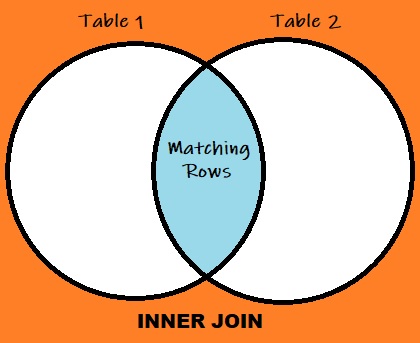
Now that we know what a JOIN clause is in SQL, we can move on to exploring how to work with JOINs using SQLAlchemy, Flask, and Python.
SQLAlchemy JOIN Using Flask and Python
The next example will explain how to work with the JOIN clause using SQLAlchemy/Flask and Python, but this example is perfectly adaptable to just SQLAlchemy and Python if desired. Let's work with the tables from the previous example, we proceed to create the models/tables using SQLAlchemy/Flask and Python as follows:
from flask import Flask
from flask_sqlalchemy import SQLAlchemy

db = SQLAlchemy()

class Client(db.Model):
	client_id = db.Column(db.Integer, primary_key=True)
	name = db.Column(db.String(50))
	phone = db.Column(db.Integer)

class Order(db.Model):
	order_id = db.Column(db.Integer, primary_key=True)
	client_id = db.Column(db.String(50), db.ForeignKey('clients.client_id')
	invoice = db.Column(db.Integer)
With the models/tables ready, we proceed to write our query (syntax) as follows:
results = db.session.query(table1, table2).join(table2).all()Following this syntax, let's now join the Client table with the Order table as follows:
from flask import Flask
from flask_sqlalchemy import SQLAlchemy

db = SQLAlchemy()

class Client(db.Model):
	client_id = db.Column(db.Integer, primary_key=True)
	name = db.Column(db.String(50))
	phone = db.Column(db.Integer)

class Order(db.Model):
	order_id = db.Column(db.Integer, primary_key=True)
	client_id = db.Column(db.String(50), db.ForeignKey('clients.client_id')
	invoice = db.Column(db.Integer)

results = db.session.query(Client, Order).join(Order).all()

#Printing the results:
for client, order in results:
	print(client.name, order.order_id)
After printing the results and running the code in a bash terminal we get:
Brandon Hughes 111
Bryan Owens 222
Bryan Owens 333
Sheryl Loan 444
INNER JOIN is not the only way that we can combine tables, sometimes we might want to receive information from matched and unmatched rows from one of the tables or both, the JOIN that will help us on getting also unmatching information is called OUTER JOIN
SQLAlchemy OUTER JOIN Using Flask and Python
There are multiple types of OUTER JOINs, and depending on which table or tables we want to extract information from, we will decide which OUTER JOIN will be the best choice. There are 3 types of OUTER JOINs:
LEFT OUTER JOIN:
Unlike an INNER JOIN, where we only look for matching rows in both tables, a LEFT JOIN will give priority to the table on the left, giving us all of its rows, and will still look for matching rows on the right table. In other words, we'll get all the information from the left table and only the matching information from the right table.

Let's use the same tables used in the SQLAlchemy/Flask and Python INNER JOIN example previously:
from flask import Flask
from flask_sqlalchemy import SQLAlchemy

db = SQLAlchemy()

class Client(db.Model):
	client_id = db.Column(db.Integer, primary_key=True)
	name = db.Column(db.String(50))
	phone = db.Column(db.Integer)

class Order(db.Model):
	order_id = db.Column(db.Integer, primary_key=True)
	client_id = db.Column(db.String(50), db.ForeignKey('clients.client_id')
	invoice = db.Column(db.Integer)
Now, in our query, instead of writing the word join, we need to write the word outerjoin which by default is a LEFT OUTER JOIN in SQLAlchemy:
INNER JOINquery:
results = db.session.query(table1, table2).join(table2).all()LEFT OUTER JOINquery:
results = db.session.query(table1, table2).outerjoin(table2).all()We then proceed to write our query and print the results as follows:
from flask import Flask
from flask_sqlalchemy import SQLAlchemy

db = SQLAlchemy()

class Client(db.Model):
	client_id = db.Column(db.Integer, primary_key=True)
	name = db.Column(db.String(50))
	phone = db.Column(db.Integer)

class Order(db.Model):
	order_id = db.Column(db.Integer, primary_key=True)
	client_id = db.Column(db.String(50), db.ForeignKey('clients.client_id')
	invoice = db.Column(db.Integer)

results = db.session.query(Client, Order).outerjoin(Order).all()

#Printing the results:
for client, order in results:
	print(client.name, order.order_id)
After printing the results and running the code in a bash terminal we get:
Brandon Hughes 111
Bryan Owens 222
Bryan Owens 333
Sheryl Loan 444
Mark White  Null
See that now Mark White appears on the results with no order, in this way we have all the information from the left table plus the matching information from the right table.
RIGHT OUTER JOIN:
A RIGHT JOIN will give priority to the table on the right, giving us all of its rows, and will still look for matching rows on the left table. In other words, we’ll get all the information from the right table and only the matching information from the left one.

For the next example, let's add an order that for some reason does not have a client assigned to it, so the tables should look like this:
- Clients
| client_id | name | phone |
|---|---|---|
| 01 | Bryan Owens | 123 123 4567 |
| 02 | Mark White | 123 987 6543 |
| 03 | Brandon Hughes | 123 159 1591 |
| 04 | Sheryl Lohan | 123 456 4567 |
- Orders
| order_id | client_id | invoice |
|---|---|---|
| 111 | 03 | 654 |
| 222 | 01 | 159 |
| 333 | 01 | 901 |
| 444 | 04 | 778 |
| 555 | 05 | 001 |
Using these tables in SQLAlchemy/Flask and Python as follows:
from flask import Flask
from flask_sqlalchemy import SQLAlchemy

db = SQLAlchemy()

class Client(db.Model):
	client_id = db.Column(db.Integer, primary_key=True)
	name = db.Column(db.String(50))
	phone = db.Column(db.Integer)

class Order(db.Model):
	order_id = db.Column(db.Integer, primary_key=True)
	client_id = db.Column(db.String(50), db.ForeignKey('clients.client_id')
	invoice = db.Column(db.Integer)
There is no word in SQLAlchemy that allows us to perform a RIGHT OUTER JOIN since the outerjoin word refers to a LEFT OUTER JOIN by default. If we want to perform a RIGHT OUTER JOIN, we just need to flip the order of our tables, in other words, Table 1 RIGHT OUTER JOIN Table 2 is equivalent of Table 2 LEFT OUTER JOIN Table 1, so the query should look like this:
results = db.session.query(table2, table1).outerjoin(table1).all()We then proceed to write our query and print the results as follows:
from flask import Flask
from flask_sqlalchemy import SQLAlchemy

db = SQLAlchemy()

class Client(db.Model):
	client_id = db.Column(db.Integer, primary_key=True)
	name = db.Column(db.String(50))
	phone = db.Column(db.Integer)

class Order(db.Model):
	order_id = db.Column(db.Integer, primary_key=True)
	client_id = db.Column(db.String(50), db.ForeignKey('clients.client_id')
	invoice = db.Column(db.Integer)

results = db.session.query(Order, Client).outerjoin(Client).all()

#Printing the results:
for client, order in results:
	print(client.name, order.order_id)
After printing the results and running the code in a bash terminal we get:
Brandon Hughes 111
Bryan Owens 222
Bryan Owens 333
Sheryl Loan 444
NULL		555
See that now Order 555 appears on the results with no client assigned to it, in this way we have all the information from the right table plus the matching information from the left table.
FULL OUTER JOIN:
An OUTER JOIN or FULL OUTER JOIN will combine the results of a LEFT JOIN and a RIGHT JOIN, giving us all the rows from the first and second tables. If there is no match in one of the table rows, there will be a NULL on that side of the table's result.
There is no word in SQLAlchemy that allows us to perform a FULL OUTER JOIN since the outerjoin word refers to a LEFT OUTER JOIN by default. If we want to perform a FULL OUTER JOIN, we just need to add full=True statement in our query as follows:
results = db.session.query(table2, table1).outerjoin(table1, full=True).all()We then proceed to write our query and print the results as follows:
from flask import Flask
from flask_sqlalchemy import SQLAlchemy

db = SQLAlchemy()

class Client(db.Model):
	client_id = db.Column(db.Integer, primary_key=True)
	name = db.Column(db.String(50))
	phone = db.Column(db.Integer)

class Order(db.Model):
	order_id = db.Column(db.Integer, primary_key=True)
	client_id = db.Column(db.String(50), db.ForeignKey('clients.client_id')
	invoice = db.Column(db.Integer)

results = db.session.query(Order, Client).outerjoin(Client, full=True).all()

#Printing the results:
for client, order in results:
	print(client.name, order.order_id)
After printing the results and running the code in a bash terminal we get:
Brandon Hughes 111
Bryan Owens 222
Bryan Owens 333
Sheryl Loan 444
NULL		555
Mark White  NULL
As mentioned before, we see that we get all the information from both tables including the unmatched results from table 1 and table 2.
Combining tables with SQLAlchemy JOIN queries is a core skill for building back-end applications in Python. To practice it in complete projects, you can learn to code through a structured program with mentors and code reviews.